

Actions security policies
Actions Security Policies control whether different actions can be used, and what limits can be applied to each action. Since each action provides different sets of functionality and interaction, the configurable options for each action are different.
The primary option for each action is whether the action is enabled. Users will not see the actions that aren't allowed in the dialogue when creating new actions.
Change actions security policies
To change the security policies for actions:
Switch to the Actions tab using the buttons at the top of the Security policies display.
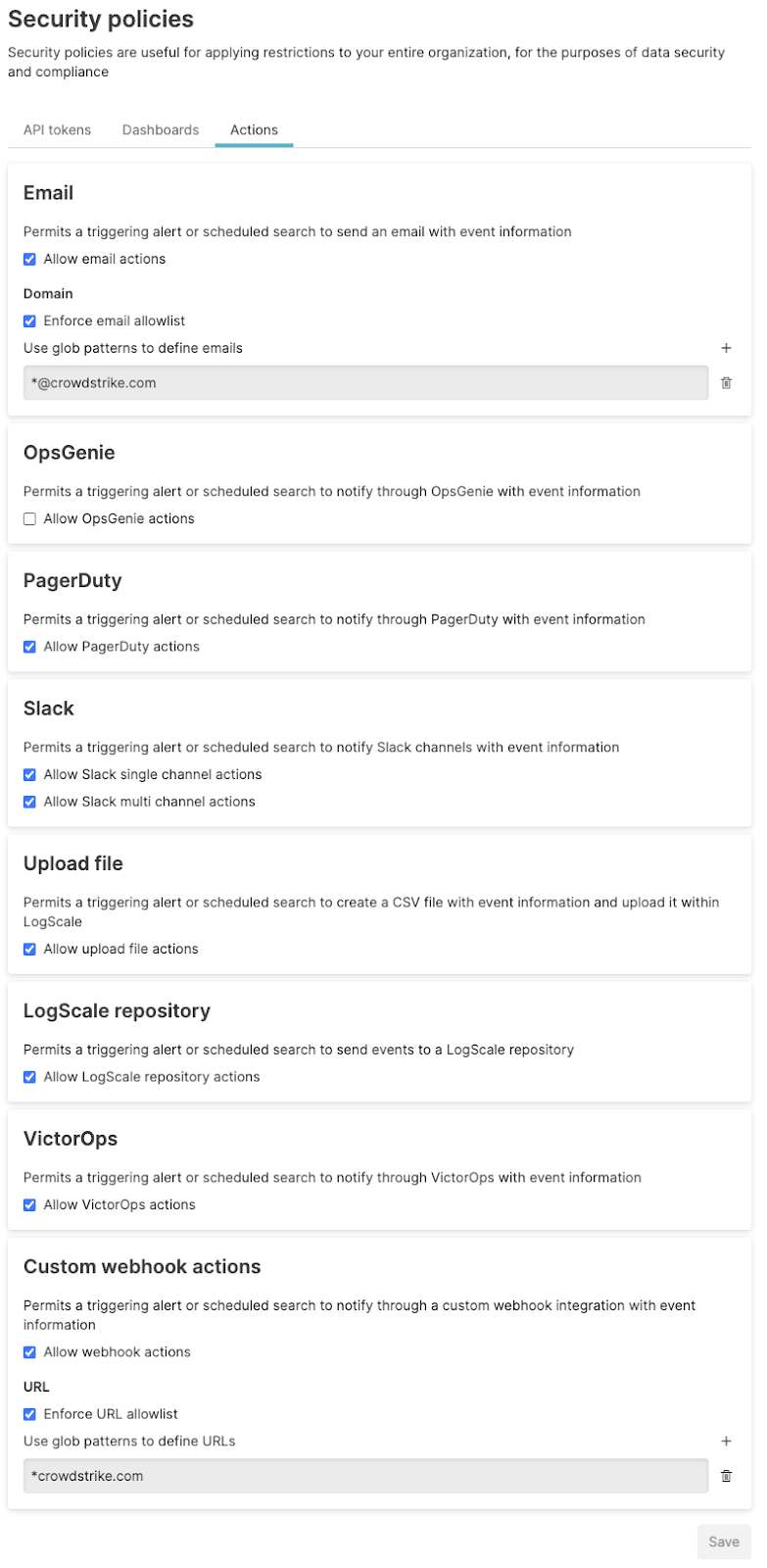
Change the security policies as required, disabling or enabling by selecting the checkbox, and configuring individual policy settings for each action as appropriate.
Click to save the policies. The effect of enabling the policies is immediate, and may include immediately disabling or removing access, or stopping actions for executing.
Important
When disabling a specific Action type (such as, OpsGenie), existing actions of this type will be disabled and it will not be possible to create new actions of this type.
Email action security policy
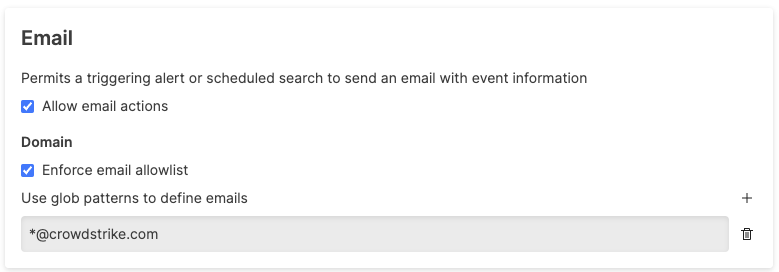
The Email Action Security Policies enable or disable the ability to email users in the event of a trigger through automation. You can configure:
enables or disables email actions. If disabled, email actions will not appear in the list of available actions.
limits the email addresses to which any email action can send email. To limit the range of email addresses, set a glob pattern. For example, the glob pattern:
*@crowdstrike.com
Limits emails to only the
crowdstrike.com domain. To add
additional glob patterns click the
button. To delete existing
glob patterns click the
button ()
next to each pattern.
 |
If an email allowlist has been configured, when creating an action, an error message will be generated noting the validation issue for the configured email. For example:
 |
If you enforce an allowlist after an action has been created, and the
email address does not match the allowlist configuration, the action
will be disabled. This will be flagged on the
Actions page:
 |
OpsGenie action security policy
The OpsGenie Action Security Policy enables or disables OpsGenie actions. If disabled, the action will not appear in the list of available actions.
 |
PagerDuty action security policy
The PagerDuty Action Security policy enables or disables PagerDuty actions. If disabled, the PagerDuty action will not appear in the list of available actions.
 |
Slack action security policy
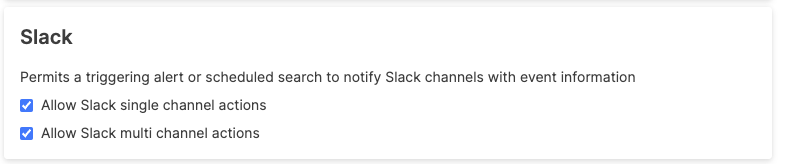
The Slack Action Security Policy enables or disables specific types of Slack actions. Two settings are available:
Triggering an action that affects only a single Slack channel.
Triggering an action that affects multiple Slack channels.
These can be configured independently.
 |
If both types of Slack actions are disabled, the Slack action will not appear in the list of available actions.
Lookup file action security policy
Lookup file enables or disables the Lookup file action. If disabled, the action will not appear in the list of available actions.
 |
LogScale repository action security policy
The Falcon LogScale Repository Policy enables or disables LogScale repository actions. If disabled, the LogScale repository action will not appear in the list of available actions
 |
VictorOps action security policy
The VictorOps Action Security Policy enables or disables actions. If disabled, VictorOps action will not appear as an option in the list of available actions.
 |
Custom webhook actions action security policy
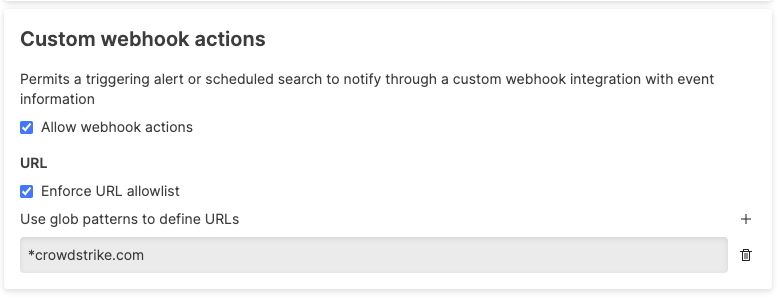
Security policies for custom Webhooks actions support the following restrictions:
disables or enables webhook actions. When disabled, webhooks actions will not be available in the list of available actions.
limits the range of URLs to which webhook actions can send requests. The configuration supports wildcards, for example:
ini*crowdstrike.comis a pattern that allows webhooks to any domain ending in
crowdstrike.com.Additional glob patterns can be added by clicking the button. Existing glob patterns can be deleted by clicking the button () next to each pattern.
 |
If you try to create a webhook action that is not compatible with the allowlist, a message will be displayed:
 |
If an allowlist is added after an incompatible webhook action has been
added with an address not in the allowlist, the action will be
disabled. This will be flagged on the
Actions page:
 |