Skip to content
LogoLogScale DocumentationFull Library Knowledge Base Release Notes Integrations Query Examples Training API GraphQL API Contacting Support
Help button for documentation
    • Data Analysis Overview
    • LogScale Web Interface
      • System Tabs and Falcon Icon
      • Navigation Icons
        • Notifications
        • Releases and Release Notes
        • Help
        • Avatar icon
      • Informational Panels
      • Left-hand Navigation Panel
      • Table Components
      • Repositories and Views
        • Repositories and Views Menubar
        • Search interface
        • Dashboards Interface
        • Automation Interface
        • Parsers Interface
        • Resources Interface
          • Asset Type Interface Elements
        • Settings Interface
      • All Dashboards
      • Data Ingest
    • Manage Repositories and Views
      • Create Repository or View
      • Repository and View Settings
      • Falcon LTR Repositories
      • Lookup Files
      • Delete a Repository or View
    • Manage Account
    • Parse Data
      • Built-in Parsers
      • Create a Parser
          • Normalize and Validate Against CPS Schema
      • Ingest Tokens
      • Parser Errors
      • Removing Fields
      • Parsing Event Tags
      • Parsing Timestamps
    • Search Data
      • Query Editor
      • Event Fields
      • Display Fields
      • Select and Filter Fields
      • Add and Remove Fields
      • Display Results and Events
      • Inspect Events
      • Copy Rows
      • Look Up Events
      • Show in Context
      • Format Columns
      • Column Properties
      • Field Data Types
      • Field Interactions
      • Different Visualizations
      • Highlight Filter Match
      • Change Time Interval
      • Set Time Zone
      • Save Results
      • Export Data
      • Search Status
      • Event List Interactions
      • Field Aliasing
        • Configuring Field Aliasing
        • Managing Field Aliasing
        • Searching with Field Aliasing
        • Understanding Field Mapping Requirements
        • Understanding Schema Requirements
    • Write Queries
      • Basic query principles
      • Returned events
      • Query management
        • Writing New Queries
        • Save searches
        • Grant Permissions for Saved Queries
        • Use Saved Queries in Interactions
      • Common Queries
      • Statement order for better queries
      • Query readability and better usage
    • Query Language Syntax
      • Comments
      • Query Filters
      • Operators
      • Adding Fields to Events
      • User Parameters/Variables
      • Conditional Evaluation
      • Array Syntax
      • Expressions
      • Saved Searches (User Functions)
      • Function Syntax
      • Time Syntax
        • Supported Time Zones
        • Relative Time Syntax
      • Referencing Resources
      • Regular Expression Syntax
        • Regular Expression Syntax Patterns
        • Unsupported Regular Expression Patterns
        • Regular Expression Flags
        • LogScale Regular Expression Engines
        • Differences from Other Regex Implementations
    • Query Joins and Lookups
      • Types of Join
      • Join Methods
      • Asset Resolution in Subqueries
      • Using Ad-hoc Tables
      • Using Lookup Files
        • Using the readFile() Function
        • Using the match() Function
      • Using join() or selfJoin()
        • Using the join() Function
        • Using the selfJoin() Function
        • Join Operation and Optimization
    • Query Functions
      • Aggregate Query Functions
      • Array Query Functions
      • Comparison Query Functions
      • Conditional Query Functions
      • Data Manipulation Query Functions
      • Event Information Query Functions
      • Filtering Query Functions
      • Formatting Query Functions
      • Geolocation Query Functions
      • Hash Query Functions
      • Join Query Functions
      • Math Query Functions
      • Network and Location Query Functions
      • Parsing Query Functions
      • Preamble Query Functions
      • Regular Expression Query Functions
      • Security Related Query Functions
      • Sequence Query Functions
      • Statistics Query Functions
      • String Query Functions
      • Time and Date Query Functions
      • Tranformation Query Functions
      • Widget Query Functions
      • accumulate()
      • array:append()
      • array:contains()
      • array:dedup()
      • array:drop()
      • array:eval()
      • array:exists()
      • array:filter()
      • array:intersection()
      • array:length()
      • array:reduceAll()
      • array:reduceColumn()
      • array:reduceRow()
      • array:regex()
      • array:rename()
      • array:sort()
      • array:union()
      • asn()
      • avg()
      • base64Decode()
      • base64Encode()
      • beta:param()
      • beta:repeating()
      • bitfield:extractFlags()
      • bitfield:extractFlagsAsArray()
      • bitfield:extractFlagsAsString()
      • bucket()
      • callFunction()
      • cidr()
      • coalesce()
      • collect()
      • communityId()
      • concat()
      • concatArray()
      • copyEvent()
      • correlate()
      • count()
      • counterAsRate()
      • createEvents()
      • crypto:md5()
      • crypto:sha1()
      • crypto:sha256()
      • default()
      • defineTable()
      • drop()
      • dropEvent()
      • duration()
      • end()
      • eval()
      • eventFieldCount()
      • eventInternals()
      • eventSize()
      • fieldset()
      • fieldstats()
      • findTimestamp()
      • format()
      • formatDuration()
      • formatTime()
      • geography:distance()
      • geohash()
      • getField()
      • groupBy()
      • hash()
      • hashMatch()
      • hashRewrite()
      • head()
      • if()
      • in()
      • ioc:lookup()
      • ipLocation()
      • join()
      • json:prettyPrint()
      • kvParse()
      • length()
      • linReg()
      • lower()
      • lowercase()
      • match()
      • matchAsArray()
      • math:abs()
      • math:arccos()
      • math:arcsin()
      • math:arctan()
      • math:arctan2()
      • math:ceil()
      • math:cos()
      • math:cosh()
      • math:deg2rad()
      • math:exp()
      • math:expm1()
      • math:floor()
      • math:log()
      • math:log10()
      • math:log1p()
      • math:log2()
      • math:mod()
      • math:pow()
      • math:rad2deg()
      • math:sin()
      • math:sinh()
      • math:spherical2cartesian()
      • math:sqrt()
      • math:tan()
      • math:tanh()
      • max()
      • min()
      • neighbor()
      • now()
      • objectArray:eval()
      • objectArray:exists()
      • parseCEF()
      • parseCsv()
      • parseFixedWidth()
      • parseHexString()
      • parseInt()
      • parseJson()
      • parseLEEF()
      • parseTimestamp()
      • parseUri()
      • parseUrl()
      • parseXml()
      • partition()
      • percentage()
      • percentile()
      • range()
      • rdns()
      • readFile()
      • regex()
      • rename()
      • replace()
      • reverseDns()
      • round()
      • sample()
      • sankey()
      • select()
      • selectFromMax()
      • selectFromMin()
      • selectLast()
      • selfJoin()
      • selfJoinFilter()
      • series()
      • session()
      • setField()
      • setTimeInterval()
      • shannonEntropy()
      • slidingTimeWindow()
      • slidingWindow()
      • sort()
      • split()
      • splitString()
      • start()
      • stats()
      • stdDev()
      • stripAnsiCodes()
      • subnet()
      • sum()
      • table()
      • tail()
      • test()
      • text:contains()
      • text:editDistance()
      • text:editDistanceAsArray()
      • text:endsWith()
      • text:length()
      • text:positionOf()
      • text:startsWith()
      • text:substring()
      • time:dayOfMonth()
      • time:dayOfWeek()
      • time:dayOfWeekName()
      • time:dayOfYear()
      • time:hour()
      • time:millisecond()
      • time:minute()
      • time:month()
      • time:monthName()
      • time:second()
      • time:weekOfYear()
      • time:year()
      • timeChart()
      • tokenHash()
      • top()
      • transpose()
      • unit:convert()
      • upper()
      • urlDecode()
      • urlEncode()
      • wildcard()
      • window()
      • worldMap()
      • writeJson()
      • xml:prettyPrint()
    • Data Visualization
      • Dashboards
        • Step-by-Step Guide to Dashboards
        • Create Dashboards
        • Manage Dashboards
        • Customize Dashboards
        • Design the Dashboard Layout
          • Dashboard Sections
        • Work with Time on Dashboards
          • Shared Time Selector
          • Widget Time Selector
          • Section Time Selector
          • Live Dashboards
          • Time Zone Settings
          • Default Time Settings for Dashboards
        • Make your Dashboard Interactive
          • Apply Dashboard Filters
          • Work with Dashboard Parameters
          • Work with Dashboard Interactions
        • Share Dashboards
          • Disabling Access to Shared Dashboards
          • Restricting Access with IP Filters
        • Export Dashboards as PDF
          • PDF Export Options
        • Schedule PDF Reports
          • Scheduled Reports Security
          • Managing Scheduled Reports
          • Create Scheduled Reports
          • Edit Scheduled Reports
          • Limitations
          • Scheduled Reports Errors and Resolutions
      • Widgets
        • Create Widgets
        • Manage Widgets
          • Widgets with live join() functions
          • Embedding iFrame Widgets
        • Widgets Gallery
        • Bar Chart Widget
          • Bar Chart Usage and Data Format
          • Bar Chart Examples Gallery
            • Event Detection Across Severity Levels
            • Failed and Successful Authentication Attempts
            • Threat Type Distribution
            • Alert Type Proportion in Detection Sources
            • Daily Detection Counts with Detection Severity Average
          • Bar Chart Property Reference
        • Event List Widget
          • Event List Usage and Data Format
          • Event List Property Reference
        • Gauge Widget
          • Gauge Usage and Data Format
          • Gauge Examples Gallery
            • Display Number of Errors
            • Display Query Memory
            • Display Small Multiple Charts
          • Gauge Property Reference
        • Heat Map Widget
          • Heat Map Usage and Data Format
          • Heat Map Examples Gallery
            • Github Push Events
            • Response Time
          • Heat Map Property Reference
        • Note Widget
            • Note Widget Property Reference
        • Parameter Panel Widget
        • Pie Chart Widget
          • Pie Chart Usage and Data Format
          • Pie Chart Examples Gallery
            • Log Level Distribution
            • Method Distribution in Small Multiples
          • Pie Chart Property Reference
        • Sankey Diagram Widget
          • Sankey Usage and Data Format
          • Sankey Examples Gallery
            • Network Traffic
            • Thread Usage
          • Sankey Property Reference
        • Scatter Chart Widget
          • Usage and Data Format
          • Scatter Chart Property Reference
        • Single Value Widget
          • Single Value Usage and Data Format
          • Single Value Examples Gallery
            • Displaying Number of Errors
            • Displaying Statistics from a Build
            • Displaying a Non-Numeric Value
            • Displaying a Trend with a Timechart
            • Displaying Values in a Grid
          • Single Value Property Reference
        • Table Widget
          • Table Usage and Data Format
          • Table Widget Interactions
          • Table Widget Examples Gallery
            • Display Different Statuses
            • Add Temporary Events and URLs
          • Table Property Reference
        • Time Chart Widget
          • Time Chart Usage and Data Format
          • Time Chart Examples Gallery
            • Charting Metric Data
            • Charting Log Levels
            • Charting Commits in GitHub
          • Time Chart Property Reference
        • World Map Widget
          • World Map Usage and Data Format
          • World Map Examples Gallery
            • IP-Based Geographic Distribution
            • Service Performance Monitorings
            • Geohash Performance Clustering
          • World Map Property Reference
    • Automation
      • Triggers
        • What trigger type to choose
        • General information about triggers
        • Trigger management
          • Create triggers
          • Edit triggers
          • Manage triggers
        • Trigger properties
          • General properties
          • Configuration
          • Actions
          • Advanced settings
          • Scheduled search properties
        • Monitor, diagnose, and troubleshoot triggers
          • Monitor Triggers with humio-activity Repository
          • Aggregate alert errors and solutions
          • Scheduled search errors and solutions
          • Filter alert errors and solutions
          • Legacy alert errors and solutions
          • Errors when Using Live join() Functions
      • Actions
        • Create Actions
        • Manage Actions
        • Action Type: Email
        • Action Type: Falcon LogScale Repository
        • Action Type: OpsGenie
        • Action Type: PagerDuty
        • Action Type: Slack
        • Action Type: Lookup File
        • Action Type: VictorOps (Splunk On-Call)
        • Action Type: Webhooks
        • Send aggregate results to actions
        • Message Templates and Variables
      • Cron Scheduling
    • Template Language
      • Template Expressions
      • Template Variable Types
      • Template Examples
    • Keyboard Shortcuts
Falcon LogScale Documentation
/ Data Analysis 1.208.0-1.218.0
/ Search Data

Save Results

It is possible to save search results, queries, dashboard widgets, and more. As it can take some time to construct a search query and if used often, saving searches and different widgets for reuse is time saving.
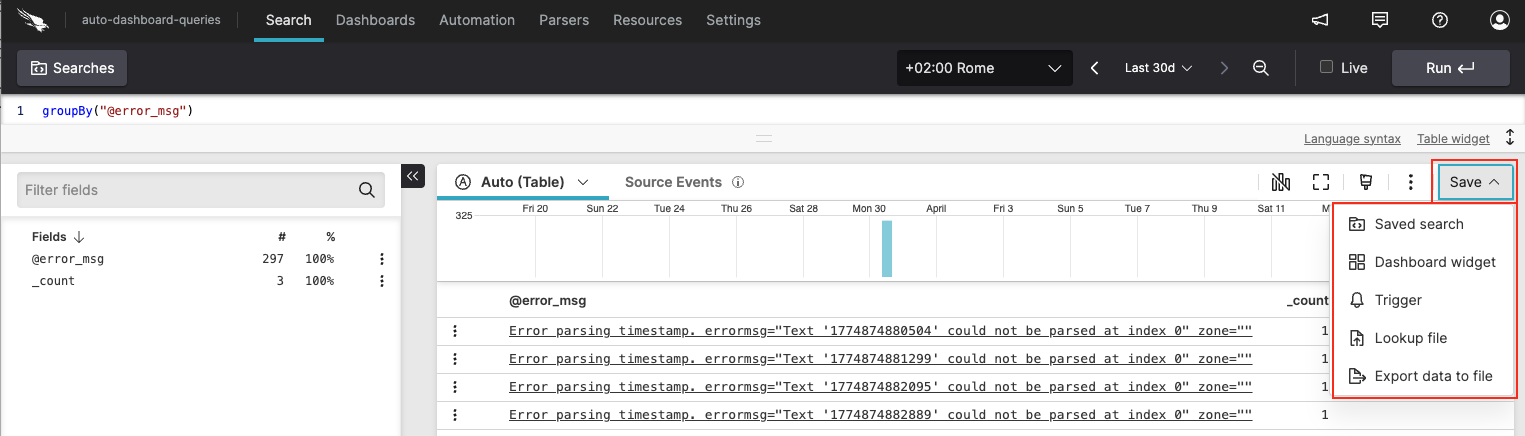
In the Results or Events tab, click Save and select one of the following options:

  • Saved search. You can make a saved query of your search. See Save searches for more information.

  • Dashboard widget. If your search is visualized as one of the available widgets, you can save that widget for future use. See Dashboards for more information.

  • Trigger. You can save a query as a trigger (if the type of search is appropriate), including scheduled searches. See Triggers for more information.

  • Lookup file. You can save a query as a lookup file. See Lookup Files for more information.

  • Export to File. This option will export the results of the query, all that is shown in the Results panel, to a file locally. See Export Data for more information.

screenshot showing the save button with its options

Figure 106. Save results


Support
  • Twitter
  • LinkedIn
  • Youtube

© 2025 CrowdStrike All other marks contained herein are the property of their respective owners.

  • Other articles on this topic

    • Dashboard Best Practices
    • Grammar Subset
    • Requirements and Build Information
  • Similar Content

    • Grant Permissions for Saved Queries
    • Query management
    • Save searches
    • Template Examples
    • Template Expressions
    • Template Variable Types
    • Work with Dashboard Interactions
    • Work with Dashboard Parameters
    • Write Queries
  • Related Language Syntax

    • Referencing Resources
    • Saved Searches (User Functions)
    • User Parameters (Variables)
  • Security Audit Entries

    • Audit Log Event saved-query.create
    • Audit Log Event saved-query.delete
    • Audit Log Event saved-query.update

Enter search term