

Terraform Configuration
This section covers the Terraform modules, backend setup, and deployment sequence for both primary and secondary clusters.
Key DR mechanisms managed by Terraform:
Encryption key synchronization - Primary generates the key on first deploy and exports it as a sensitive Terraform output.
Automated failover - an Azure Function scales the Humio operator from 0 → 1 when the primary becomes unhealthy. See Failover Timing Reference for the full event chain, timing, and configuration options.
AZURE_RECOVER_FROM_*environment variables are set on the standby cluster at provisioning time but only consumed when the LogScale pod starts during failover.
Deterministic Storage Container Naming
Storage account names must be globally unique in Azure. This repo
intentionally includes a short random prefix
(random_string.name-modifier) in
local.resource_name_prefix, so the exact storage
account/container names are:
Stable within a state file (the random prefix is stored in Terraform state)
Not knowable in advance before the first apply
For DR operations, do not guess names. Use Terraform outputs in each state:
terraform output -raw storage_acct_name
terraform output -raw storage_acct_container_name
terraform output -raw storage_acct_blob_endpoint
Important
The current DR design does not require the primary to pre-know the
secondary container name for RBAC. The standby cluster reads the
primary's storage details via
primary_remote_state_config and performs the
cross-region firewall update from the standby side. See
Azure Storage for DR.
Terraform Modules
The following modules and configurations are used for DR infrastructure.
Note
The module.logscale (and its nested
module.logscale.module.crds) is sourced from a a
GitHub
repository.
This implementation introduces two new Terraform modules specifically for disaster recovery. These modules automate the critical DR operations that would otherwise require manual intervention.
Why These Modules Are Needed
In a disaster recovery scenario, two things must happen quickly:
Traffic must be redirected from the failed primary cluster to the healthy secondary cluster
The secondary cluster must start up and begin serving requests
Without automation, an operator would need to manually update DNS records and scale up Kubernetes deployments - a process that could take 15-30 minutes or more. The modules below reduce this to under 10 minutes with no human intervention.
Traffic Manager (module.traffic-manager)
Purpose: Provides automatic traffic failover between primary and secondary clusters using Azure Traffic Manager.
When users access your LogScale cluster, they use a single global DNS name (like logscale.example.com). This module creates an Azure Traffic Manager that continuously monitors both clusters' health. If the primary cluster becomes unhealthy, Traffic Manager automatically routes all traffic to the secondary cluster - no DNS changes needed, no manual intervention required.
Deployed on: Primary (active) cluster only when
manage_traffic_manager = true
Key resources created:
| Resource | Purpose |
|---|---|
azurerm_traffic_manager_profile
| Manages health-based routing between clusters using Priority routing method |
azurerm_traffic_manager_external_endpoint
(primary)
| Points to primary cluster's load balancer IP (priority 1) |
azurerm_dns_cname_record
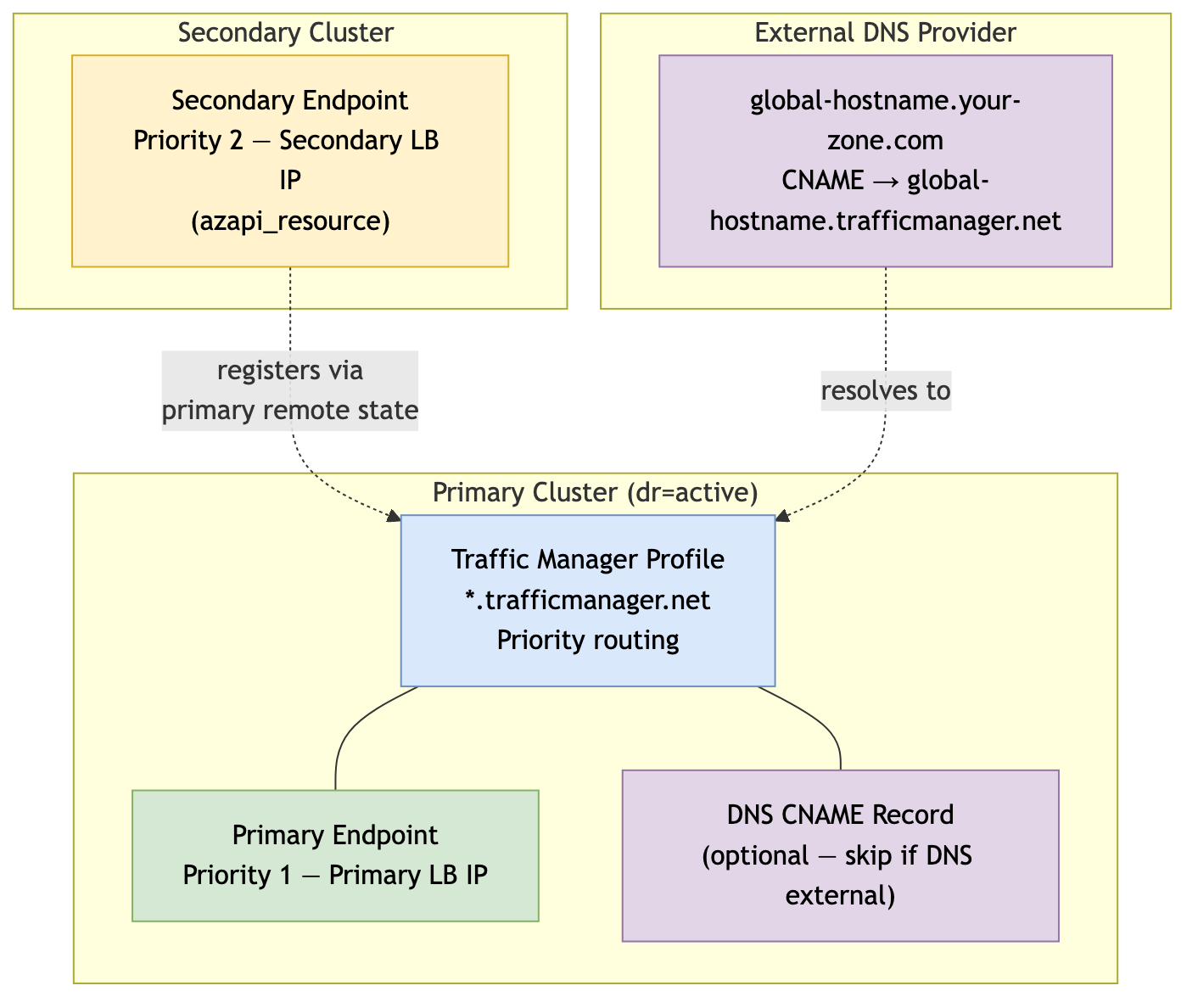
| Creates the global hostname CNAME pointing to Traffic Manager (optional - see below) |
Secondary Endpoint Registration:
The secondary (standby) cluster automatically registers itself with
Traffic Manager using
azapi_resource.traffic_manager_secondary_endpoint.
This resource:
Is created when
manage_global_dns = falseand the primary Traffic Manager endpoint ID is available via remote state (so it persists throughdrpromotion)Adds the secondary cluster's load balancer IP as a priority 2 endpoint
Requires no manual configuration - the standby cluster discovers the Traffic Manager profile from the primary's remote state
This approach eliminates the need for the primary cluster to know the secondary's IP address in advance, simplifying the deployment sequence.
Traffic Manager Resource Architecture
 |
DNS Configuration Options:
The root DNS zone for your global LogScale hostname can be
hosted anywhere - Azure DNS, AWS Route 53, Cloudflare, or any other DNS
provider. Traffic Manager uses its own
*.trafficmanager.net domain; you only need a CNAME
record in your DNS provider pointing to the Traffic Manager FQDN.
| Scenario |
traffic_manager_create_dns_record
|
traffic_manager_dns_zone_resource_group
| Action Required |
|---|---|---|---|
| DNS Hosted in Azure DNS |
true
| Resource group name |
Module creates CNAME automatically
|
| DNS hosted elsewhere (AWS Route 53, etc.) |
false
| "" (empty) |
Manually create CNAME in your DNS provider
|
When DNS is hosted outside of Azure (e.g., AWS Route 53):
traffic_manager_dns_zone_name           = "example.com"         # Still required - used for TM host header
traffic_manager_dns_zone_resource_group = ""                    # No Azure DNS zone
traffic_manager_create_dns_record       = false                 # Skip Azure DNS CNAME creation
Then create a CNAME record in your DNS provider:
| Record Type | Name | Value | TTL |
|---|---|---|---|
CNAME
|
<global_logscale_hostname>.<zone>
|
<global_logscale_hostname>.trafficmanager.net
| 60 |
traffic_manager_dns_zone_name is always required even
when DNS is external - Traffic Manager uses it as the host header in
health probes so the ingress controller can route the request correctly.
Traffic Manager Priority Routing:
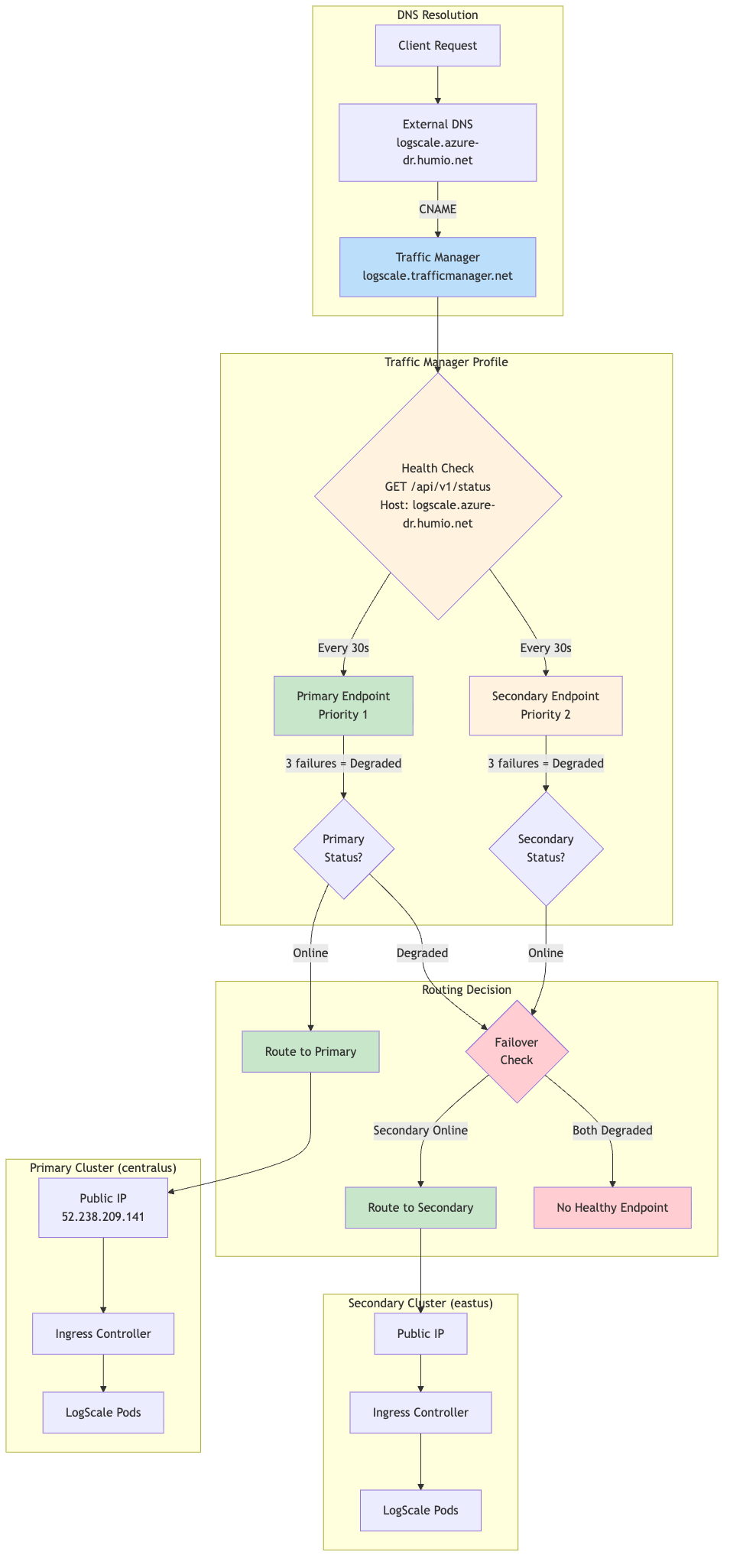 |
Priority Routing Logic:
The following table shows priority routing logic:
| Primary Status | Secondary Status | Traffic Routed To |
|---|---|---|
| Online | Online | Primary (Priority 1) |
| Online | Degraded | Primary (Priority 1) |
| Degraded | Online | Secondary (Priority 2) |
| Degraded | Degraded | No healthy endpoint |
Expected Profile Status:
When the secondary cluster is in standby mode
(dr="standby"), the Traffic Manager profile will show a
status of "Degraded", while it should be healthy.
Verification:
Despite the "Degraded" profile status, traffic routes correctly:
# Global DR FQDN should return HTTP 200
curl -sk https://<global_logscale_hostname>.<zone>/api/v1/status
# DNS resolves to primary IP
dig +short <global_logscale_hostname>.<zone>
For health check settings, expected status table, and failover timing details, see Traffic Manager Configuration.
DR Failover Function (module.dr-failover-function)
Purpose: Automatically starts the LogScale application on the secondary cluster when the primary fails.
The secondary cluster runs in a minimal "standby" state to save costs - the Humio operator is scaled to zero, so no LogScale pods are running. When the primary cluster fails, this module's Azure Function automatically scales up the Humio operator, which then starts the LogScale pod to recover from the primary's data. This happens automatically, triggered by the same health check that Traffic Manager uses.
Deployed on: Secondary (standby) cluster only when dr =
"standby" and dr_failover_function_enabled = true
Key resources created:
| Resource | Purpose |
|---|---|
azurerm_service_plan
| Consumption-based (Y1) plan for cost efficiency |
azurerm_linux_function_app
| Python 3.11 function that scales the Humio operator |
azurerm_role_assignment
| Grants the function "AKS Cluster Admin" role to manage deployments |
azurerm_monitor_action_group
| Connects the alert to the function |
azurerm_monitor_metric_alert
| Fires when primary Traffic Manager endpoint becomes unhealthy |
azurerm_storage_account
| Storage account for Function App (deployed in same region as Function App) |
Metric Alert Configuration:
The metric alert monitors the health state of the primary Traffic Manager external endpoint:
| Setting | Value | Description |
|---|---|---|
| Metric Namespace | Microsoft.Network/trafficManagerProfiles | Traffic Manager profile metrics |
| Metric Name | ProbeAgentCurrentEndpointStateByProfileResourceId | Endpoint health state (1=healthy, 0=unhealthy) |
| Aggregation | Maximum | Use maximum value in evaluation window |
| Operator | LessThan | Alert when value drops below threshold |
| Threshold | 1 | Fires when endpoint is unhealthy (state < 1) |
| Frequency | PT1M | Evaluate every 1 minute |
| Window Size | PT1M | Evaluate over 1-minute window |
| Dimension filter | EndpointName = <primary-endpoint-name> | Filters the metric to the primary external endpoint |
| Skip metric validation | true | Allows alert creation even if the metric is temporarily unavailable |
Implementation note:
The module scopes the alert to the Traffic Manager profile and uses the EndpointName dimension (extracted from the primary endpoint resource ID) to target only the primary endpoint.
How it works:
The following diagram provides an overview of the process:
 |
Failover chain timing:
| Stage | Duration |
|---|---|
| Traffic Manager detection | ~30-60 seconds |
| Azure Monitor alert evaluation | ~60 seconds |
| Pre-failover validation (configurable) | ~180 seconds (default) |
| Azure Function execution | ~10-20 seconds |
| Total (detection → function complete) | ~4-5 minutes |
Configuration options (in tfvars):
| Variable | Default | Description |
|---|---|---|
dr_failover_function_location
| null | Azure region override for Function App deployment. If not set, defaults to the resource group region. Useful when the primary region lacks quota for consumption-based (Y1) Function Apps. |
dr_failover_function_sku
| Y1 | SKU for the Function App Service Plan. Options: Y1 (Consumption), EP1/EP2/EP3 (Premium), B1/B2/B3 (Basic). Use B1 if Consumption/Premium quota is unavailable in your region. |
For timing and retry variables
(pre_failover_failure_seconds,
cooldown_seconds, max_retries),
see Failover Timing Reference.
Function App SKU Selection:
Azure Function Apps support multiple pricing tiers. The choice depends on quota availability in your target region:
| SKU | Type | Quote Required | Use Case |
|---|---|---|---|
| Y1 | Consumption | Dynamic VMs | Default, cheapest, pay-per-execution |
| EP1/EP2/EP3 | Premium | ElasticPremium VMs | Pre-warmed instances, VNet integration |
| B1/B2/B3 | Basic | BS Series | Fallback when Consumption/Premium unavailable |
Checking Azure Quota:
If deployment fails with quota errors, check available quota:
# Check Dynamic VMs quota (for Y1 Consumption plan)
az vm list-usage --location <region> -o table | grep -i dynamic
# Check BS Series quota (for B1/B2/B3 Basic plan)
az vm list-usage --location <region> -o table | grep -i "BS Family"Example tfvars for Basic SKU (quota workaround):
# Use Basic plan when Consumption (Y1) quota is unavailable
dr_failover_function_sku = "B1"
dr_failover_function_location = "eastus2"Cross-Region Deployment:
The Function App can be deployed to a different Azure region than the
AKS cluster if quota constraints prevent deployment in the primary
region. This is configured using the
dr_failover_function_location variable:
# Deploy Function App to westus when eastus2 lacks Y1 quota
dr_failover_function_location = "westus"Why this works:
The Azure Function communicates with AKS using Azure's control plane API (ARM), not the pod network. The Function App's Managed Identity is granted the "Azure Kubernetes Service Cluster Admin Role" on the AKS cluster, which is a subscription-scoped RBAC assignment that works regardless of the Function App's region.
AKS Authorized IP Ranges (Critical):
When AKS is configured with authorized IP ranges
(ip_ranges_allowed_to_kubeapi), the Function App's
outbound IPs must be included in the authorized list. Otherwise, the
function will fail to connect to the Kubernetes API with connection
timeout errors.
This is handled automatically by the
azapi_update_resource.aks_authorized_ips_for_function
resource in data-sources.tf, which:
Reads the Function App's
possible_outbound_ip_addressesafter deploymentMerges these IPs with the existing AKS authorized IP ranges
Updates the AKS cluster's
apiServerAccessProfile.authorizedIPRanges
Why this requires a separate resource:
A circular dependency exists because:
The AKS cluster must be created before the Function App (Function App needs AKS resource ID for RBAC)
The Function App's outbound IPs are only known after creation
The AKS cluster needs the Function App's IPs in its authorized ranges
The
azapi_update_resource.aks_authorized_ips_for_function
resource breaks this cycle by updating AKS after both resources exist.
Security: The Function App is locked down so only Azure Monitor can
invoke it - all inbound traffic is denied by default
(ip_restriction_default_action = "Deny") except the
ActionGroup service tag. HTTPS and TLS 1.2 are enforced, FTP is
disabled, and the HTTP trigger requires a function-level key. SCM
(deployment) access is similarly restricted. See
modules/azure/dr-failover-function/main.tf for the
full configuration.
TLS Certificate for Global DR Hostname
The ingress_extra_hostnames variable automatically adds the global DR FQDN to the TLS certificate via cert-manager. Both the cluster-specific and global DR hostnames are included as SANs.
Verify with:
kubectl get certificate <fqdn> -n logging -o jsonpath='{.spec.dnsNames}'For the full certificate flow, SANs table, and verification commands, see TLS Certificate Configuration.
Azure Storage for DR
This section covers how LogScale authenticates to Azure Blob Storage and how the storage firewall is configured so both clusters can access the primary's data during DR recovery.
Authentication
LogScale authenticates to Azure Blob Storage using a storage account access key (Azure Workload Identity is not supported by LogScale at the moment). Both the access key and a LogScale-level encryption key are stored in a Kubernetes secret and injected into pods as environment variables.
On the primary cluster, the encryption key is randomly generated at
first deploy and the storage account key comes from the storage account
itself. On the secondary cluster, Terraform copies both keys from the
primary's Terraform state (via
terraform_remote_state) so the secondary can
authenticate to and decrypt the primary's blob data. If remote state is
unavailable, the keys can be supplied manually via
existing_storage_encryption_key and
azure_recover_from_accountkey variables. Terraform
validates at plan time that a standby deployment has both keys.
The pod receives five storage-related environment variables:
AZURE_STORAGE_ACCOUNTNAME,
AZURE_STORAGE_ACCOUNTKEY,
AZURE_STORAGE_BUCKET,
AZURE_STORAGE_ENDPOINT_BASE, and
AZURE_STORAGE_ENCRYPTION_KEY. The account name, bucket,
and endpoint are set directly; the two keys come from the Kubernetes
secret. On the secondary, additional
AZURE_RECOVER_FROM_* environment variables point
LogScale to the primary's storage account for snapshot recovery.
Storage Firewall and Cross-Region Access
The primary storage account has a firewall that only allows traffic from specific IP addresses. Both clusters write firewall rules to this account - and because Azure replaces the entire ipRules array on every update, each side must merge existing rules with its own to avoid dropping the other's entries.
How it works:
Primary merges admin IPs (from
ip_ranges_allowed_storage_account_accessin tfvars) with the secondary's AKS outbound IPs (read via remote state) and sets them as storage firewall rules. On the first deploy before the secondary exists, the secondary IPs are empty.Secondary reads the primary storage firewall's current live rules via the Azure API (not remote state, which can be stale), merges them with its own AKS outbound IPs, and writes the combined ruleset back.
RBAC: Terraform also grants the secondary AKS identity Storage Blob Data Reader on the primary storage account for future-proofing (LogScale uses shared keys today).
The primary uses remote state instead of a live API read because reading its own storage firewall would create a Terraform dependency cycle. AKS pods egress through the load balancer IPs, not the NAT gateway.
Note
Why live API reads matter: The secondary reads the primary storage account's firewall via a live Azure API call (data.azapi_resource.primary_storage_firewall in data-sources.tf) rather than from remote state. If the primary's firewall rules were updated outside of Terraform - for example, by an administrator adding a temporary IP or by another automation - the secondary's merge operation still sees the current rules and preserves them. Using stale remote state would risk silently dropping those out-of-band rules on the next terraform apply, locking out legitimate access.
Recovery-Time Data Flow
At recovery time, the secondary LogScale pod authenticates to the primary storage account using the storage account key and reads the global snapshot:
Operational notes:
ip_ranges_allowed_storage_account_accessin tfvars controls which admin IPs can access the storage account directly (Portal, CLI, DR testing).Deploy primary first, then secondary. The secondary patches the primary storage firewall on its first apply. A reapply is needed to allow primary access to the secondary's bucket.
See Terraform Configuration for backend, workspace, remote state configuration, and the full deployment commands.
For the complete data flow summary table and storage firewall verification commands, see Azure DR Technical Reference: Cross-Region Storage Access
AKS Node Pool Topology
Standby clusters exclude UI and Ingest node pools to save costs. These are created automatically during promotion (dr="standby" → dr="active"), taking 5-10 minutes per pool.
For the full node pool matrix, creation logic (Terraform count conditions), and rationale, see Node Pool Creation by DR Mode.
This section covers backend setup, workspace management, remote state data flow, and the deployment sequence for both primary and secondary clusters.
This implementation uses two separate Terraform workspaces (primary and secondary) within the same Azure Blob Storage backend. This is a simplified approach that allows the secondary cluster to read the primary cluster's outputs (such as the storage account encryption key, storage account name, and storage access credentials) directly via data.terraform_remote_state, without requiring manual key exchange or an external secrets manager. Both workspaces share the same backend storage account, so cross-workspace state access works out of the box.
The DR deployment uses separate Terraform state files for primary and secondary clusters. Both state files are stored in the same Azure Blob Storage backend but isolated by workspace name.
Backend Prerequisites
Create the Azure Storage resources for Terraform state if they do not already exist:
# 1. Create Resource Group for Terraform state
az group create --name terraform-state-rg --location centralus
# 2. Create Storage Account (name must be globally unique, 3-24 chars, lowercase alphanumeric)
az storage account create \
--name <unique_storage_account_name> \
--resource-group terraform-state-rg \
--location centralus \
--sku Standard_LRS \
--encryption-services blob \
--allow-blob-public-access false \
--min-tls-version TLS1_2
# 3. Create Blob Container for state files
az storage container create \
--name tfstate \
--account-name <storage_account_name>Backend Configuration
This repo uses partial backend configuration. Start with the example templates and copy them to your environment-specific backend configs.
cp backend-configs/example-primary.hcl backend-configs/production-primary.hcl
cp backend-configs/example-secondary.hcl backend-configs/production-secondary.hclImportant
The values in the example files are commented out. After copying, you must uncomment the lines and update all four variables with your actual values. The HCL snippets below are examples only - every variable is required for backend initialization to succeed.
| Variable | Purpose |
|---|---|
resource_group_name
| Azure Resource Group that contains the Terraform state Storage Account. |
storage_account_name
| Name of the Azure Storage Account used to store Terraform state files (must be globally unique) |
container_name
|
Blob container within the Storage Account that holds the
.tfstate files
|
key
| Name of the state file blob. Each cluster uses a unique key for full state isolation. |
encrypt
| Enable encryption at rest for the state file (recommended: true). Present in the example templates but optional. |
Example backend-configs/production-primary.hcl:
resource_group_name = "terraform-state-rg"
storage_account_name = "<your_storage_account_name>"
container_name = "tfstate"
key = "logscale-azure-primary.tfstate"
encrypt = true
Example backend-configs/production-secondary.hcl:
resource_group_name = "terraform-state-rg"
storage_account_name = "<your_storage_account_name>"
container_name = "tfstate"
key = "logscale-azure-secondary.tfstate"
encrypt = trueState File Layout:
Each cluster has its own state file:
| Cluster | Backend Config | State File Key |
|---|---|---|
| Primary |
production-primary.hcl
|
logscale-azure-primary.tfstate
|
| Secondary |
production-secondary.hcl
|
logscale-azure-secondary.tfstate
|
Workspace Creation
Each cluster uses a separate Terraform workspace. The workspace names used below (primary and secondary) are illustrative - you can choose any names that suit your environment (e.g., prod-eastus, dr-westus). Whatever names you pick, they must match the workspace_name value in the corresponding tfvars file. Workspaces must be created after terraform init (the backend must be initialized before workspace commands are available).
Important
terraform init is run once per backend configuration.
To switch between primary and secondary state files, use
terraform init -backend-config=<config>
-reconfigure. The -reconfigure flag tells
Terraform to re-initialize the backend with the new config without
migrating state.
First-time setup (create workspaces):
# 1. Initialize with primary backend config (first time only)
terraform init -backend-config=backend-configs/production-primary.hcl
# 2. Create the primary workspace (only needed once)
terraform workspace new primary
# 3. Switch to secondary backend config
terraform init -backend-config=backend-configs/production-secondary.hcl
# 4. Create the secondary workspace (only needed once)
terraform workspace new secondarySwitching between clusters terraform workspaces:
# Switch to primary cluster
terraform workspace select primary
# Switch to secondary cluster
terraform workspace select secondaryWorkspace Safety Validation
Each tfvars file includes a workspace_name variable
validated at plan time. A mismatch triggers a blocking error. Additional
guards in validation.tf and
locals.tf catch DR misconfigurations (e.g., missing
remote state, missing encryption key).
For the full validation rules table, see Workspace and Validation Guards.
Remote State Data Flow
The secondary reads the primary's state via primary_remote_state_config to
obtain storage credentials, encryption keys, and Traffic Manager endpoint
IDs. The primary reads the secondary's state via
secondary_remote_state_config to include the
secondary's AKS IPs in its storage firewall rules.
For the full data flow table with all exchanged values, see Cross-Region Storage Access. For how the firewall merging works, see Azure Storage for DR.
Module Deployment Matrix
See Azure DR Technical Reference: Module Deployment Matrix for which modules deploy per DR mode (dr="active", dr="standby", dr="").
Module Dependency Graph
Deploy modules top-to-bottom per the dependency graph.
module.logscale-storage-account depends on
module.azure-kubernetes for DR RBAC.
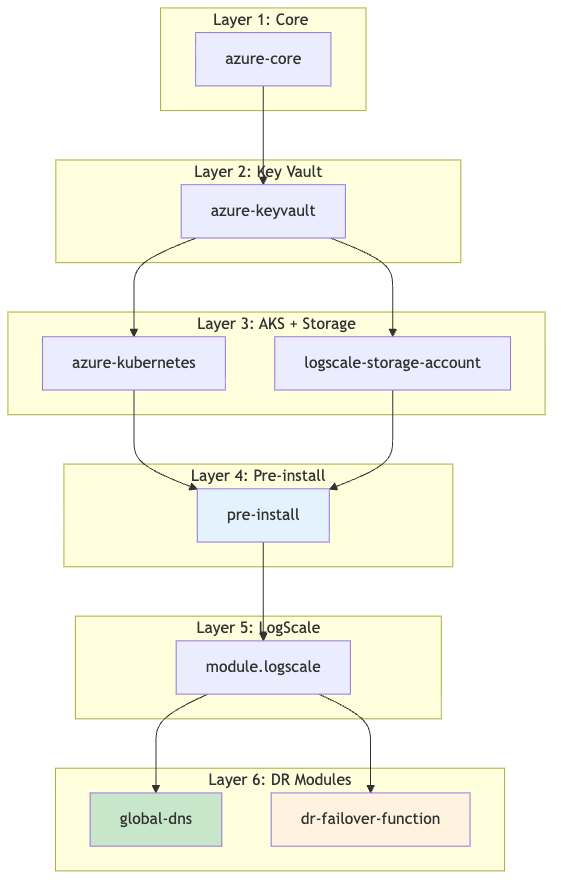 |
See Module Dependency Graph for detailed dependency notes.
Primary Cluster Deployment
The primary cluster deploys all shared infrastructure modules plus the
Traffic Manager module. Set dr = "active" in your tfvars.
Minimal example
primary-<region>.tfvars
(DR-relevant settings only):
dr = "active"
azure_resource_group_region = "<primary-region>"
resource_name_prefix = "primary"
azure_subscription_id = "your-subscription-id"
# Traffic Manager (only on primary)
manage_traffic_manager = true
global_logscale_hostname = "logscale-dr"
traffic_manager_dns_zone_name = "example.com"
# Option A: DNS zone in Azure - module creates CNAME automatically
traffic_manager_dns_zone_resource_group = "dns-rg"
traffic_manager_create_dns_record = true
# Option B: DNS zone external (e.g., AWS Route 53) - create CNAME manually
# traffic_manager_dns_zone_resource_group = "" # Empty - no Azure DNS zone
# traffic_manager_create_dns_record = false # Skip Azure DNS CNAME creation
# Then manually create CNAME: logscale-dr.example.com -> logscale-dr.trafficmanager.net
# Remote state to fetch secondary outputs (add after secondary is deployed)
# Used by primary to discover secondary AKS outbound IPs for storage firewall merging
secondary_remote_state_config = {
backend = "azurerm"
workspace = "secondary"
config = {
resource_group_name = "terraform-state-rg"
storage_account_name = "<your_storage_account_name>"
container_name = "tfstate"
key = "logscale-azure-secondary.tfstate" # Secondary state file, NOT primary
}
}| Step | Module | Purpose |
|---|---|---|
| 1 |
module.azure-core
| VNet, subnets, NAT gateway, public IP |
| 2 |
module.azure-keyvault
| Key Vault for secrets |
| 3 |
module.azure-kubernetes
| AKS cluster and node pools |
| 4 |
module.logscale-storage-account
| Storage account and blob container |
| 5 |
module.pre-install
| Namespace, encryption key, and storage account key secrets |
| 6 |
module.logscale.module.crds
| CRDs (cert-manager, strimzi, humio-operator) |
| 7 |
module.logscale
| LogScale application stack (nginx-ingress, operators, HumioCluster) |
| 8 |
module.traffic-manager
|
Traffic Manager profile and primary endpoint (only when
manage_traffic_manager = true)
|
Commands:
# Select the primary workspace
terraform workspace select default
terraform init -backend-config=backend-configs/production-primary.hcl -reconfigure
terraform workspace select primary
# 1. Infrastructure: networking, Key Vault, AKS cluster, storage account
terraform apply -var-file=primary-<region>.tfvars \
-target="module.azure-core" \
-target="module.azure-keyvault" \
-target="module.azure-kubernetes" \
-target="module.logscale-storage-account"
# 2. Configure kubectl
export KUBECONFIG=$(terraform output -raw kubeconfig_path)
kubectl get nodes
# 3. Pre-install (namespace, secrets) and CRDs
terraform apply -var-file=primary-<region>.tfvars \
-target="module.pre-install" \
-target="module.logscale.module.crds"
# 4. LogScale application stack
terraform apply -var-file=primary-<region>.tfvars -target="module.logscale"
# 5. Full apply (Traffic Manager + remaining resources)
terraform apply -var-file=primary-<region>.tfvarsVerify:
az aks show --resource-group <resource-group-name> --name <aks-cluster-name>
terraform output
# shows storage_acct_name, storage_acct_container_name, and a sensitive storage_encryption_keySecondary Cluster Deployment
The secondary cluster deploys the same shared infrastructure modules plus
the DR failover function. Set dr = "standby" in your tfvars.
The standby cluster reads the primary's remote state to obtain storage
credentials, encryption keys, and Traffic Manager endpoint IDs.
Minimal example
secondary-<region>.tfvars
(DR-relevant settings only)
dr =
        "standby"
azure_resource_group_region = "<secondary-region>"
resource_name_prefix = "secondary"
azure_subscription_id = "your-subscription-id"
# DR routing: false = digest pod serves all traffic (Phase 1 failover)
# true = dedicated UI/ingest pods handle traffic (Phase 2 failover)dr = "standby"
azure_resource_group_region = "<secondary-region>"
resource_name_prefix = "secondary"
azure_subscription_id = "your-subscription-id"
# DR routing: false = digest pod serves all traffic (Phase 1 failover)
# true = dedicated UI/ingest pods handle traffic (Phase 2 failover)
dr_use_dedicated_routing = false
# Remote state to fetch primary outputs (uses workspace to access primary state)
primary_remote_state_config = {
backend = "azurerm"
workspace = "primary" # Read from primary workspace state
config = {
# These values must match your backend-configs/production-primary.hcl file
resource_group_name = "terraform-state-rg"
storage_account_name = "<your_storage_account_name>"
container_name = "tfstate"
key = "logscale-azure-primary.tfstate"
}
}
# Traffic Manager DNS zone name - REQUIRED for ingress to accept traffic for the global DR FQDN
# This must match the primary's traffic_manager_dns_zone_name value
traffic_manager_dns_zone_name = "example.com"
# Global hostname - REQUIRED alongside traffic_manager_dns_zone_name for ingress_extra_hostnames
# This must match the primary's global_logscale_hostname value
global_logscale_hostname = "logscale-dr"
# DR failover function - deploys Azure Function to monitor primary and trigger failover
dr_failover_function_enabled = true
# Recovery hints (fallback if remote state is unavailable)
azure_recover_from_replace_region = "<primary-region>/<secondary-region>"Important
The traffic_manager_dns_zone_name variable must be
set on the standby cluster even though manage_traffic_manager =
false. This enables the
ingress_extra_hostnames configuration which adds the
global DR FQDN to the ingress, allowing Traffic Manager health checks
and user traffic to reach the secondary cluster via the global hostname.
Standby Cluster Initial State:
When dr = "standby", the secondary cluster is provisioned
with a minimal infrastructure footprint, but LogScale stays
offline until the operator is scaled up. System, Digest, Kafka, and
Ingress node pools are created; UI and Ingest are not created to save
costs.
Running Pods (initial state):
Kafka brokers: 3-5 replicas (per
kafka_broker_pod_replica_countin cluster size) - Required for LogScale to function when scaled upCert-manager: Running - Maintains certificates automatically
TopoLVM: Running - LVM volume provisioner for Humio storage
Ingress controller: Running to keep load balancer target group healthy
humio-operator-webhook: Running (1 replica) - The webhook admission controller runs as a separate deployment from the operator and stays at 1 replica even on standby
Not Running:
Humio operator: 0 replicas (enforced on every terraform apply when
dr="standby") until failover/promotion.LogScale pods: 0 replicas (operator is off; HumioCluster declares
nodeCount=1).LogScale ingest/UI pods: 0 replicas - not part of standby topology; added when
drbecomes active.
| Step | Module | Purpose |
|---|---|---|
| 1 |
module.azure-core
| VNet, subnets, NAT gateway, public IP |
| 2 |
module.azure-keyvault
| Key Vault for secrets |
| 3 |
module.azure-kubernetes
| AKS cluster and node pools |
| 4 |
module.logscale-storage-account
| Storage account, blob container, and cross-region RBAC to primary storage |
| 5 |
module.pre-install
| Namespace, encryption key (from primary), and storage account key secrets |
| 6 |
module.logscale.module.crds
| CRDs (cert-manager, strimzi, humio-operator) |
| 7 |
module.logscale
| LogScale application stack (humio-operator scaled to 0 replicas in standby) |
| 8 |
module.dr-failover-function
|
Azure Function + metric alert for automated failover (only when
dr_failover_function_enabled = true)
|
Commands:
# Select the secondary workspace
terraform workspace select default
terraform init -backend-config=backend-configs/production-secondary.hcl -reconfigure
terraform workspace select secondary

# 1. Infrastructure: networking, Key Vault, AKS cluster
#    Note: storage account must be applied separately because the cross-region
#    role assignment depends on the AKS principal ID (not known until after AKS is created)
terraform apply -var-file=secondary-<region>.tfvars \
  -target="module.azure-core" \
  -target="module.azure-keyvault" \
  -target="module.azure-kubernetes"

# 2. Infrastructure: storage account (requires AKS principal from step 1)
terraform apply -var-file=secondary-<region>.tfvars \
  -target="module.azure-core" \
  -target="module.azure-keyvault" \
  -target="module.azure-kubernetes" \
  -target="module.logscale-storage-account"

# 3. Configure kubectl
export KUBECONFIG=$(terraform output -raw kubeconfig_path)
kubectl get nodes

# 4. Pre-install (namespace, secrets) and CRDs
terraform apply -var-file=secondary-<region>.tfvars \
  -target="module.pre-install" \
  -target="module.logscale.module.crds"

# 5. LogScale application stack
terraform apply -var-file=secondary-<region>.tfvars -target="module.logscale"

# 6. Full apply (DR failover function + remaining resources)
terraform apply -var-file=secondary-<region>.tfvars
Verify:
az aks show --resource-group <resource-group-name> --name <aks-cluster-name>
# Encryption keys match (compare hashes)
kubectl get secret -n logging logscale-storage-encryption-key --context aks-primary -o jsonpath='{.data.azure-storage-encryption-key}' | base64 -d | shasum -a 256
kubectl get secret -n logging logscale-storage-encryption-key --context aks-secondary -o jsonpath='{.data.azure-storage-encryption-key}' | base64 -d | shasum -a 256
# Verify storage credentials secret exists
kubectl get secret logscale-storage-encryption-key -n logging --context aks-secondary
# Pods minimal on secondary
kubectl get pods -n logging --context aks-secondary