Session management

Security Requirements and Controls

LogScale uses cookies as a secure mechanism to establish a session between the LogScale web frontend and back-end API. The only information that's stored in a LogScale session cookie is a session identifier.

Sessions control security for individual user sessions:

  • By limiting the duration of a session timeout (the period before login is required).

  • By enforcing a maximum duration for which a user can be logged in.

Users and administrators can manage sessions to remove access for users who may already be logged in.

Set session parameters

Security Requirements and Controls

As the organization owner, you can access Session settings, where you can configure inactivity timeout and re-login requirements.
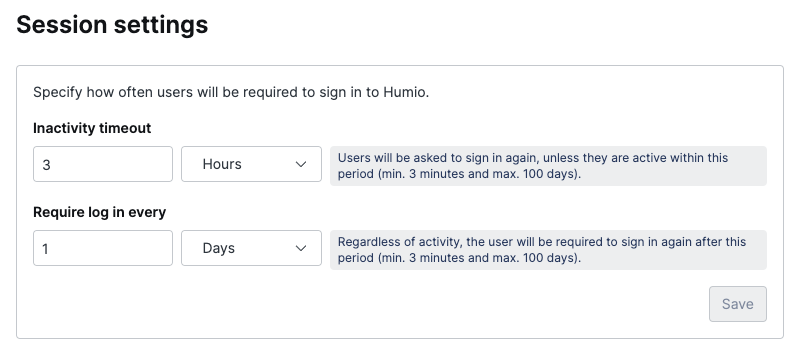
Screenshot of the LogScale Session Settings administrative interface accessible only to organization owners. The configuration panel displays security controls for managing user session parameters across the organization. The interface shows two main configuration sections: the Inactivity Timeout setting, which allows administrators to define the maximum period users can remain inactive before automatic logout (with toggle switch for enabling/disabling and duration selectors); and the Maximum Login Duration setting (labeled 'Require login every'), which forces periodic re-authentication by limiting how long users can remain logged in regardless of activity (also with toggle and duration controls). Each setting includes dropdown selectors for configuring the time values in minutes, hours, or days. This interface enables organization administrators to implement session security policies that balance user convenience with organizational security requirements, providing controls to mitigate risks from unattended sessions and enforce regular authentication challenges.

Figure 56. Session Settings


Set an inactivity timeout

Inactivity timeout defines the maximum period of time that users can be inactive.

Activity includes:

  • Mouse movement.

  • Refreshing a page.

  • Opening a new LogScale window/tab.

Sixty (60) seconds before the session expires, users will be provided with a warning, and have the option to extend their session. They may also choose to terminate their session immediately.
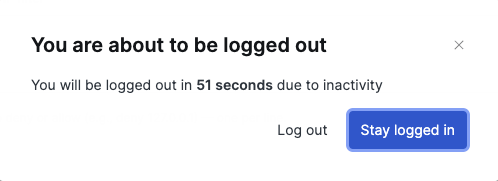
Screenshot of the session inactivity warning dialog that appears 60 seconds before a user's session expires due to inactivity. The dialog alerts users that their session is about to time out and presents two action buttons: one to extend the current session by continuing to use LogScale, and another to log out immediately. This warning gives users the opportunity to maintain their session if they're still actively using the application or safely terminate it if they're finished working.

Figure 57. Inactivity Timeout


Set a maximum login duration

Require login every defines the maximum duration for a session before the user is required to log in again.

Users will receive a warning fifteen (15) minutes before they are required to log in again; they will have the option to terminate their session immediately.

Screenshot of the LogScale login requirement warning dialog that appears fifteen minutes before a user's session expires due to maximum login duration policy. The dialog notifies users that their current session will soon reach the administrator-configured maximum duration limit, after which re-authentication will be required to maintain access to the system. The warning provides users with a countdown of the remaining time before forced logout and presents two action options: to continue working with their current session until the mandatory re-authentication point is reached, or to end their session immediately. This security feature enforces periodic identity verification independent of user activity levels, complementing the separate inactivity timeout feature by ensuring users must re-authenticate at regular intervals even during continuous system use.

Figure 58. Require Log In


Manage active sessions

Security Requirements and Controls

You can get an overview of sessions on an account and organizational level.

Self-Managing Sessions

As a user, you can get an overview of all your active sessions by going to the Sessions page:

  • You can end an individual session, or all sessions at once.

  • Ending all user sessions will also end the current session, which will log you out immediately.

Manage sessions within an organization

As the organization owner, you can access Active sessions and get an overview of all current active sessions of the users in the organization.

From this interface, you can:

  • Find and filter the sessions by user ID.

  • Terminate individual sessions or end all sessions for all users within the organization.

    Ending all organization sessions will also end your current session, which will log you out immediately.
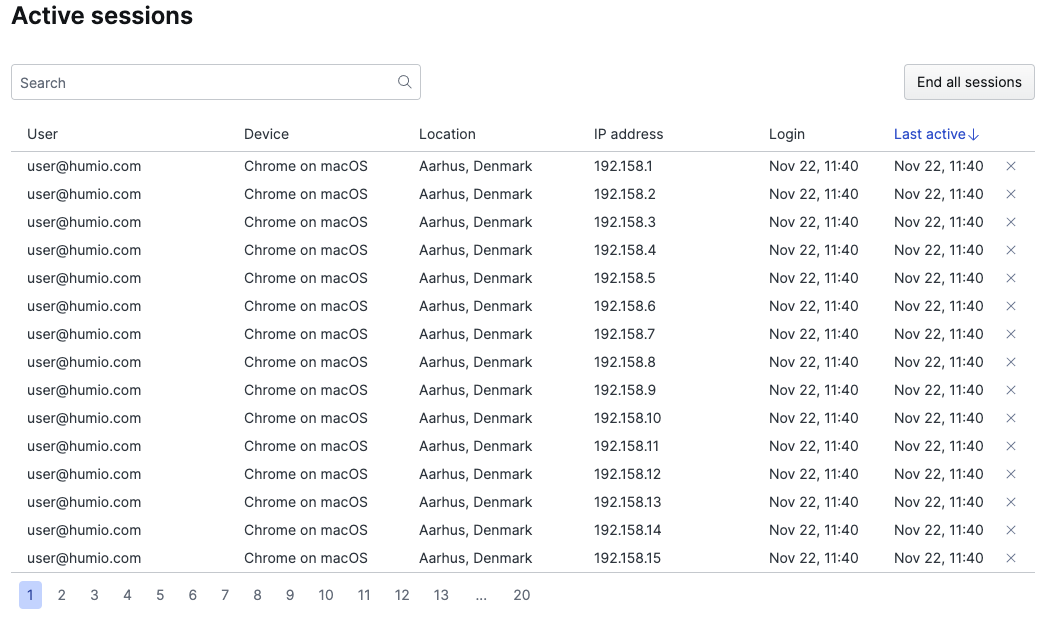
A screenshot of the Active Sessions interface showing active user sessions in an organization. The interface displays a table with columns for User ID, Sign-in Time, and Browser Information. Each row represents a user session with options to terminate individual sessions. At the top of the interface is a search field to filter sessions by user ID, and a button to end all organization sessions.

Figure 59. Managing Sessions in an Organization