

Terraform Configuration
This section covers the DR-specific Terraform modules, workspace setup, and deployment sequence for the secondary (standby) cluster.
Key DR mechanisms managed by Terraform:
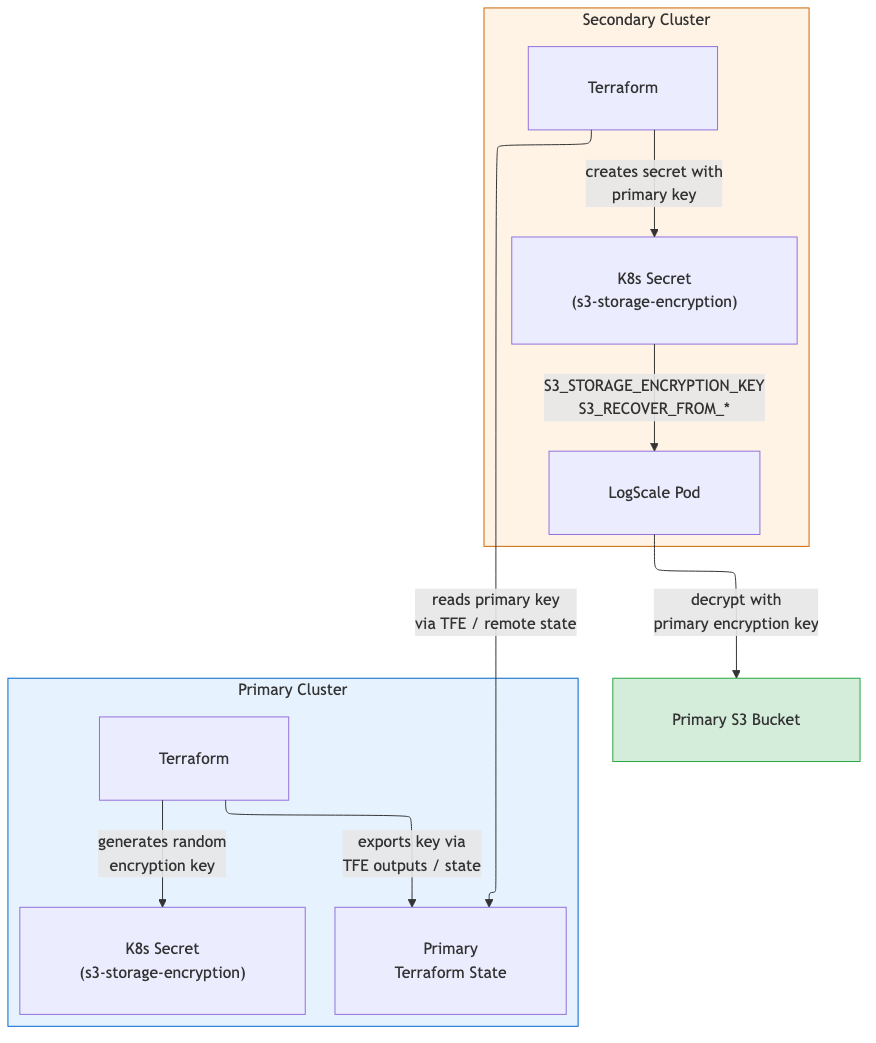
Encryption key synchronization -- the primary generates the key; the secondary copies it via TFE outputs or remote state. See S3 Storage for DR.
Automated failover -- a Lambda function scales the Humio operator from 0 to 1 when the primary becomes unhealthy. See DR Failover Lambda (
module.dr-failover-lambda) for the full event chain, timing, and configuration options.Health check FQDN locking -- during failover, the Lambda swaps the primary Route53 health check FQDN to
failover-locked.invalidto prevent automatic DNS failback. See DNS Architecture and Traffic Flow.S3_RECOVER_FROM_*environment variables are set on the standby cluster at provisioning time but only consumed when the LogScale pod starts during failover.
DR Modules
Three DR-specific modules automate failover operations. They are gated by
manage_global_dns and
dr_failover_lambda_enabled flags and are not deployed
in standalone dr="" mode.
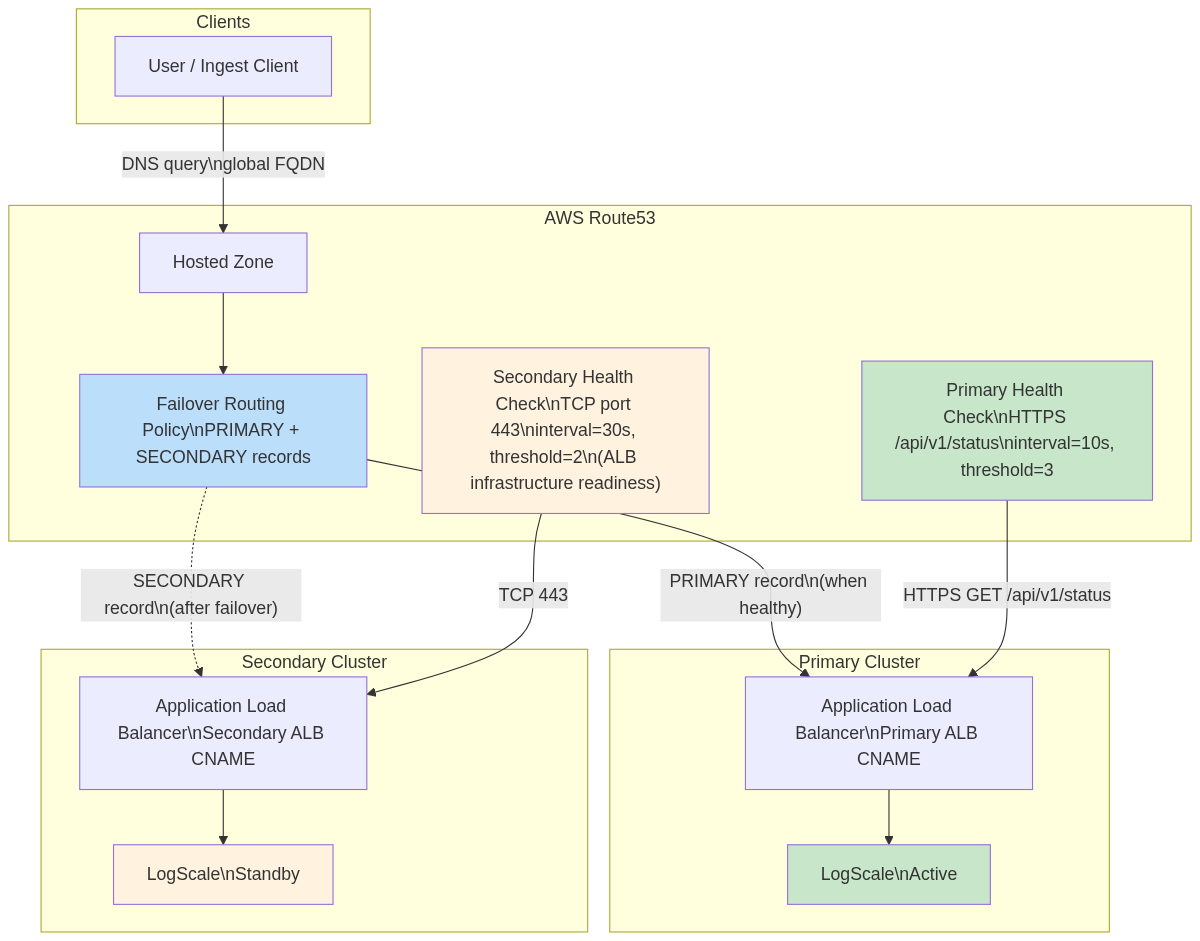
Global DNS (module.global-dns)
Provides automatic traffic failover between primary and secondary
clusters using Route53 Failover Routing. Deployed on the primary cluster
only (manage_global_dns = true, requires dr =
"active").
Key resources:
| Resource | Purpose |
|---|---|
aws_route53_health_check (primary)
| HTTPS health check on /api/v1/status (interval=10s, threshold=3) |
aws_route53_health_check (secondary)
| TCP health check on port 443 (interval=30s, threshold=2) |
aws_route53_record (primary)
| PRIMARY failover record → primary ALB |
aws_route53_record (secondary)
| SECONDARY failover record → secondary ALB |
Global DNS routing:
 |
Important
Both clusters must use the same
global_logscale_hostname value. Mismatched values
cause HTTP 404 errors on failover.
For details on failback prevention (FQDN locking), ExternalDNS annotation requirements, and DNS configuration by DR mode, see Global DNS Details and DNS Architecture — FQDN Locking Details.
DR Failover Lambda (module.dr-failover-lambda)
Automatically scales humio-operator from 0 → 1 on the secondary
cluster when the primary becomes unhealthy, and locks the primary health
check to prevent DNS failback. Deployed on the standby cluster only
(dr = "standby", dr_failover_lambda_enabled =
true).
Key resources:
| Resource | Purpose |
|---|---|
aws_lambda_function
| Python 3.12 — scales operator and locks primary health check |
aws_cloudwatch_metric_alarm
| Fires when primary health check becomes unhealthy |
aws_sns_topic + subscription
| Connects alarm → Lambda |
aws_iam_role + policies
| EKS API, Route53, and KMS access |
aws_eks_access_entry
| Kubernetes RBAC for operator scaling |
aws_kms_key
| Encryption for Lambda environment variables |
Failover chain: Health Check fails → CloudWatch Alarm → SNS → Lambda validates failure duration → cleans stale TLS secrets → scales operator 0 → 1 → locks primary health check FQDN → Operator reconciles HumioCluster → LogScale pod recovers from primary bucket.
 |
Key configuration (tfvars):
| Variable | Default | Description |
|---|---|---|
dr_failover_lambda_pre_failover_failure_seconds
| 180 | Minimum seconds primary must be failing before failover (0 for testing) |
dr_failover_lambda_enabled
| true | Enable/disable Lambda deployment |
dr_failover_lambda_timeout
| 60 | Lambda execution timeout (seconds) |
Health check IDs are auto-resolved from primary remote state — no manual tfvars entry needed. For the full variable list, internal defaults, EKS access details, and retry logic, see Lambda Function Internals and Lambda Configuration Details.
S3 Storage for DR
The primary writes to its own S3 bucket. The secondary reads the primary
bucket during recovery via S3_RECOVER_FROM_*
environment variables and uses its own bucket for new writes.
Encryption key synchronization: Primary generates the key
(random_password) and exports it as a sensitive
output. Secondary reads it via TFE outputs or
terraform_remote_state and stores it in the
<cluster-name>-s3-storage-encryption Kubernetes
secret.
 |
For cross-region IAM policy details and security controls, see S3 Storage for DR — Implementation Details.
EKS Node Group Topology — DR Modes
| Node Group | Primary (dr="active") | Standby (dr="standby") | Purpose |
|---|---|---|---|
| Digest | Deployed | Deployed | Core LogScale processing |
| Kafka | Deployed* | Deployed* | Kafka broker nodes |
| Ingress | Deployed | Deployed | Load balancer / ingress |
| UI | Deployed | Not created | Web UI serving |
| Ingest | Deployed† | Not created | High-volume ingestion |
* When provision_kafka_servers =
true.
† When cluster_type =
"advanced". UI and Ingest node groups are omitted on standby to
reduce cost; they are created during promotion via terraform apply.
| Component | Active | Standby |
|---|---|---|
| Humio operator replicas | 1 | 0 |
HumioCluster nodeCount
|
cluster_size
| 1 (declared, not running) |
| Replication factor | Production | 1 |
S3 force_destroy
|
false
|
true
|
For the full topology comparison including non-DR mode, see EKS Node Group Topology — DR Modes.
Workspace Setup for DR Pairs
DR deployments require two Terraform workspaces: one for the primary cluster and one for the secondary. The workspace names used below (primary and secondary) are illustrative - you can choose any names that suit your environment.
First-time setup (create both workspaces):
# 1. Initialize with primary backend config (first time only)
terraform init -backend-config=backend-configs/primary-aws.hcl
# 2. Create the primary workspace (only needed once)
terraform workspace new primary
# 3. Switch to secondary backend config
terraform init -backend-config=backend-configs/secondary-aws.hcl -reconfigure
# 4. Create the secondary workspace (only needed once)
terraform workspace new secondarySwitching between cluster workspaces:
# Switch to primary cluster
terraform workspace select primary
# Switch to secondary cluster
terraform workspace select secondaryRemote State Data Flow
The primary and secondary clusters exchange critical data via
terraform_remote_state (or TFE outputs).
Configuration: The secondary cluster's
primary_remote_state_config must specify
workspace and config.key matching
the primary's backend config. For S3 backends,
locals.tf constructs the full state path
(env:/<workspace>/<key>) automatically
— see Terraform Configuration
for details on the workspace path workaround.
Secondary reads from primary:
| Data | Output Name | Purpose |
|---|---|---|
| Encryption key |
s3_storage_encryption_key
| Decrypt/encrypt data in both buckets |
| Encryption key K8s secret name |
s3_encryption_key_secret_name
| Name of the K8s Secret containing the encryption key |
| Bucket name |
s3_bucket_id
|
S3_RECOVER_FROM_BUCKET
|
| Bucket region |
s3_bucket_region
|
S3_RECOVER_FROM_REGION
|
| Health check ID (primary) |
primary_health_check_id
| Lambda monitors this health check |
| Health check ID (secondary) |
secondary_health_check_id
| Used for failover DNS routing |
Note
Health check IDs are automatically resolved from remote state when
primary_remote_state_config is set. You do not need
to manually specify dr_primary_health_check_id or
dr_secondary_health_check_id in your tfvars. The
resolution priority is: explicit tfvars variable > remote state from
primary > empty string (same pattern as
s3_storage_encryption_key).
Module Deployment Matrix
Module deployment matrix:
 |
| Module |
dr=""
|
dr="active"
|
dr="standby"
| Notes |
|---|---|---|---|---|
module.vpc
| Yes | Yes | Yes | VPC, subnets, NAT gateways |
module.eks
| Yes | Yes | Yes | EKS cluster + node groups |
module.pre-install
| Yes | Yes | Yes | Namespaces, encryption secret |
module.logscale
| Yes (operator replicas: 1) | Yes (operator replicas: 1) | Yes (operator replicas: 0) | Kafka, Nginx, HumioCluster |
module.global-dns
|
Always instantiated; resources gated by
manage_global_dns=true (requires
dr="active")
|
Resources deploy when manage_global_dns=true
|
Instantiated but precondition blocks
manage_global_dns=true
| Route53 zone, health checks, failover records |
module.dr-failover-lambda
| No | No |
When dr_failover_lambda_enabled=true
| Lambda, alarm, SNS |
Notes:
DR module conditions:
module.global-dnsis always instantiated (no count guard) but its resources only deploy whenmanage_global_dns=true, which requiresdr="active"(enforced by precondition).module.dr-failover-lambdaonly deploys whendr="standby"anddr_failover_lambda_enabled=true.Keep
manage_global_dns=trueonly in a single workspace to avoid two states managing the same failover records/zone.
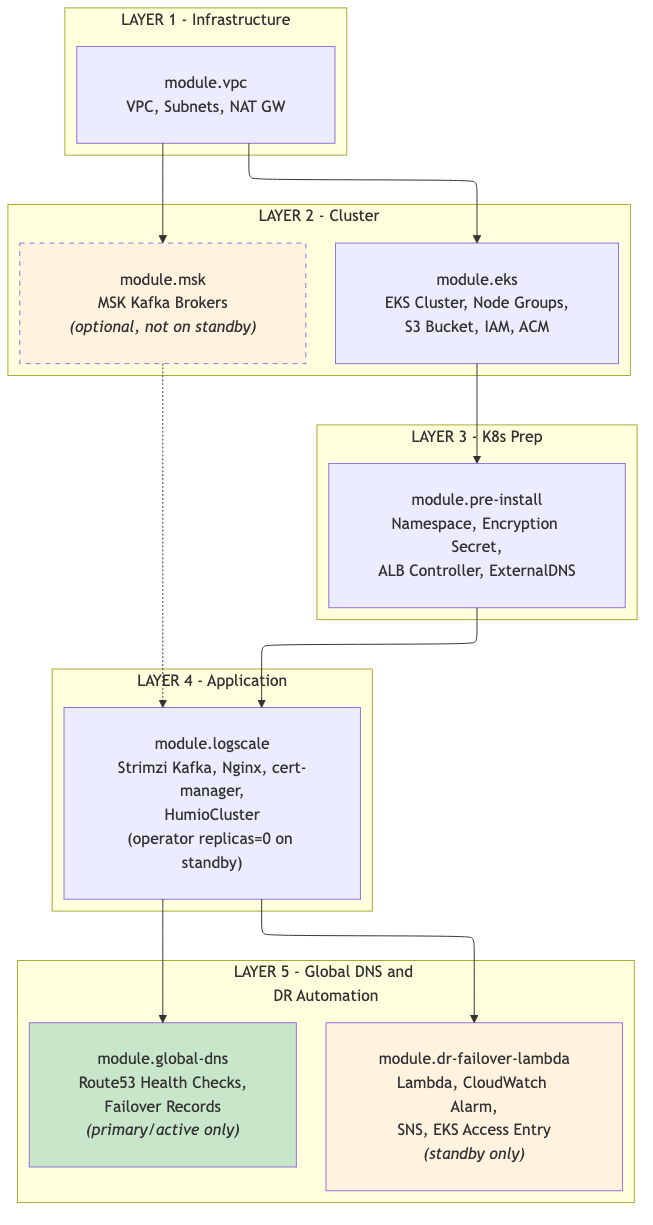
Module Dependency Graph
Follow this order to apply Terraform safely and avoid dependency issues.
Each module references outputs from upstream modules. The diagram below shows the dependency order -- modules must be deployed top-to-bottom. Deploying out of order will result in missing references or Terraform errors.
Note
module.eks creates the S3 bucket, IAM roles, and ACM
certificates that module.pre-install and
module.logscale consume. When both modules are
included in the same targeted apply (-target), Terraform resolves this
dependency automatically and creates eks first.
Primary Cluster - DR-Specific Settings
The primary cluster is provisioned as usual with dr="active".
Minimal primary-us-west-2.tfvars:
dr =
        "active"
aws\_region = "us-west-2"
cluster\_name = "dr-primary"
# Global DNS (only on primary)
manage\_global\_dns = true
global\_logscale\_hostname = "logscale-dr"
primary\_logscale\_hostname = "logscale-dr-primary"
secondary\_logscale\_hostname = "logscale-dr-secondary"
zone\_name = "<your-domain.example.com>"Commands:
# Select the primary workspace (terraform init already completed)
terraform workspace select primary # or: terraform workspace new primary
terraform init -backend-config=backend-configs/primary-aws.hcl
# 1. VPC, subnets, NAT gateway, security groups
terraform apply -var-file=primary-us-west-2.tfvars \
-target="module.vpc"
# 2. EKS cluster, node groups, S3 bucket, IAM roles, ACM certificate
terraform apply -var-file=primary-us-west-2.tfvars \
-target="module.eks"
# 3. Pre-install (namespace, encryption key secret, ALB controller, ExternalDNS)
terraform apply -var-file=primary-us-west-2.tfvars \
-target="module.pre-install"
# 4. CRDs (cert-manager, strimzi, humio-operator CRDs must exist before LogScale resources)
terraform apply -var-file=primary-us-west-2.tfvars \
-target="module.logscale.module.crds"
# 5. LogScale application stack (Strimzi Kafka, cert-manager, Nginx, HumioCluster)
terraform apply -var-file=primary-us-west-2.tfvars \
-target="module.logscale"
# 6. Global DNS -- Route53 health checks and failover records (primary only)
terraform apply -var-file=primary-us-west-2.tfvars \
-target="module.global-dns"
# Final: full apply to ensure all resources are in sync
terraform apply -var-file=primary-us-west-2.tfvars
Verify:
aws eks describe-cluster --name dr-primary --region us-west-2 --query 'cluster.tags.dr'
# => "active"
terraform output
# shows s3\_bucket\_id, s3\_bucket\_region, and a sensitive s3\_storage\_encryption\_key
Workspace Safety Validation
Existing precondition blocks in the Terraform modules prevent dangerous cross-workspace misconfigurations at plan time:
| Module | Precondition | Blocks if |
|---|---|---|
| global-dns |
manage_global_dns requires
dr="active"
| Standby cluster tries to manage DNS records |
| pre-install/s3 |
dr="standby" requires
existing_s3_encryption_key
| Standby applied without primary encryption key |
Recommended additional guard: add a workspace_name
variable to each tfvars file and a matching precondition that checks
terraform.workspace. The
example.tfvars already includes a commented
workspace_name field for this purpose.
# primary-us-west-2.tfvars
workspace\_name = "primary"
dr = "active"
# secondary-us-east-2.tfvars
workspace\_name = "secondary"
dr = "standby"
If implemented, Terraform will block any apply where the workspace does not match:
WORKSPACE MISMATCH - EXECUTION BLOCKED
Current workspace: 'default'
tfvars workspace: 'secondary'
Fix: terraform workspace select secondary
OR use the correct tfvars file for 'default' workspace
Secondary Cluster Deployment
The secondary cluster deploys the same shared infrastructure modules plus
the DR failover Lambda. Set dr = "standby" in your tfvars.
The standby cluster reads the primary's state to obtain storage
credentials, encryption keys, and health check IDs — all
automatically via terraform_remote_state when
primary_remote_state_config is configured.
Minimal secondary-us-east-2.tfvars:
dr = "standby"
aws\_region = "us-east-2"
cluster\_name = "dr-secondary"
# Global DNS hostname (must match primary)
global\_logscale\_hostname = "logscale-dr"
primary\_logscale\_hostname = "logscale-dr-primary"
secondary\_logscale\_hostname = "logscale-dr-secondary"
zone\_name = "<your-domain.example.com>"
manage\_global\_dns = false # Important: avoid two states managing global DNS
# Remote state to fetch primary outputs
primary\_remote\_state\_config = {
  backend = "s3"
  workspace = "primary"
  config = {
    bucket = "logscale-tf-backend"
    key = "env:/logscale-aws-eks"
    region = "us-west-2"
    profile = "your-aws-profile"
    encrypt = true
  }
}
# Recovery hints (fallback if remote state is unavailable)
s3\_recover\_from\_region = "us-west-2"
s3\_recover\_from\_bucket = "<primary-bucket-name>"
s3\_recover\_from\_encryption\_key\_secret\_name = "dr-secondary-s3-storage-encryption"
s3\_recover\_from\_encryption\_key\_secret\_key = "s3-storage-encryption-key"
Auto-resolved from remote state (no need to set in tfvars when
primary_remote_state_config is configured):
s3_storage_encryption_key— fetched asexisting_s3_encryption_keyprimary_health_check_idandsecondary_health_check_id— used by Lambda and CloudWatch alarm
Important
primary_remote_state_config alignment: The
workspace and config.key values
must exactly match the primary cluster's backend configuration (see
Terraform Configuration). Misaligned
values cause terraform_remote_state to read the wrong
state file, resulting in a different encryption key. This causes
AEADBadTagException when the secondary
LogScale pod tries to decrypt the global snapshot. Verify by
comparing encryption key hashes:
# These must produce identical hashes
kubectl get secret -n logging dr-primary-s3-storage-encryption --context dr-primary -o jsonpath='{.data.s3-storage-encryption-key}' | base64 -d | shasum -a 256
kubectl get secret -n logging dr-secondary-s3-storage-encryption --context dr-secondary -o jsonpath='{.data.s3-storage-encryption-key}' | base64 -d | shasum -a 256
Deployment sequence:
terraform workspace select secondary
terraform init -backend-config=backend-configs/secondary-aws.hcl

terraform apply -var-file=secondary-us-east-2.tfvars -target="module.vpc"
terraform apply -var-file=secondary-us-east-2.tfvars -target="module.eks"
terraform apply -var-file=secondary-us-east-2.tfvars -target="module.pre-install"
terraform apply -var-file=secondary-us-east-2.tfvars -target="module.logscale.module.crds"
terraform apply -var-file=secondary-us-east-2.tfvars -target="module.logscale"
terraform apply -var-file=secondary-us-east-2.tfvars -target="module.dr-failover-lambda"
terraform apply -var-file=secondary-us-east-2.tfvars  # final full apply
Standby Readiness Checklist:
| Check | Command | Expected |
|---|---|---|
| Humio operator scaled to 0 |
kubectl --context dr-secondary -n logging get deploy
              humio-operator
| replicas: 0 |
| Kafka pods running |
kubectl --context dr-secondary -n logging get pods | grep
              kafka
| All pods Running |
| Ingress has ALB |
kubectl --context dr-secondary -n logging get ingress
| ALB address assigned |
| S3 recovery env vars set |
kubectl --context dr-secondary -n logging get humiocluster
              -o yaml | grep S3_RECOVER
| Env vars present |
| Encryption keys match |
Compare shasum -a 256 output above
| Identical hashes |
| Lambda exists |
aws lambda get-function --function-name
              <prefix>-handler --region us-east-2
| Function listed |
Note
Note: Kafka must be running before LogScale starts. Strimzi generates the Kafka TLS truststore secret only after Kafka is up — if LogScale starts before this secret exists, the pod crashloops. For the full standby topology (which node groups and pods are running vs. not), see EKS Node Group Topology — DR Modes.
Accessing the Clusters
Terraform does not require a kubeconfig file -- the Kubernetes and Helm
providers read EKS credentials directly from module.eks
outputs. Cluster-specific kubeconfig files are auto-generated on terraform
apply as
kubeconfig-<cluster-name>.yaml
in the repository root (git-ignored).
# Single cluster access
export KUBECONFIG=./kubeconfig-dr-primary.yaml
kubectl get nodes
DR dual-cluster access:
# Merge both kubeconfigs (one per workspace)
export KUBECONFIG=./kubeconfig-dr-primary.yaml:./kubeconfig-dr-secondary.yaml
# Use contexts (context name = cluster\_name from tfvars)
kubectl --context dr-primary get nodes
kubectl --context dr-secondary get nodes
Note
Note: The kubeconfig uses aws eks get-token with the
aws_profile set in your tfvars. Ensure your AWS CLI
profile has valid credentials before running kubectl commands.
Kubernetes Access
Ensure kubectl contexts are configured for both clusters:
# Configure contexts (run once)
aws eks update-kubeconfig --name dr-primary --region us-west-2 --alias dr-primary
aws eks update-kubeconfig --name dr-secondary --region us-east-2 --alias dr-secondary
# Verify access
kubectl --context dr-primary cluster-info
kubectl --context dr-secondary cluster-info