

Manage Persisted Aggregations
Security Requirements and Controls
Delete Persisted aggregationspermissionUpdate Persisted aggregationspermission
Several options to manage persisted aggregations are available from the Persisted aggregations overview page. You can view, enable, disable, and delete persisted aggregations.
You can manage persisted aggregations in bulk or individually:
To manage multiple persisted aggregations at once, select the checkboxes and click :
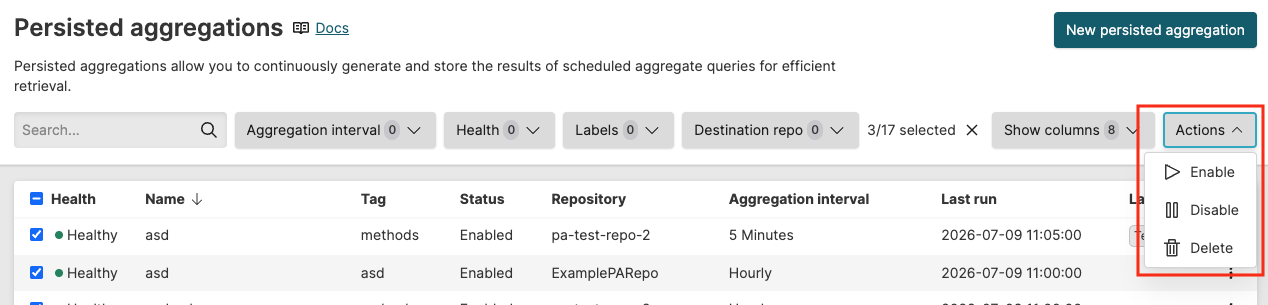
Figure 304. Manage persisted aggregations in bulk
or persisted aggregations. This action requires the
Update Persisted aggregationspermission.persisted aggregations. This action deletes the underlying data - if instead you want to keep the underlying data but you no longer need the persisted aggregation to execute, then simply disable the PA using the toggle (see Figure 303, “Edit persisted aggregation query”).
This action requires the
Delete Persisted aggregationspermission.
To manage an individual persisted aggregation, click the menu icon ⋮ next to each entry:
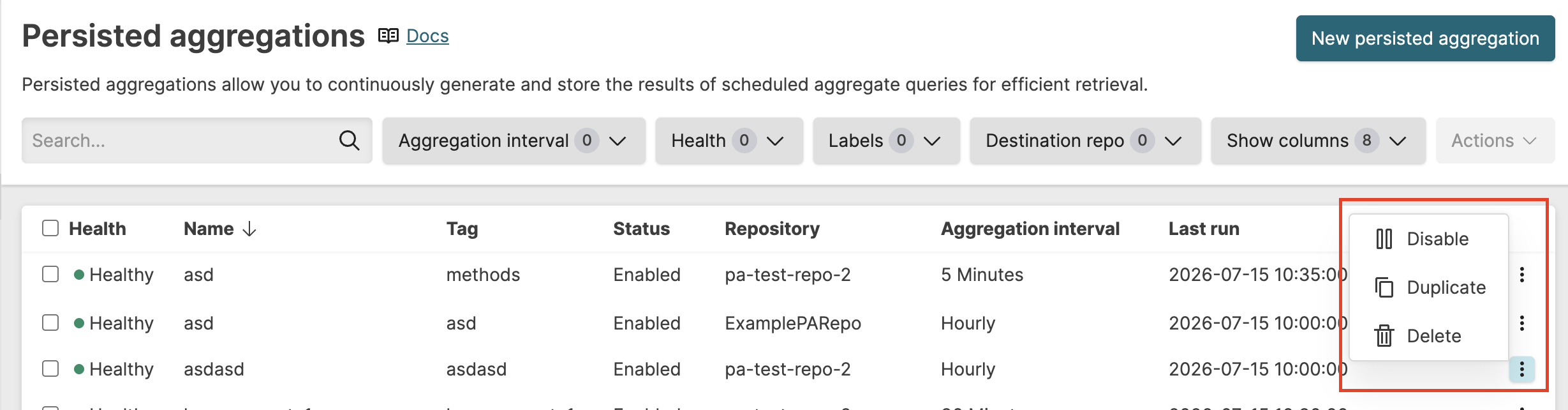
Figure 305. Manage individual persisted aggregation
/ the persisted aggregation. This action requires the
Update Persisted aggregationspermission. When disabled, the persisted aggregation stops running on its schedule.the persisted aggregation. This action allows to change the query and save it as a new persisted aggregation.
the persisted aggregation. This action requires the
Delete Persisted aggregationspermission. The action cannot be undone. Deleting a persisted aggregation frees the tag for reuse.
allows you to customize the
Persisted aggregationsoverview by showing or hiding columns in the table. The columns provide information such as the name, type, status of the persisted aggregation, its repository, and so on. Available columns are:Column Description Aggregation interval How often the aggregation runs and the time window it covers on each run. Backfill amount Number of time units to backfill when calculating historical results (1,2, 10, etc.). Backfill unit Time unit for the backfill period (days, weeks, or months). Created at Date and timestamp when the persisted aggregation was created. Created by User or Organization who created the persisted aggregation. Description Optional description documenting the purpose of the persisted aggregation. Health Health status indicator showing whether the persisted aggregation is operating correctly. Labels Labels applied to the persisted aggregation. Last modified at Date and timestamp when persisted aggregation was last changed. Last modified by User or Organization who last changed the persisted aggregation. Last run Date and timestamp when the persisted aggregation last executed. Name Name of the persisted aggregation. Offset seconds Offset in seconds from the interval boundary to set back the end time. Only applicable for EventTime timestamp type. Owned by Who owns the persisted aggregation. If blank, the persisted aggregation is owned by the organization. Query string The aggregation query that runs on the defined schedule. Repository Name of the repository the persisted aggregation belongs to. Status Status of the persisted aggregation. Persisted aggregations can have the following statuses:
Running - The aggregation is actively executing on schedule.
Disabled - The aggregation is temporarily disabled and not running.
Backfilling - The aggregation is currently calculating historical results.
Errored - The aggregation encountered an error during execution.
Tag Unique identifier used to filter and identify results from this persisted aggregation. Timestamp type Timestamp type used by the persisted aggregation.
For information on more options and buttons to manage assets - including persisted aggregations - from the table overview, see Table Components.