

Queries and Querying
Queries and querying are the cornerstone of unlocking data's potential for insight. The query language offered to users for designing queries is the CrowdStrike Query Language (CQL), which allows users to design complex queries that accomplishes a wide range of analysis and visualization.
When considering how to retrieve, organize, and visualize data for reporting purposes, users should first consider the functions necessary for manipulating, extracting, and summarizing data. Query functions are tools within CQL that use events, parameters, and/or configurations to produce and/or modify values within a given dataset, or within the events themselves within a query pipeline. The events that can be used can be any type of text based data, structured and unstructured, whether it is from application logs, infrastructure events, network, or other security-related devices or applications.
There is a broad range of possibilities for queries, and learning the basics of some of the most powerful queries will be essential to a user's understanding of LogScale and the capability of their data to provide insights. The data and query language allows for the information to be modified, summarized and manipulated within the language without necessarily having to use a third-party tool or interface to format the data. Datasets resulting from a well-written query then become the foundation for automations and dashboards.
Queries
The CrowdStrike Query Language (CQL) enables users to select, filter, and format data through a pipe-based processing structure similar to Unix/Linux shell environments, allowing for event filtering, data augmentation, and various formatting options. The documentation covers core query concepts, including aggregation functions for data summarization, and live queries which provide real-time information processing during data ingestion for faster results in dashboards and alerting systems.
The CrowdStrike Query Language (CQL) provides a full set of tools for selecting, filtering, and formatting data. The basic structure of the CQL is similar to the pipe-based processing within the Unix or Linux shell environment. The input to the query is a list of events, selected by a time span. That time span is either explicit, or relative, for example, the last 5 minutes.
Each set of events is then processed and either filtered, select events from the lists, augmented with additional data or information, or formatted. Formatting can include adding units to numerical values, formatting dates, or aggregated data to provide counts, sums or averages over the data.
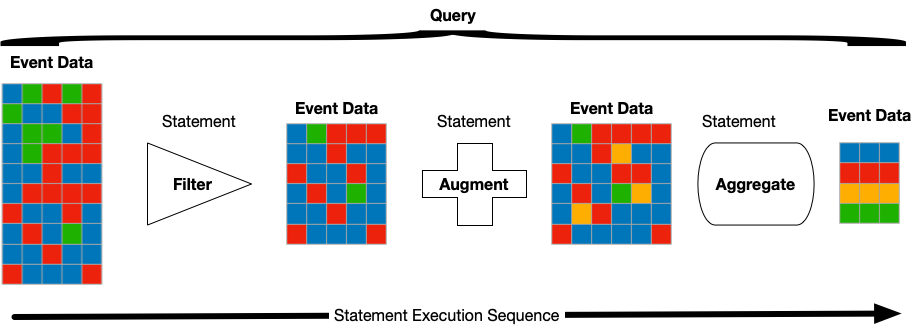 |
For each statement in the query, an event list, consisting of a set of fields, is provided as an input. The query statement performs and action, and then outputs an updated list of events to provide the input for the next statement.
For example, when processing web access logs, you might run the query
url = /.js$/
| groupBy(statuscode)
The first line filters the incoming events, selecting only events where
the requested URL ends in .js
(JavaScript files). The result list of events is then provided as the
input to the groupBy(), which is an aggregate
function that summarizes the data, in this case using the
statuscode. This will take a
unique list of the statuscode values from the set of filtered events and
then count the number of events with that value. The output might look
like this:
| statuscode | _count |
|---|---|
| 200 | 288 |
| 304 | 110 |
| 404 | 11 |
Queries are used throughout LogScale to query and access data, including from the internal system repositories used to manage information. Internal usage data, for example, is stored in LogScale and is viewable within the Web UI.
Aggregations
Aggregation expressions are always function calls. These functions can combine their input into a new structure or emit new events into the output stream.
A query becomes an aggregation
query if it uses at least one aggregate function like
sum(), count() or
avg().
For example, the query count() takes a stream of
events as its input, and produces a single record containing a
_count field.
Below are some examples:
loglevel = ERROR
| timechart()x := y * 2
| bucket(function=sum(x))Live Queries
Live queries are executed by LogScale during ingestion and are used to provide 'live' information from the ingested data. Because the data is processed when it is ingested, the results can be returned quicker than if the system waited for the data to be ingested and stored on disk. This is particularly useful in dashboards, but also for built-in alerting system.
When executing a live query, the time interval is always a time window relative to now, for example the last 5 minutes or the last day. Live queries are made up of the historical element and the live element, with the live element directly querying data that is being actively ingested.
Live queries are always being executed if they are being actively or regularly polled for results. This means that results are immediately available when opening a dashboard that is using live queries. If live queries are not polled the server will stop them at some point. The following describes when live queries are stopped:
Live queries are kept running for 1 hour if they are not polled.
All live queries that have not completed their historical search part will be closed if they are not polled for 90 seconds, like historical queries are.
The UI will try to stop live queries, when they are not used anymore. When submitting a new search, the previous one will be stopped.
The basics
In general, there are a few rules that will help users who are learning CQL and beginning to design queries:
Specificity matters. The more specific the query, the faster the query will run and the more focused the results will be
Adhering to an ordered flow when writing queries will help with CPU costs, memory usage, and increase efficiency
Filter first, then perform data formatting and modification
For more information, see Statement Order for Better Queries Frequent query operations, Examples Library.
CrowdStrike Query Language (CQL)
CrowdStrike Query Language (CQL) is the query syntax to use when composing queries to retrieve, process and analyze data in Falcon LogScale. To derive the best possible result, queries must be written using the appropriate syntax. Because the language is built around data-processing commands linked together, it allows users to design complex queries and to combine query expressions. This architecture is similar to command pipes in Unix and Linux shells.
Events ingested and parsed in LogScale can be any type of text based data, can be both structured and unstructured, and can originate anywhere from application logs and infrastructure events to networks, security-related devices, or applications.
Much like a query for an SQL database, CQL queries are written to include or exclude values from a repository or view. However, unlike most SQL queries, you can also do calculations and transform data.
CQL components
No matter what kind of query you write, CQL provides a range of different tools and components designed to provide the results you need:
Query Filters: Filters reduce query results to only relevant data by using free-text filters to grep data, filtering based on fields, stipulating acceptable field values, or using regular expressions for matching field contents. For more information see Query Filters.
Operators: Several operators exist for filtering- logical operators and comparison operators narrow search results to only what's most important. For more information see Operators.
Adding Fields: Creating new fields when querying data improves result sets and gives the ability to construct more complex queries. To do this, use the
:=syntax, theasparameter, a regex, or theeval()function. For more information see Adding Fields to Events.Conditional Statements: CQL doesn't provide a typical conditional syntax, but there are ways to evaluate data on a conditional basis by using a case or a match statement. For more information see Conditional Evaluation.
Query Joins: Queries can be used to filter or enrich other queries to obtain a combined result using the join() function. One query can be used to filter or enrich another, thus obtaining a combined result. For more information see
join()Syntax.Array Syntax: Array functions allow you to extract, create and manipulate items embedded in arrays, or to interpret arrays, within events using a syntax similar to JSON.
Function Syntax: LogScale provides built-in query functions to obtain values or reduce results. You can also combine them to create your own. For more information see Query Functions.
Time Related Syntax: Time syntax defines how to convert or translate timestamps and other time-related values, including specifying and calculating time in relation to other times. Rate Unit Conversion is also important. For more information, see Relative Time Syntax.
Regular Expression Syntax: Regular expressions in CQL are similar to many other regular expression environments, with some notable differences. For more information, see Regular Expression Syntax.
For more information, refer to:
Filtering and analysis
LogScale query filters enable powerful search capabilities through free text matching, field-specific filters, and regular expressions, with each type offering distinct ways to find and filter event data. The documentation covers the syntax and usage of these three filter types, including how multiple filters can be combined, along with important considerations for performance and field extraction when using different filtering methods.
Free text filters
One of the most basic queries in LogScale is to search for a string in one or more fields of events, in which all fields with the exception of a few are searched, including @rawstring.
Fields that are the exception include:
@idTag fields
Free text filters enable searching the data, including the original raw string, without having to specify a field or more specific or defined value. This can be a simpler, and faster, method of finding and filtering data before extracting more specific content. It does not account for fields added or removed within the pipeline. Furthermore, free-text searches are only supported before an aggregate query function- after the initial aggregate function, a free-text search then refers to any text filter not specific to a field.
Conversely, a free-text search that is applied to a parser differs. Instead, the event is processed where the free-text search occurs. For this, using Field Filters within a parser avoids more general and therefore less relevant matches.
Free-text search does not specify what order in which fields are searched, because the order fields are checked only matters when fields are being extracted. Any match will let the event pass the filter. However, when extracting fields using a regular expression, matches can yield extracted fields that are at times unpredictable. For this reason, LogScale recommends user's try to match data on @rawstring when extracting fields.
Field filters
Field filters allow users to query the values of specific event fields, both in text and numerical form. This is useful when data has been parsed and a specific value has been extracted, then assigned to a field. With field filters, users are able to distinguish between different values- for example, an original log line might contain multiple IP addresses, but the user wants to extract information based specifically on the IP address of the remote service associated with the organization. Querying specific fields, especially when combined with standardized parsing using the Pa-Sta standard, provides users with a focused and specific result.
For this filter, if "x = y" is the basic format for an expression, 'x' will always be a field name, and 'y' will be one of the following:
A literal entry, i.e. 3.14, "Sumatra", ok
A wildcard pattern allows users to search for values matching the beginning or end of a value or value. An asterisk denotes the area currently in question:
deli* (delicious, delilah, delimiter)
mega* (megatron, megan)
A regular expression, supporting many of the standard regular expression semantics such as groupings, character classes and other more complex constructs:
/\d+/, /status=(\w+)/i
Regular expression filters
Regular expression filters operate either through a simple regular expression declaration or by using the regex() function. Different regex syntax operations are significantly different in performance: the /regex/ searching over all fields is slower compared to using either regex() or /regex/ that search on a single, specific field instead.
For more information, see:
Correlation
Correlation is the ability to look at multiple relationships within the data and then make a decision or match based on that combination.
For example, matching a number of different security events in a particular sequence over a period of time. This can be complex to achieve in a single query as you may need to search for different combinations or queries:
A number of login failures
A number of login successes
Matching sequence occurring within a time window
LogScale includes a number of specialised functions that allow
for matching or counting events before or after a given situation, and a
function, correlate(), that can execute multiple
queries and then identify which queries are related to each other.
Joins
LogScale correlates information by establishing relationships between two event data sets, known as the Primary Query and the Subquery, using joins. Joins match events from the two data sets, and are typically described according to how the combination of the two sets is attained.
These data sets can come from a LogScale repository, a search result, or a previously uploaded flat file.
This data combination is essential for various analytical needs, such as:
Enriching data by matching field values in an event stream (Primary Query) against a static list of corresponding values in a file (Subquery or lookup file). For instance, translating a machine codename into a human-readable name.
Filtering or defining a query scope using a fixed list of values (Subquery) to seed the main search (Primary Query), such as running a query for a specific group of users.
Correlating events within the same or different repositories by matching common fields (e.g., username, IP address) to link related activities, like associating authentication successes with failed login attempts.
There are three different types of joins:
Left joins
Inner joins
Right joins
Lookup files
Lookup files provide extra context to event data by allowing you to add, replace, or filter fields in search results. To use them, you must upload a CSV or JSON file to a repository or view, and the dedicated Lookup files page assists in managing these files.
Once uploaded, these files are synchronized across all nodes in the cluster, though a brief delay may occur before updates are fully available for querying. The available operations for managing these files include creation, uploading, updating, exporting, and asset sharing.
Lookup files using CSV format
When using CSV for lookup files, the following rules apply:
Individual fields should be separated by a comma (,).
Whitespace is always included in the imported fields, the input takes the literal contents split by the comma character.
Fields can optionally be quoted by double quotes, for example to include commas in the imported values.
The first line of the CSV is interpreted as the column header and can be used as the field name when looking up values with functions like
match().
Lookup files using JSON format
When using JSON files, two different formats are supported:
Object-based
Array-based
JSON must be formatted in strict notation format. This requires no trailing commas (where there is no additional value). In the object-based format, format the JSON as a hash or associative array, with a single key and corresponding object. In the array-based format, format the JSON as an array of objects. In this model, the keys for each individual object become fields that can be matched when performing a lookup.
For more information, see correlate()
function.