

Falcon LogScale 1.177.0 GA (2025-02-25)
| Version? | Type? | Release Date? | Availability? | End of Support | Security Updates | Upgrades From? | Downgrades To? | Config. Changes? |
|---|---|---|---|---|---|---|---|---|
| 1.177.0 | GA | 2025-02-25 | Cloud | 2026-03-31 | No | 1.150.0 | 1.157.0 | No |
Download: Use docker pull humio/humio-core:1.177.0 to download the latest version
Bug fixes and updates.
Breaking Changes
The following items create a breaking change in the behavior, response or operation of this release.
Automation and Triggers
Important Notice: Downgrade Considerations
Enhancements to Aggregate alerts in version 1.176 include additional state tracking for errors and warnings. While this is an improvement, it does require attention if you need to downgrade to an earlier version.
Potential Impact:
If you downgrade from 1.176 or above to 1.175 or below, you may encounter errors related to Aggregate Alerts, causing Aggregate Alerts to not run to completion.
Resolution Steps:
After downgrading, if you encounter errors containing Error message and error in phase must either both be set or not set, do the following:
Identify affected Aggregate Alerts by executing the following GraphQL query:
graphqlquery q1 { searchDomains { name aggregateAlerts {id, lastError, lastWarnings} } }Document the IDs of any affected alerts having warnings and no errors set.
Apply the resolution – for each identified alert with warnings (optionally and/or errors), apply this GraphQL mutation, replacing
INSERTwith your actual view name and alert ID:graphqlmutation m1 { clearErrorOnAggregateAlert(input:{viewName:"INSERT",id:"INSERT"}) {id} }Keep track of modified alert IDs for future reference.
Verify the resolution – confirm that the system returns to normal operation, and monitor for any additional error messages using a LogScale query and/or alert, such as:
logscale#kind=logs class="c.h.c.Context" "Error message and error in phase must either both be set or not set"These steps will reset the Aggregate Alerts and restore the system to normal operation.
Deprecation
Items that have been deprecated and may be removed in a future release.
The
colorfield on the Role type has been marked as deprecated (will be removed in version 1.195).The
storagetask of the GraphQL NodeTaskEnum is deprecated and scheduled to be removed in version 1.189. This affects the following items:
The
supportedTasksfield of the ClusterNode type.The
assignedTasksfield of the ClusterNode type.The
unassignedTasksfield of the ClusterNode type.The AssignTasks() mutation.
The UnassignTasks() mutation
The
INITIAL_DISABLED_NODE_TASKSconfiguration variable.LogScale is deprecating free-text searches that occur after the first aggregate function in a query. These searches likely did not and will not work as expected. Starting with version 1.190.0, this functionality will no longer be available. A free-text search after the first aggregate function refers to any text filter that is not specific to a field and appears after the query's first aggregate function. For example, this syntax is deprecated:
logscale Syntax"Lorem ipsum dolor" | tail(200) | "sit amet, consectetur"Some uses of the
wildcard()function, particularly those that do not specify afieldargument are also free-text-searches and therefore are deprecated as well. Regex literals that are not particular to a field, for example/(abra|kadabra)/are also free-text-searches and are thus also deprecated after the first aggregate function.To work around this issue, you can:
Move the free-text search in front of the first aggregate function.
Search specifically in the @rawstring field.
If you know the field that contains the value you're searching for, it's best to search that particular field. The field may have been added by either the log shipper or the parser, and the information might not appear in the @rawstring field.
Free-text searches before the first aggregate function continue to work as expected since they are not deprecated. Field-specific text searches work as expected as well: for example,
myField=/(abra|kadabra)/continue to work also after the first aggregate function.The use of the event functions
eventInternals(),eventFieldCount(), andeventSize()after the first aggregate function is deprecated. For example:Invalid Example for Demonstration - DO NOT USElogscaleeventSize() | tail(200) | eventInternals()Usage of these functions after the first aggregate function is deprecated because they work on the original events, which are not available after the first aggregate function.
Using these functions after the first aggregate function will be made unavailable in version 1.190.0 and onwards.
These functions will continue to work before the first aggregate function, for example:
logscaleeventSize() | tail(200)The
lastScheduledSearchfield from the ScheduledSearch datatype is now deprecated and planned for removal in LogScale version 1.202. The new lastExecuted and lastTriggered fields have been added to the ScheduledSearch datatype to replacelastScheduledSearch.The
EXTRA_KAFKA_CONFIGS_FILEconfiguration variable has been deprecated and planned to be removed no earlier than version 1.225.0. For more information, see RN Issue.
New features and improvements
Security
The introduction of granular asset permissions in LogScale allows for more control over access to supported assets. With this release, administrators can assign edit and delete permissions to groups or individual users for specific assets.
Key features are:
Assign granular permissions directly or through groups
Edit and delete permissions can be granted on individual assets
Redesigned UI flow for assigning permissions, providing a more guided experience for asset administrators and clear communication of the consequences of changes applied
Read-only views for all assets
The following assets support granular permissions:
All types of Triggers (Scheduled Searches, Legacy, Filter, and Aggregate Alerts)
Installation and Deployment
During an update, nodes with the new version will keep serving static assets with the old version. This should prevent crashes in the UI during upgrades.
Administration and Management
Changed user or system classifications of certain errors to help make better decisions in clients. System errors where end users need information in the UI will return a status code of 515 with the error message.
Automation and Triggers
Alerts and Scheduled Searches are now consolidated under one page called
Triggers. This provides an overview of all triggers in one spot, making them easier to manage and configure. Additionally, the term "trigger" now refers to both alerts and scheduled searches.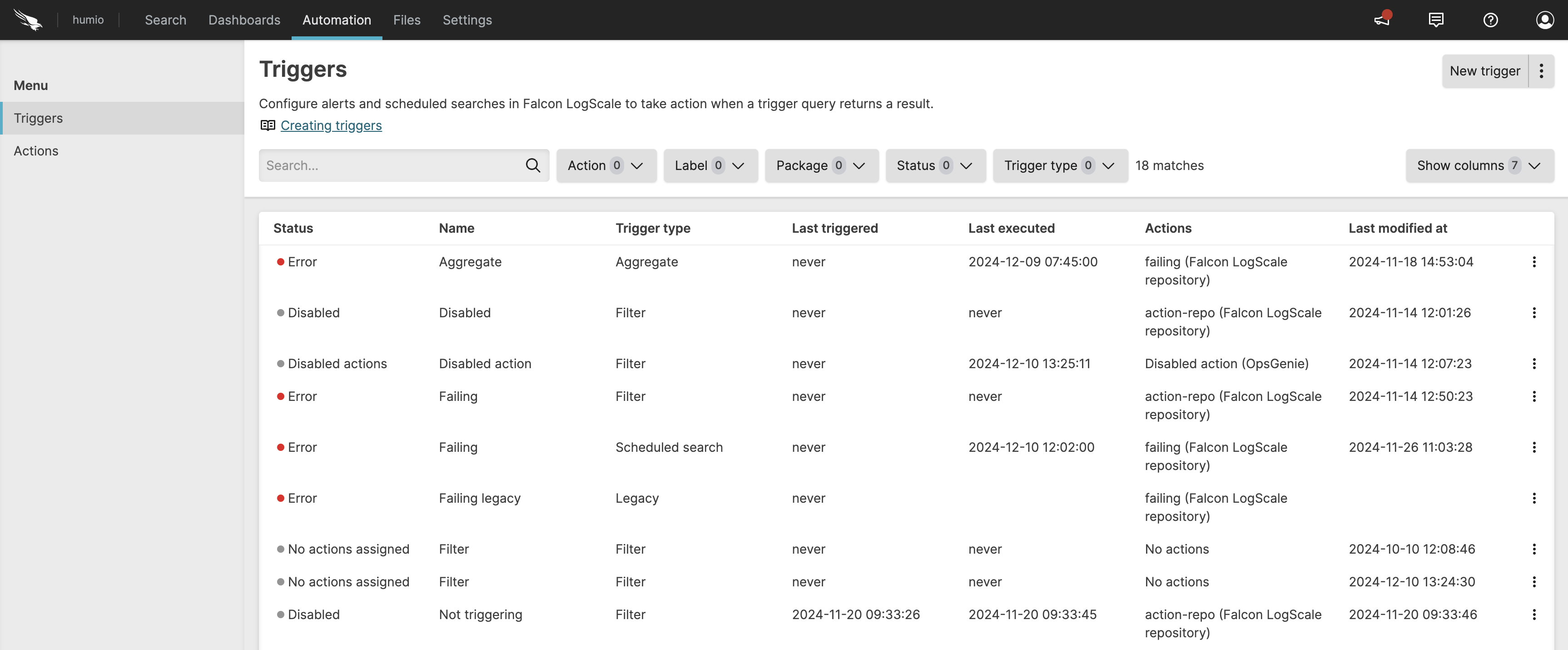
There is a new option to save a query as trigger from the
Searchpage, streamlining the process of creating triggers. This option opens a side panel where you can select a query type, live or scheduled search, and configure other trigger properties.For scheduled searches, the Delay run option allows you to offset the scheduled search to make sure the search doesn't miss late arriving events. For information about this setting, see Delay run.
The new Frequency option is also available to run scheduled searches on a daily, weekly, or monthly schedule.
The Time window for scheduled searches must now be in whole seconds.
This release also adds two corresponding GraphQL mutations: createScheduledSearchV2() and updateScheduledSearchV2(). And there are new GraphQL fields on type ScheduledSearch and UnsavedScheduledSearch:
searchIntervalSecond,searchIntervalOffsetSeconds,maxWaitTimeSeconds,backfillLimitV2,queryTimestampType. The fieldsqueryStartandqueryEndon CreateScheduledSearch and UpdateScheduledSearch no longer accept values that are not in whole seconds.For more information, see Automation, Types.
GraphQL API
The GraphQL mutation
createScheduledSearchV2()has been added; Create a scheduled search.The GraphQL query
s3ArchivingRequiresRole()has been added; Returns whether AWS Role is required when configuring S3 Archiving.
Storage
To improve security, authorization for S3 archiving has been changed substantially to allow and, in some situations, require assuming an IAM AWS role for new S3 archiving configurations.
For Falcon LogScale Cloud and multi-organization self-install clusters, new configurations of S3 archiving will now require an AWS IAM role to be specified. This policy for assuming this role must have a condition on the external ID matching what is shown in the LogScale S3 archiving UI. S3 archiving will then assume this role, and then write to the bucket afterwards.
If you are operating a self-install cluster, the user configured with S3 archiving must have the
sts:AssumeRoleAWS permission. In addition:If you are operating a multi-organization self-install cluster and are certain this requirement is not relevant to you, this requirement can be disabled via the
S3_ARCHIVING_REQUIRE_ROLEenvironment variable.If you are operating a single-organization self-install cluster, you will continue to be able to create new configurations of S3 archiving without using a role.
Existing non-role-based S3 archiving configurations will continue to function.
Consult the documentation on S3 archiving for more information.
For more information, see S3 Archiving.
API
Added a new subpath to the
bucket-storage-targetAPI endpoint calledupdate-segments-storage-target. The new endpoint will be invoked with parametersoldStorageTargetIdandnewStorageTargetIdto change the bucket entity references in all relevant segment entities. The primary use case for this endpoint is for swapping between bucket providers in a controlled manner.
Dashboards and Widgets
LogScale introduces data mapping in the
Bar Chartconfiguration. It is now possible to overwrite the default mapping from fields in the query result to visualization properties such as Category (x-axis) and Series values (y-axis).LogScale also introduces the Line overlay property for the
Bar Chartwidget. It is now possible to add a line overlay by enabling it in the widget configuration.Bar Chartalso supports an optional, independent right axis for the line overlay that can be configured via the Right axis checkbox.For more information, see Bar Chart Widget.
The Legend property section in the
Scatter Charthas been updated to match the rest of the widgets.
Queries
Improved the fairness of multi-cluster searches.
For live queries, LogScale first runs a historic/static query and then LogScale runs the live query which reacts to events coming through the ingest/digest pipeline.
LogScale now deletes historic warnings from live queries once they are no longer part of the search interval. As an example, say a live query has a search interval of 1 hour. Then LogScale runs a static query for a 1 hour interval. After 1 hour everything related to the initial hour is outside of the search interval. Therefore LogScale can remove the warnings related to the static query from the initial hour at this point in time.
Fixed in this release
Administration and Management
Fixed an issue where a compiler warning for unknown escape sequences could stop query submission.
User Interface
Fixed an issue where scrolling to get more events would lead the Event List to become empty.
Automation and Triggers
Fixed an issue introduced in 1.176 that could prevent all aggregate and filter alerts from running.
Configuration
Fixed an issue that could cause several nodes to attempt to upload to bucket storage at the same time. This can still occur occasionally, but the issue causing it to occur more often than expected has been fixed.
Queries
Fixed an issue where the restriction on the placement of the
window()function was only enforced at runtime and not in the query editor and GraphQL queries. The query editor and GraphQL queries that analyze LogScale query strings now properly respond with errors when this restriction is violated.Fixed an issue where workers that had completed processing a query would continue to be polled for new data.
Recent Package Updates
The following LogScale packages have been updated within the last month.
Package Changes
f5networks/bigip has been updated to v2.1.1.
Updates initial regex to accept events without processid
For more information, see Package f5networks/bigip Release Notes.
fortinet/fortigate has been updated to v1.3.0.
Added support for REST API events
Enhanced event categorization for system and VPN events
Improved outcome detection for success/failure events
Added URL parsing capabilities for UTM events
Updated field mappings to align with ECS 8.16.0
For more information, see Package fortinet/fortigate Release Notes.
zscaler/deception has been updated to v2.0.0.
Additional ECS Field Normalization
Expanded field normalization has been added to support more ZScaler Deception datasets
For more information, see Package zscaler/deception Release Notes.
aruba/clearpass has been updated to v1.2.2.
Enhanced initial regex to accomodate events with newline character at the end
Enhanced user.name and user.domain extraction for some events
For more information, see Package aruba/clearpass Release Notes.
aws/cloudtrail has been updated to v1.1.3.
Expands support for more eventNames (adding category and type)
For more information, see Package aws/cloudtrail Release Notes.
cisco/ise has been updated to v1.2.1.
Utilizes array:append() function for array declarations.
Bumps ecs.version to 8.16.0.
Add custom parsing for CISE_MONITORING_DATA_PURGE_AUDIT events
For more information, see Package cisco/ise Release Notes.
darktrace/detect has been updated to v1.2.0.
Adds default of "event" of event.kind field.
Fixes regex to parse out alternative timestamp format.
Fixes gap error for Vendor.model.tags[] array.
Adds source.ip field.
For more information, see Package darktrace/detect Release Notes.
veeam/veeamdataplatform has been updated to v1.0.0.
Initial version of the Veeam package.
For more information, see Package veeam/veeamdataplatform Release Notes.
trellix/fireeye-nx has been updated to v1.1.1.
Migrated from manual array element declaration (e.g. event.category[0] := "value") to use the array:append() function (e.g. array:append(array="event.category[]", values=["values"])). This ensures that manual array element declarations won't collide with each other.
For more information, see Package trellix/fireeye-nx Release Notes.
aws/cloudtrail has been updated to v1.1.2.
Utilizes array:append() function for array declarations.
For more information, see Package aws/cloudtrail Release Notes.
zscaler/internet-access has been updated to v1.3.3.
Migrated from manual array element declaration (e.g. event.category[0] := "value") to use the array:append() function (e.g. array:append(array="event.category[]", values=["values"])). This ensures that manual array element declarations won't collide with each other.
For more information, see Package zscaler/internet-access Release Notes.
cisco/ise has been updated to v1.2.2.
Bugfix to update timestamp parsing to accept + and - prefixed timezones
For more information, see Package cisco/ise Release Notes.
zscaler/internet-access has been updated to v1.3.2.
Bugfix to parse url.domain from hostname field
For more information, see Package zscaler/internet-access Release Notes.
zoom/qss has been updated to v1.1.0.
Adds the following fields: event.category[], user.email, user.id, user.name, host.hostname, host.mac[]
Bumps ecs.version to 8.17.0
For more information, see Package zoom/qss Release Notes.
zscaler/private-access has been updated to v1.3.1.
Migrated from manual array element declaration (e.g. event.category[0] := "value") to use the array:append() function (e.g. array:append(array="event.category[]", values=["values"])). This ensures that manual array element declarations won't collide with each other.
Deprecation and removal of several legacy ZScaler Private Access parsers in favor of the unified zscaler-private-access parser, including:
zscaler-zpa-app-connector-status-json
zscaler-zpa-app-protection-json
zscaler-zpa-audit-json
zscaler-zpa-browser-access-json
zscaler-zpa-user-activity-json
zscaler-zpa-user-status-json
For more information, see Package zscaler/private-access Release Notes.
aruba/clearpass has been updated to v1.2.1.
Utilizes array:append() function for array declarations.
Bumps ecs.version to 8.17.0.
Properly handles events with trailing special characters.
For more information, see Package aruba/clearpass Release Notes.