Skip to content
LogoLogScale DocumentationLibraryGuidance Release Notes Integrations Query Examples Training APIGraphQLSearch Archives Contact Support
🔖੆Help button for documentation
    • Data Analysis Overview
    • LogScale Web Interface
      • System Tabs and Falcon Icon
      • Navigation Icons
        • Notifications
        • Releases and Release Notes
        • Help
        • Avatar icon
      • Informational Panels
      • Left-hand Navigation Panel
      • Table Components
      • Repositories and Views
        • Repositories and Views Menubar
        • Search Interface
        • Dashboards Interface
        • Automation Interface
        • Parsers Interface
        • Resources Interface
          • Asset Type Interface Elements
        • Settings Interface
      • All Dashboards
      • Data Ingest
    • Manage Repositories and Views
      • Create Repository or View
      • Repository and View Settings
      • Delete a Repository or View
      • Falcon LTR Repositories
      • Lookup Files
        • Supported File Types and Formats
        • Create a Lookup File
        • Manage Lookup Files
        • Lookup Files Operations with match()
    • Manage Your LogScale Account
    • Parse Data
      • Built-in Parsers
      • Custom Parsers
        • Create a Parser
        • Write a Parser
          • Example: Parsing Log Lines
          • Example: Parsing JSON
          • Parsers Validation Errors
          • Normalize and Validate Against CPS Schema
      • Manage Parsers
      • Ingest Tokens
      • Parser Errors
      • Removing Fields
      • Parsing Event Tags
      • Parsing Timestamps
    • Search Data
      • Query Editor
      • Event Fields
      • Display Fields
      • Manage Fields
      • Display Results and Events
      • Inspect Events
      • Copy Rows
      • Look Up Events
      • Show in Context
      • Format Columns
      • Column Properties
      • Field Data Types
      • Field Interactions
      • Choose Visualization
      • Highlight Filter Match
      • Change Time Interval
      • Set Time Zone
      • Save Results
      • Export Data
      • Search Status
      • Event List Interactions
      • Field Aliasing
        • Configuring Field Aliasing
        • Managing Field Aliasing
        • Searching with Field Aliasing
        • Understanding Field Mapping Requirements
        • Understanding Schema Requirements
    • Write Queries
      • Basic Query Principles
      • Returned Events
      • Query Management
        • Write a New Query
        • Save Searches
          • Create a Saved Search
          • Manage Saved Searches
          • Grant Permissions for Saved Queries
        • Use Saved Queries in Interactions
      • Common Queries
      • Statement Order for Better Queries
      • Query Readability and Better Usage
    • Query Language Syntax
      • Comments
      • Query Filters
      • Operators
      • Adding Fields to Events
      • User Parameters/Variables
      • Conditional Evaluation
      • Array Syntax
      • Expressions
      • Saved Searches (User Functions)
      • Function Syntax
      • Time Syntax
        • Supported Time Zones
        • Relative Time Syntax
      • Referencing Resources
      • Regular Expression Syntax
        • Regular Expression Syntax Patterns
          • Unsupported Regular Expression Patterns
        • Regular Expression Flags
        • LogScale Regular Expression Engines
        • Differences from Other Regex Implementations
      • Persisted Aggregations Syntax
    • Query Joins and Lookups
      • Types of Join
      • Join Methods
      • Asset Resolution in Subqueries
      • Using Ad-hoc Tables
      • Using Lookup Files
        • Using the readFile() Function
        • Using the match() Function
      • Using join() or selfJoin()
        • Using the join() Function
        • Using the selfJoin() Function
        • Join Operation and Optimization
    • Query Functions
      • Aggregate Query Functions
      • Array Query Functions
      • Comparison Query Functions
      • Conditional Query Functions
      • Data Manipulation Query Functions
      • Event Information Query Functions
      • Filtering Query Functions
      • Formatting Query Functions
      • Geolocation Query Functions
      • Hash Query Functions
      • Join Query Functions
      • Query Debugging Functions
      • Math Query Functions
      • Network and Location Query Functions
      • Parsing Query Functions
      • Preamble Query Functions
      • Regular Expression Query Functions
      • Security Related Query Functions
      • Sequence Query Functions
      • Statistics Query Functions
      • String Query Functions
      • Time and Date Query Functions
      • Transformation Query Functions
      • Widget Query Functions
      • accumulate()
      • array:append()
      • array:contains()
      • array:dedup()
      • array:drop()
      • array:eval()
      • array:exists()
      • array:filter()
      • array:intersection()
      • array:length()
      • array:reduceAll()
      • array:reduceColumn()
      • array:reduceRow()
      • array:regex()
      • array:rename()
      • array:sort()
      • array:union()
      • asn()
      • avg()
      • base64Decode()
      • base64Encode()
      • beta:param()
      • beta:repeating()
      • bitfield:extractFlags()
      • bitfield:extractFlagsAsArray()
      • bitfield:extractFlagsAsString()
      • bucket()
      • callFunction()
      • cidr()
      • coalesce()
      • collect()
      • communityId()
      • concat()
      • concatArray()
      • copyEvent()
      • correlate()
      • count()
      • counterAsRate()
      • createEvents()
      • crypto:md5()
      • crypto:sha1()
      • crypto:sha256()
      • default()
      • defineTable()
      • drop()
      • dropEvent()
      • duration()
      • end()
      • eval()
      • eventFieldCount()
      • eventInternals()
      • eventSize()
      • fieldset()
      • fieldstats()
      • findTimestamp()
      • format()
      • formatDuration()
      • formatTime()
      • geography:distance()
      • geohash()
      • getField()
      • groupBy()
      • hash()
      • hashMatch()
      • hashRewrite()
      • head()
      • if()
      • in()
      • ioc:lookup()
      • ipLocation()
      • join()
      • json:prettyPrint()
      • kvParse()
      • length()
      • linReg()
      • lower()
      • lowercase()
      • match()
      • matchAsArray()
      • math:abs()
      • math:arccos()
      • math:arcsin()
      • math:arctan()
      • math:arctan2()
      • math:ceil()
      • math:cos()
      • math:cosh()
      • math:deg2rad()
      • math:exp()
      • math:expm1()
      • math:floor()
      • math:log()
      • math:log10()
      • math:log1p()
      • math:log2()
      • math:mod()
      • math:pow()
      • math:rad2deg()
      • math:sin()
      • math:sinh()
      • math:spherical2cartesian()
      • math:sqrt()
      • math:tan()
      • math:tanh()
      • max()
      • min()
      • neighbor()
      • now()
      • objectArray:eval()
      • objectArray:exists()
      • parseCEF()
      • parseCsv()
      • parseFixedWidth()
      • parseHexString()
      • parseInt()
      • parseJson()
      • parseLEEF()
      • parseTimestamp()
      • parseUri()
      • parseUrl()
      • parseXml()
      • partition()
      • percentage()
      • percentile()
      • range()
      • rdns()
      • readFile()
      • regex()
      • rename()
      • replace()
      • reverseDns()
      • round()
      • sample()
      • sankey()
      • select()
      • selectFromMax()
      • selectFromMin()
      • selectLast()
      • selfJoin()
      • selfJoinFilter()
      • series()
      • session()
      • setField()
      • setTimeInterval()
      • shannonEntropy()
      • slidingTimeWindow()
      • slidingWindow()
      • sort()
      • split()
      • splitString()
      • start()
      • stats()
      • stdDev()
      • stripAnsiCodes()
      • subnet()
      • sum()
      • table()
      • tail()
      • test()
      • text:contains()
      • text:editDistance()
      • text:editDistanceAsArray()
      • text:endsWith()
      • text:length()
      • text:positionOf()
      • text:startsWith()
      • text:substring()
      • time:dayOfMonth()
      • time:dayOfWeek()
      • time:dayOfWeekName()
      • time:dayOfYear()
      • time:hour()
      • time:millisecond()
      • time:minute()
      • time:month()
      • time:monthName()
      • time:second()
      • time:weekOfYear()
      • time:year()
      • timeChart()
      • tokenHash()
      • top()
      • transpose()
      • unit:convert()
      • upper()
      • urlDecode()
      • urlEncode()
      • wildcard()
      • window()
      • worldMap()
      • writeJson()
      • xml:prettyPrint()
    • Dashboards
      • Step-by-Step Guide to Dashboards
      • Create Dashboards
      • Manage Dashboards
      • Customize Dashboards
      • Design the Dashboard Layout
        • Dashboard Sections
      • Work with Time on Dashboards
        • Shared Time Selector
        • Widget Time Selector
        • Section Time Selector
        • Live Dashboards
        • Time Zone Settings
        • Default Time Settings for Dashboards
      • Make your Dashboard Interactive
        • Apply Dashboard Filters
        • Work with Dashboard Parameters
        • Work with Dashboard Interactions
      • Share Dashboards
        • Disabling Access to Shared Dashboards
        • Restricting Access with IP Filters
      • Export Dashboards as PDF
        • PDF Export Options
    • Automation
      • Triggers
        • What Trigger Type to Choose
        • General Information About Triggers
        • Trigger Management
          • Create Triggers
          • Edit Triggers
          • Manage Triggers
        • Trigger Properties
          • General Properties
          • Configuration Properties
          • Actions Properties
          • Advanced Settings
          • Scheduled Search Properties
        • Monitor, Diagnose, and Troubleshoot Triggers
          • Monitor Triggers with humio-activity Repository
          • Aggregate Alert Errors and Solutions
          • Scheduled Search Errors and Solutions
          • Filter Alert Errors and Solutions
          • Legacy Alert Errors and Solutions
          • Errors when Using Live join() Functions
      • Actions
        • Create Actions
        • Manage Actions
        • Action Type: Email
        • Action Type: Falcon LogScale Repository
        • Action Type: OpsGenie
        • Action Type: PagerDuty
        • Action Type: Slack
        • Action Type: Lookup File
        • Action Type: VictorOps (Splunk On-Call)
        • Action Type: Webhooks
        • Send aggregate results to actions
        • Message Templates and Variables
      • Schedule PDF Reports
        • Scheduled Reports Security
          • Create a Scheduled PDF Role using the web interface
        • Managing Scheduled Reports
        • Create Scheduled Reports
        • Edit Scheduled Reports
        • Scheduled Report Operation and Limitations
        • Scheduled Report Errors and Resolutions
      • Cron Scheduling
    • Template Language
      • Template Expressions
      • Template Variable Types
      • Template Examples
    • Keyboard Shortcuts
Falcon LogScale Documentation
/ Data Analysis 1.214.0-1.219.0
/ Automation
/ Schedule PDF Reports
/ Scheduled Reports Security
Content was updated:Jul 3, 2026
Create a Scheduled PDF Role using the web interface
Security Requirements and Controls
  • Create Scheduled Reports permission

  • Delete Scheduled Reports permission

  • Update Scheduled Reports permission

To create a role that supports configuring scheduled reports:

  1. Navigate to Organization Settings and add a new role by following the steps described at Manage Roles

  2. Select the permissions to enable for the role.
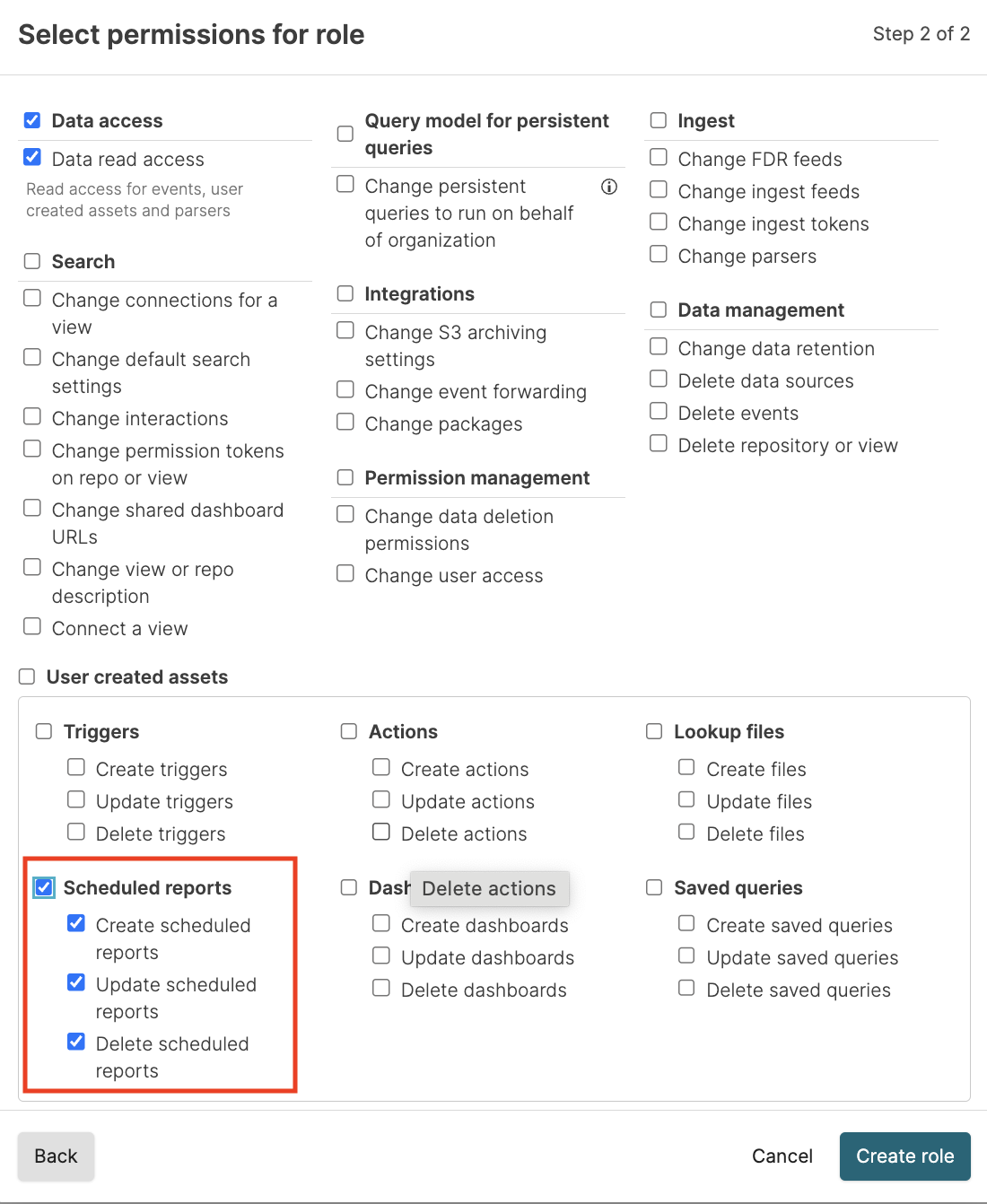
  3. Click Create role.

  4. Assign users or groups to the new role as explained at Assign Roles to Groups.

Support
  • Twitter
  • LinkedIn
  • Youtube

© 2026 CrowdStrike All other marks contained herein are the property of their respective owners.

  • Other articles on this topic

    • API token security policies (Cloud)
    • API token security policies (Self-Hosted)
    • Actions security policies (Cloud)
    • Actions security policies (Self-Hosted)
    • Assign Roles to Groups (Cloud)
    • Assign Roles to Groups (Self-Hosted)
    • Audit Logging (Cloud)
    • Audit Logging (Self-Hosted)
    • Authenticate with SAML
    • Authenticate with SAML (Cloud)
    • Azure Reference Architecture
    • Behavior when changing token security policies (Cloud)
    • Behavior when changing token security policies (Self-Hosted)
    • Building Dashboards, Widgets, Charts, and Graphs
    • Configure Security (Cloud)
    • Configure Security (Self-Hosted)
    • Configure session cookies (Self-Hosted)
    • Create an IP Filter (Cloud)
    • Create an IP Filter (Self-Hosted)
    • Dashboard security policies (Cloud)
    • Dashboard security policies (Self-Hosted)
    • Edit an IP Filter (Cloud)
    • Edit an IP Filter (Self-Hosted)
    • Enable organization-owned queries for a role (Cloud)
    • Enable organization-owned queries for a role (Self-Hosted)
    • Entra ID (formerly Azure Active Directory)
    • Entra ID (formerly Azure Active Directory) (Cloud)
    • Event Forwarding (Self-Hosted)
    • Grant Permissions to Specific Assets (Cloud)
    • Grant Permissions to Specific Assets (Self-Hosted)
    • Group Memberships (Cloud)
    • Group Memberships (Self-Hosted)
    • Group Synchronization (Cloud)
    • Group Synchronization (Self-Hosted)
    • Guidelines for Submitting a Package to LogScale Marketplace
    • How-To: Deploy AWS Reference Architecture
    • How-To: Install Kubernetes Reference Architecture
    • IP Filter
    • IP Filter Rules (Cloud)
    • IP Filter Rules (Self-Hosted)
    • IP Filters (Cloud)
    • IP Filters (Self-Hosted)
    • LogScale on Bare Metal - Installation Preparation
    • Manage Groups (Cloud)
    • Manage Groups (Self-Hosted)
    • Manage IP Filters (Cloud)
    • Manage IP Filters (Self-Hosted)
    • Manage Roles (Cloud)
    • Manage Roles (Self-Hosted)
    • Manage User Roles (Cloud)
    • Manage User Roles (Self-Hosted)
    • Manage Users (Cloud)
    • Manage Users (Self-Hosted)
    • Manage Users and Permissions (Cloud)
    • Manage Users and Permissions (Self-Hosted)
    • MaxMind Configuration
    • Organization API tokens security policies (Cloud)
    • Organization API tokens security policies (Self-Hosted)
    • Organization-Owned Queries (Cloud)
    • Organization-Owned Queries (Self-Hosted)
    • Permissions Requirements (Self-Hosted)
    • Personal API token security policy (Cloud)
    • Personal API token security policy (Self-Hosted)
    • Repository and View API tokens security policy (Cloud)
    • Repository and View API tokens security policy (Self-Hosted)
    • Repository and View Permissions (Cloud)
    • Repository and View Permissions (Self-Hosted)
    • S3 Ingest Self-hosted Preparation (Self-Hosted)
    • Security policies (Cloud)
    • Security policies (Self-Hosted)
    • Security, Logins, and Access Control
    • Session management (Cloud)
    • Session management (Self-Hosted)
    • Set Up Roles in a File (Self-Hosted)
    • Set a Dynamic Configuration Value (Cloud)
    • Set a Dynamic Configuration Value (Self-Hosted)
    • Syslog via TLS Source
    • System tokens security policies (Self-Hosted)
    • Understand Organizations (Cloud)
    • Understand Organizations (Self-Hosted)
    • Update organization ownership for existing queries (Cloud)
    • Update organization ownership for existing queries (Self-Hosted)
    • View queries without organization ownership permissions (Cloud)
    • View queries without organization ownership permissions (Self-Hosted)
    • XSOAR Security Management
    • createIPFilter()
    • deleteIPFilter()
    • updateIPFilter()
  • Similar Content

    • Built-in Parsers
    • Create Scheduled Reports
    • Delete a Repository or View
    • Edit Scheduled Reports
    • Export Dashboards as PDF
    • Grant Permissions for Saved Queries
    • Managing Falcon LTR Repositories
    • Managing Scheduled Reports
    • PDF Export Options
    • Schedule PDF Reports
    • Scheduled Report Errors and Resolutions
    • Scheduled Report Operation and Limitations
    • Scheduled Reports Security
    • Searching with Field Aliasing
    • Triggers
    • Using the join() Function
  • Terminology

    • Permissions
    • Scheduled Search
    • Security
  • Related Guidance Articles

    • How-To: Dashboard Design Best Practices and Templates
    • Troubleshooting: IP Access for Actions or Notifiers
  • Removed Feature RN Entries

    • Falcon LogScale 1.247.0 GA (2026-06-30)
  • Related GraphQL API

    • createIPFilter()
    • deleteIPFilter()
    • updateIPFilter()
  • Security (humio-audit) Events

    • Audit Log Event permission.assignment.delete
    • Audit Log Event permission.assignment.update
    • Audit Log Event role.organizationpermissions.change
    • Audit Log Event role.systempermissions.change
    • Audit Log Event scheduled-search.create
    • Audit Log Event scheduled-search.delete
    • Audit Log Event scheduled-search.update
    • Audit Log Event scheduledReport.create
  • Training

    • Log Sources
    • LogScale Video Series
    • Repositories

Enter search term