Skip to content
LogoLogScale DocumentationLibraryGuidance Release Notes Integrations Query Examples Training APIGraphQLSearch Archives Contact Support
🔖 🔔 ੆Help button for documentation
    • Getting Data Out
    • Manage Repositories and Views
      • Create Repository or View
      • Repository and View Settings
      • Falcon LTR Repositories
      • Delete a Repository or View
    • Search Data
      • Query Editor
      • Event Fields
      • Display Fields
      • Manage Fields
      • Display Results and Events
      • Inspect Events
      • Copy Rows
      • Look Up Events
      • Show in Context
      • Format Columns
      • Column Properties
      • Field Data Types
      • Field Interactions
      • Choose Visualization
      • Highlight Filter Match
      • Change Time Interval
      • Set Time Zone
      • Save Results
      • Export Data
      • Search Status
      • Event List Interactions
      • Field Aliasing
        • Configuring Field Aliasing
        • Managing Field Aliasing
        • Searching with Field Aliasing
        • Understanding Field Mapping Requirements
        • Understanding Schema Requirements
    • Data Visualization
      • Dashboards
        • Step-by-Step Guide to Dashboards
        • Create Dashboards
        • Optimize Dashboard Performance with Persisted Aggregations
        • Manage Dashboards
        • Customize Dashboards
        • Design the Dashboard Layout
          • Dashboard Sections
        • Work with Time on Dashboards
          • Shared Time Selector
          • Widget Time Selector
          • Section Time Selector
          • Live Dashboards
          • Time Zone Settings
          • Default Time Settings for Dashboards
        • Make your Dashboard Interactive
          • Apply Dashboard Filters
          • Work with Dashboard Parameters
          • Work with Dashboard Interactions
        • Share Dashboards
          • Disabling Access to Shared Dashboards
          • Restricting Access with IP Filters
        • Export Dashboards as PDF
          • PDF Export Options
      • Widgets
        • Create Widgets
        • Manage Widgets
          • Hint: Deselect Series in Widgets
          • Limitation: Widgets with Live join() Functions
          • Hint: Embedding iFrame Widgets
        • Widget Gallery
        • Bar Chart Widget
          • Bar Chart Usage and Data Format
          • Bar Chart Examples Gallery
            • Event Detection Across Severity Levels
            • Failed and Successful Authentication Attempts
            • Threat Type Distribution
            • Alert Type Proportion in Detection Sources
            • Detection Counts with Severity Average
          • Bar Chart Property Reference
        • Event List Widget
          • Event List Usage and Data Format
          • Event List Property Reference
        • Gauge Widget
          • Gauge Usage and Data Format
          • Gauge Examples Gallery
            • Display Number of Errors
            • Display Query Memory
            • Display Small Multiple Charts
          • Gauge Property Reference
        • Heat Map Widget
          • Heat Map Usage and Data Format
          • Heat Map Examples Gallery
            • Github Push Events
            • Response Time
          • Heat Map Property Reference
        • Note Widget
            • Note Widget Property Reference
        • Parameter Panel Widget
        • Pie Chart Widget
          • Pie Chart Usage and Data Format
          • Pie Chart Examples Gallery
            • Distribution of Security Alert Severities
            • Authentication Methods Distribution
            • Malware Types by Infection Count (In Small Multiples)
            • Network Traffic by Protocol
          • Pie Chart Property Reference
        • Sankey Diagram Widget
          • Sankey Usage and Data Format
          • Sankey Examples Gallery
            • Network Traffic
            • Thread Usage
          • Sankey Property Reference
        • Scatter Chart Widget
          • Usage and Data Format
          • Scatter Chart Property Reference
        • Single Value Widget
          • Single Value Usage and Data Format
          • Single Value Examples Gallery
            • Displaying Number of Errors
            • Displaying Statistics from a Build
            • Displaying a Non-Numeric Value
            • Displaying a Trend with a Timechart
            • Displaying Values in a Grid
          • Single Value Property Reference
        • Table Widget
          • Table Usage and Data Format
          • Table Widget Interactions
          • Table Widget Examples Gallery
            • Display Different Statuses
            • Add Temporary Events and URLs
          • Table Property Reference
        • Time Chart Widget
          • Time Chart Usage and Data Format
          • Time Chart Examples Gallery
            • Charting Metric Data
            • Charting Log Levels
            • Charting Commits in GitHub
          • Time Chart Property Reference
        • World Map Widget
          • World Map Usage and Data Format
          • World Map Examples Gallery
            • IP-Based Geographic Distribution
            • Service Performance Monitoring
            • Geohash Performance Clustering
          • World Map Property Reference
    • Automation
      • Triggers
        • What Trigger Type to Choose
        • General Information About Triggers
        • Trigger Management
          • Create Triggers
          • Edit Triggers
          • Manage Triggers
        • Trigger Properties
          • General Properties
          • Configuration Properties
          • Actions Properties
          • Advanced Settings
          • Scheduled Search Properties
        • Monitor, Diagnose, and Troubleshoot Triggers
          • Monitor Triggers with humio-activity Repository
          • Aggregate Alert Errors and Solutions
          • Scheduled Search Errors and Solutions
          • Filter Alert Errors and Solutions
          • Legacy Alert Errors and Solutions
          • Errors when Using Live join() Functions
      • Actions
        • Create Actions
        • Manage Actions
        • Action Type: Email
        • Action Type: Falcon LogScale Repository
        • Action Type: OpsGenie
        • Action Type: PagerDuty
        • Action Type: S3
        • Action Type: Slack
        • Action Type: Lookup File
        • Action Type: VictorOps (Splunk On-Call)
        • Action Type: Webhooks
        • Send aggregate results to actions
        • Message Templates and Variables
      • Schedule PDF Reports
        • Scheduled Reports Security
          • Create a Scheduled PDF Role using the web interface
        • Managing Scheduled Reports
        • Create Scheduled Reports
        • Edit Scheduled Reports
        • Scheduled Report Operation and Limitations
        • Scheduled Report Errors and Resolutions
      • Persisted Aggregations
        • Persisted Aggregation Management
          • Create Persisted Aggregations
          • Configure Persisted Aggregation Properties
            • Scheduling Details
          • Edit Persisted Aggregations
          • Manage Persisted Aggregations
      • Cron Scheduling
    • Template Language
      • Template Expressions
      • Template Variable Types
      • Template Examples
Falcon LogScale Documentation
/ Getting Data Out (GDO)
/ Automation
/ Schedule PDF Reports
/ Scheduled Reports Security
Content was updated:Aug 19, 2026

Create a Scheduled PDF Role using the web interface

Security Requirements and Controls
  • Create Scheduled Reports permission

  • Delete Scheduled Reports permission

  • Update Scheduled Reports permission

To create a role that supports configuring scheduled reports:

  1. Navigate to Organization Settings and add a new role by following the steps described at Manage Roles

  2. Select the permissions to enable for the role.
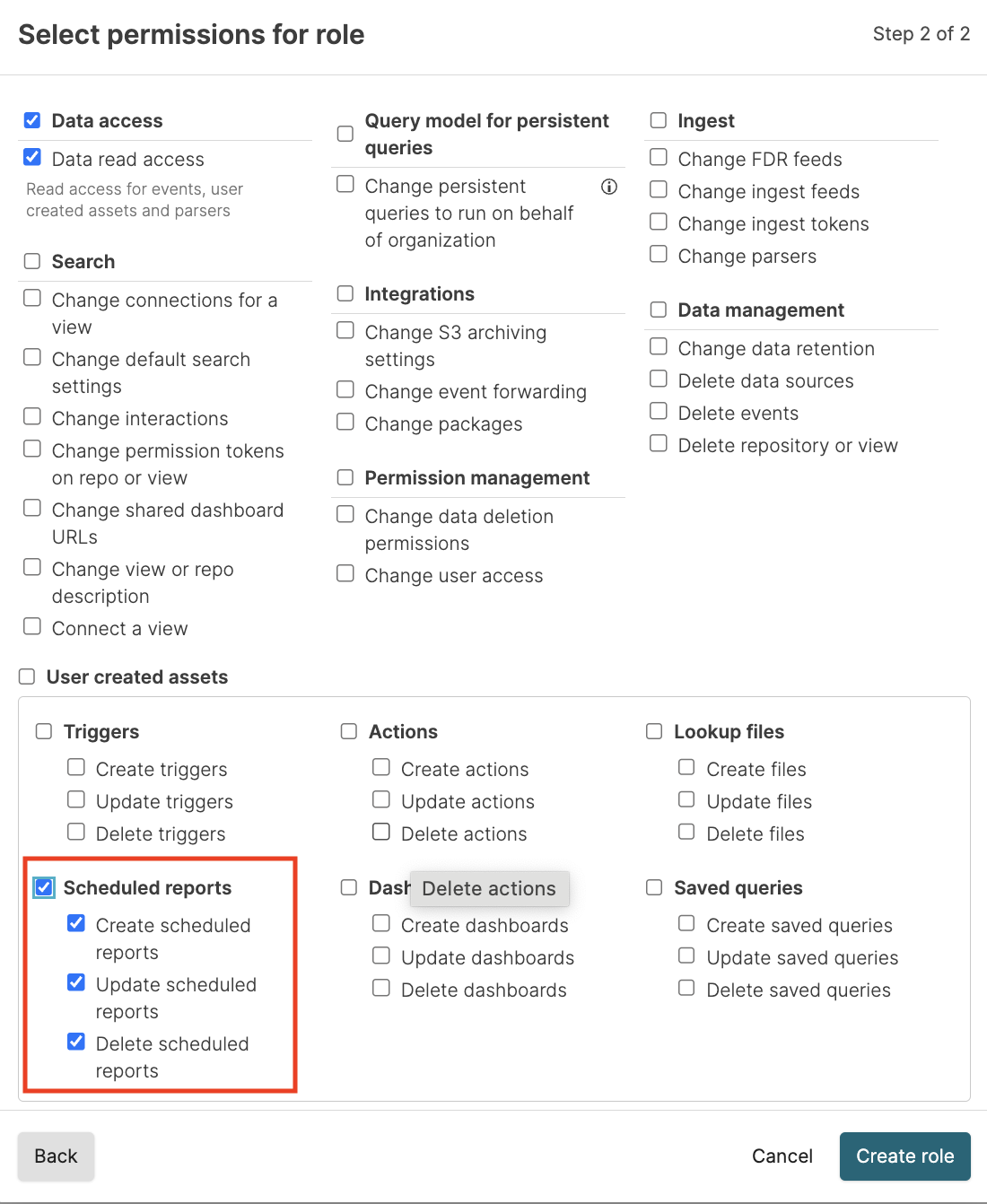
  3. Click Create role.

  4. Assign users or groups to the new role as explained at Assign Roles to Groups.

Support
  • Twitter
  • LinkedIn
  • Youtube

© 2026 CrowdStrike All other marks contained herein are the property of their respective owners.

  • Other articles on this topic

    • Authenticate with SAML
    • Building Dashboards, Widgets, Charts, and Graphs
    • Built-in Parsers
    • Create Scheduled Reports
    • Create a Scheduled PDF Role using the web interface
    • Delete a Repository or View
    • Edit Scheduled Reports
    • Entra ID (formerly Azure Active Directory)
    • Event Forwarding
    • Export Dashboards as PDF
    • Grant Permissions for Saved Queries
    • Grant Permissions for Saved Queries
    • Guidelines for Submitting a Package to LogScale Marketplace
    • How-To: Deploy AWS Reference Architecture
    • How-To: Install Kubernetes Reference Architecture
    • IP Filter
    • LogScale on Bare Metal - Installation Preparation
    • Managing Falcon LTR Repositories
    • Managing Scheduled Reports
    • MaxMind Configuration
    • PDF Export Options
    • Schedule PDF Reports
    • Scheduled Report Errors and Resolutions
    • Scheduled Report Operation and Limitations
    • Scheduled Reports Security
    • Searching with Field Aliasing
    • Security, Logins, and Access Control
    • Triggers
    • Using the join() Function
    • XSOAR Security Management
    • createIPFilter()
    • deleteIPFilter()
    • updateIPFilter()
  • Similar Content

    • Create Scheduled Reports
    • Delete a Repository or View
    • Edit Scheduled Reports
    • Export Dashboards as PDF
    • Managing Falcon LTR Repositories
    • Managing Scheduled Reports
    • PDF Export Options
    • Schedule PDF Reports
    • Scheduled Report Errors and Resolutions
    • Scheduled Report Operation and Limitations
    • Scheduled Reports Security
    • Searching with Field Aliasing
    • Triggers
  • Terminology

    • Permissions
    • Scheduled Search
    • Security
  • Related Guidance Articles

    • How-To: Dashboard Design Best Practices and Templates
    • Troubleshooting: IP Access for Actions or Notifiers
  • Removed Feature RN Entries

    • Falcon LogScale 1.247.0 GA (2026-06-30)
  • Related GraphQL API

    • createIPFilter()
    • deleteIPFilter()
    • updateIPFilter()
  • Security (humio-audit) Events

    • Audit Log Event permission.assignment.delete
    • Audit Log Event permission.assignment.update
    • Audit Log Event role.organizationpermissions.change
    • Audit Log Event role.systempermissions.change
    • Audit Log Event scheduled-search.create
    • Audit Log Event scheduled-search.delete
    • Audit Log Event scheduled-search.update
    • Audit Log Event scheduledReport.create
  • Training

    • Log Sources
    • LogScale Video Series
    • Repositories

Enter search term