


Non-Numeric Status Indicator
Display a non-numeric value — such as an emoji symbol — to represent the current state of a monitored outcome. Useful for status boards where a quick visual indicator communicates pass or fail more clearly than a number.
Visualization: the widget displays a
large emoji symbol instead of a number. A
case statement maps the most recent
value of a field to a symbol, and select()
ensures only the emoji field reaches the widget:
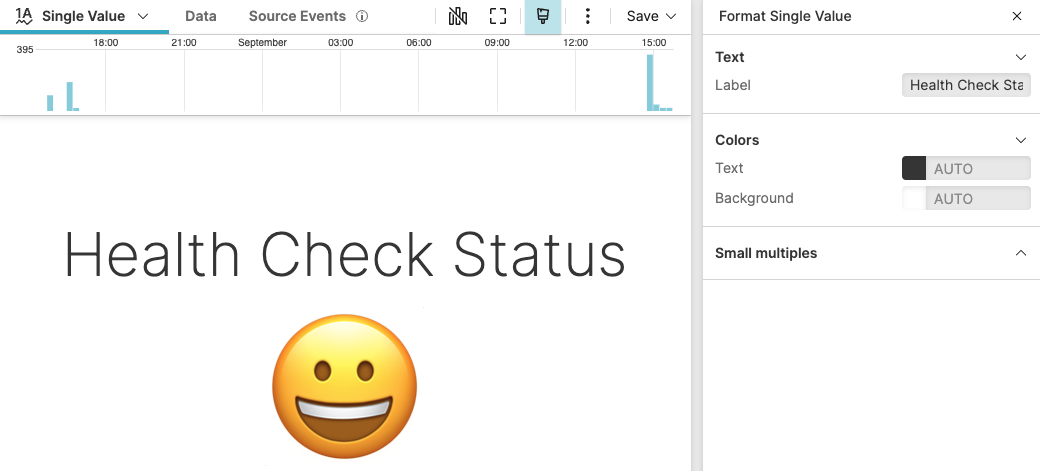 |
Figure 251. Non-Numeric Single Value Widget
Sample input data:
| @timestamp | fieldA | host | service |
|---|---|---|---|
| 1970-01-01T00:00:02 | true | mon-01 | health-check |
| 1970-01-01T00:00:02 | false | mon-01 | health-check |
| 1970-01-01T00:00:02 | true | mon-01 | health-check |
| 1970-01-01T00:00:02 | false | mon-01 | health-check |
| 1970-01-01T00:00:02 | true | mon-01 | health-check |
Query:
tail(1)
| case {
    fieldA = "true"
| emoji := "😀" ;
    *
| emoji := "😔"
}
| select(emoji)
Query breakdown:
Uses
tail()to return only the most recent event, so the widget reflects the latest known state.A
casestatement checks the value of fieldA: if it istrue, it sets emoji to😀; otherwise it sets it to😔.Uses
select()to keep only the emoji field in the result, so the widget does not display unintended fields.
Configuration:
From the
Searchpage, type your query in the Query Editor → clickChoose in the Widget selector
Click the style icon : this opens the Format panel on the side.
In Text, enter a Label such as
Health Check Statusto describe the displayed value.
To customize this widget further, see Single Value Property Reference.