

Stage 2: Failover
The steps described in the following sections are performed when a disaster scenario occurs, such as when a node pool becomes unavailable or the entire Azure region becomes inaccessible. Execute these steps when the primary cluster is unreachable and you need to activate the secondary cluster to restore service.
The architecture is shown in the following diagram:
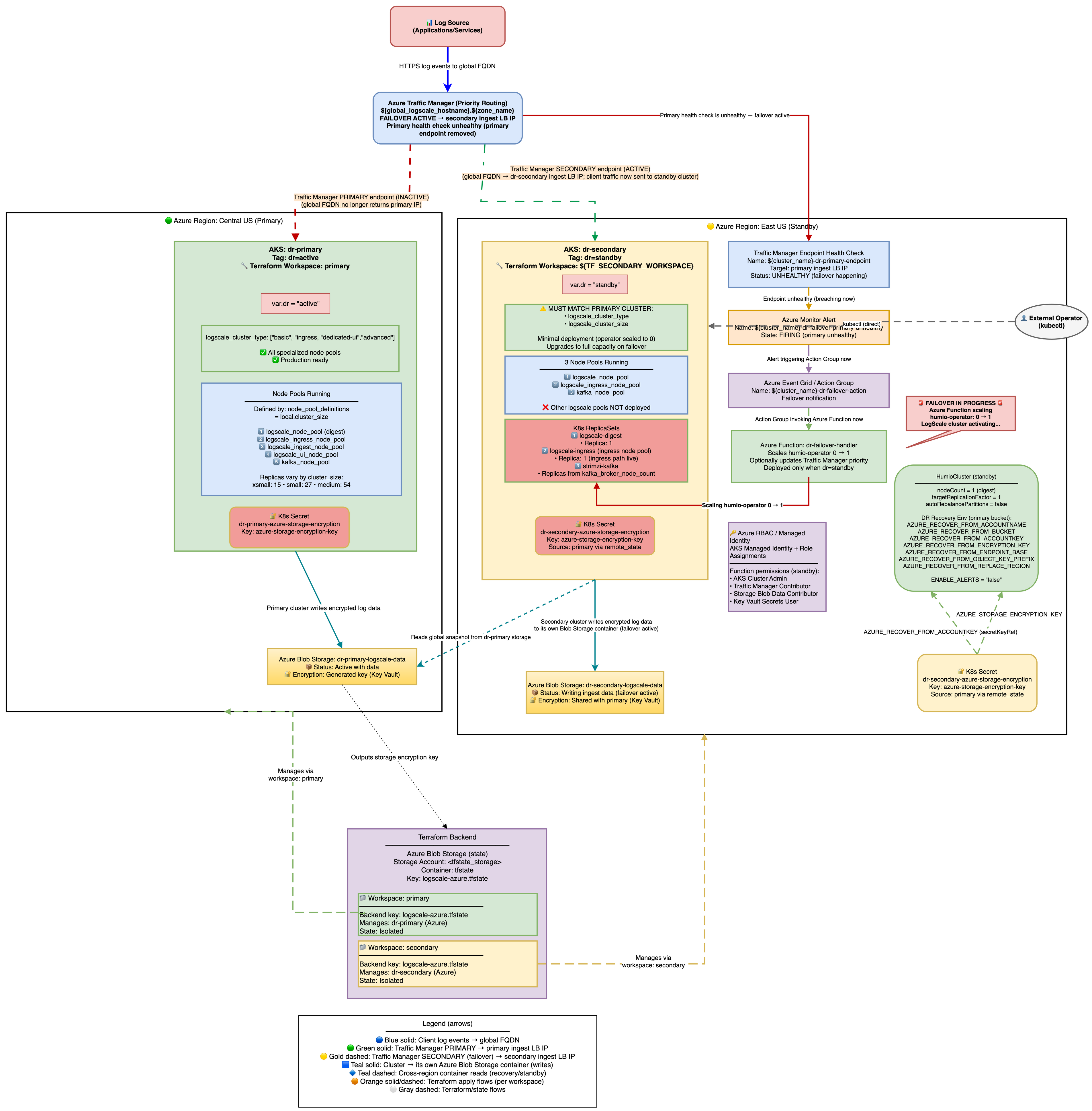 |
Secondary Readiness Required Steps
Run on secondary to ensure it's ready to promote later.
On standby, the HumioCluster already declares nodeCount=1,
but the Humio operator is scaled to 0. When the Humio Operator is scaled
to 1 (by the Azure Function on health check failure or manually), it
reconciles the HumioCluster and starts a single LogScale pod. That
pod detects the AZURE_RECOVER_FROM_* environment variables,
fetches the global snapshot from the primary Azure Blob container, patches
bucket/region references to the secondary, marks the primary container
read-only, clears host/partition assignments, and writes the patched
snapshot to the secondary container.
Scale the Humio operator on secondary
With Azure Function enabled (default): Traffic Manager health check failure → Azure Monitor Alert → Azure Function scales humio-operator replicas to 1. No further action needed.
Manually (for example, for tests or if Azure Function is disabled):
shellkubectl --context aks-secondary -n logging scale deploy humio-operator --replicas=1
Do not patch
spec.nodeCountit is already set to 1. The operator must be running for the Humio pod to start.What Happens After Operator Starts:
The Humio operator reconciles and creates the Humio pod.
The pod reads
AZURE_RECOVER_FROM_*env vars.It lists and downloads the latest
global-snapshot.jsonfrom the primary container.It patches the snapshot to reference the secondary container/region and credentials.
It loads the patched snapshot into memory.
The cluster starts up with the recovered metadata state; data segments remain in the primary container (read-only access).
Spot-check pods on secondary:
shellkubectl --context aks-secondary -n logging get pods # Expect humio-operator (1/1), one Humio pod once recovery starts, and Kafka components running
DNS Architecture and Traffic Flow
This section explains how users access LogScale from a DNS perspective and how traffic flows through the system during normal operations and failover scenarios.
Public Access URLs
Both access methods are public and reach the LogScale cluster via the internet:
| URL Type | Example | Purpose |
|---|---|---|
| Cluster-specific | <prefix>.<region>.cloudapp.azure.com | Direct access to a specific cluster |
| Global DR | logscale.azure-dr.humio.net | Failover-aware access via Traffic Manager |
DNS Resolution Chain
Cluster-specific URL (direct access):
<prefix>.<region>.cloudapp.azure.com
         │
         │  Azure DNS (cloudapp.azure.com zone)
         ▼
   <public-ip> (Public IP of cluster LB)
This is an Azure-assigned public DNS name with format
<dns-label>.<region>.cloudapp.azure.com. It
always resolves to the same cluster's load balancer IP.
Global DR URL (failover-aware access):
logscale.azure-dr.humio.net
         │
         │  AWS Route 53 CNAME
         ▼
<tm-profile>.trafficmanager.net
         │
         │  Azure Traffic Manager (Priority routing)
         ▼
   <primary-ip> (Primary) ──or──▶ <secondary-ip> (if primary unhealthy)
The global DR URL resolves through a three-tier DNS chain:
AWS Route 53:
CNAMErecord pointing to Traffic ManagerAzure Traffic Manager: Health-based routing between clusters
Cluster Load Balancer: Public IP of the healthy cluster
Traffic Flow Diagrams
Normal Operation (Primary Healthy):
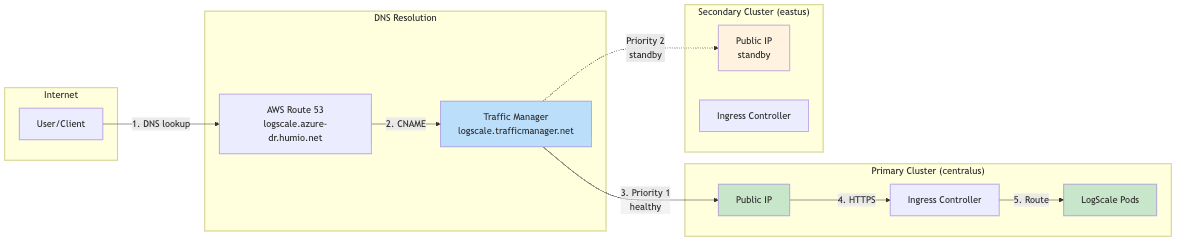 |
During Failover (Primary Unhealthy):
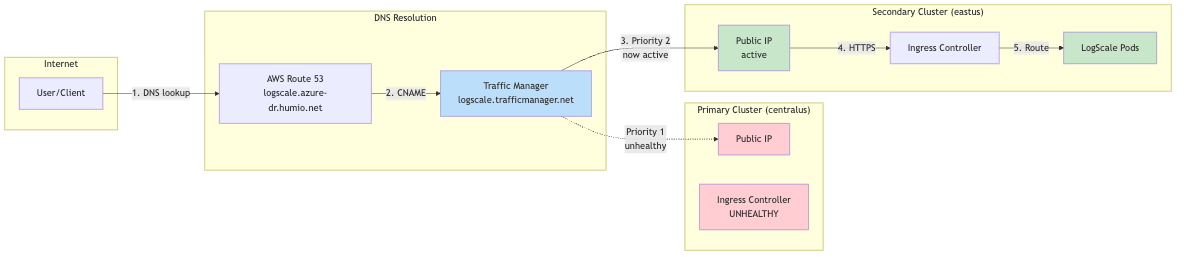 |
Why Two URL Types?
| Aspect | Cluster-Specific URL | Global DR URL |
|---|---|---|
| Failover | No automatic failover | Automatic via Traffic Manager |
| Use case | Direct cluster management, debugging | Production client access |
| DNS TTL | Standard Azure DNS | Low TTL (60s) for fast failover |
| Health checks | None | Traffic Manager probes /api/v1/status |
Client Configuration Recommendation
For production clients (log shippers, applications):
Use the global DR URL: https://<global_hostname>.<dns_zone>
Automatic failover with no client reconfiguration needed
For cluster administration:
Use cluster-specific URLs for direct access
Primary: https://<primary-prefix>.<region>.cloudapp.azure.com
Secondary: https://<secondary-prefix>.<region>.cloudapp.azure.com
Verification Commands:
# Trace DNS resolution for global DR URL
dig +trace <global_hostname>.<dns_zone>

# Check Traffic Manager routing
dig <global_hostname>.trafficmanager.net

# Verify which cluster is currently serving traffic
curl -s "https://<global_hostname>.<dns_zone>/api/v1/status" | jq '.version'

# Compare with direct cluster access
curl -s "https://<prefix>.<region>.cloudapp.azure.com/api/v1/status" | jq '.version'
Traffic Routing During Failover
During failover, all traffic is directed to the single LogScale digest pod via Kubernetes label selectors. Understanding these labels is critical for troubleshooting traffic routing issues.
Label Selectors Used:
| Label | Value | Purpose |
|---|---|---|
app.kubernetes.io/name
| humio | Generic label matching ANY LogScale pod |
humio.com/node-pool
| <cluster-name> | Pool-specific label for digest pods |
Verify DR Recovery Succeeded (logs and snapshot)
Verifying failover recovery:
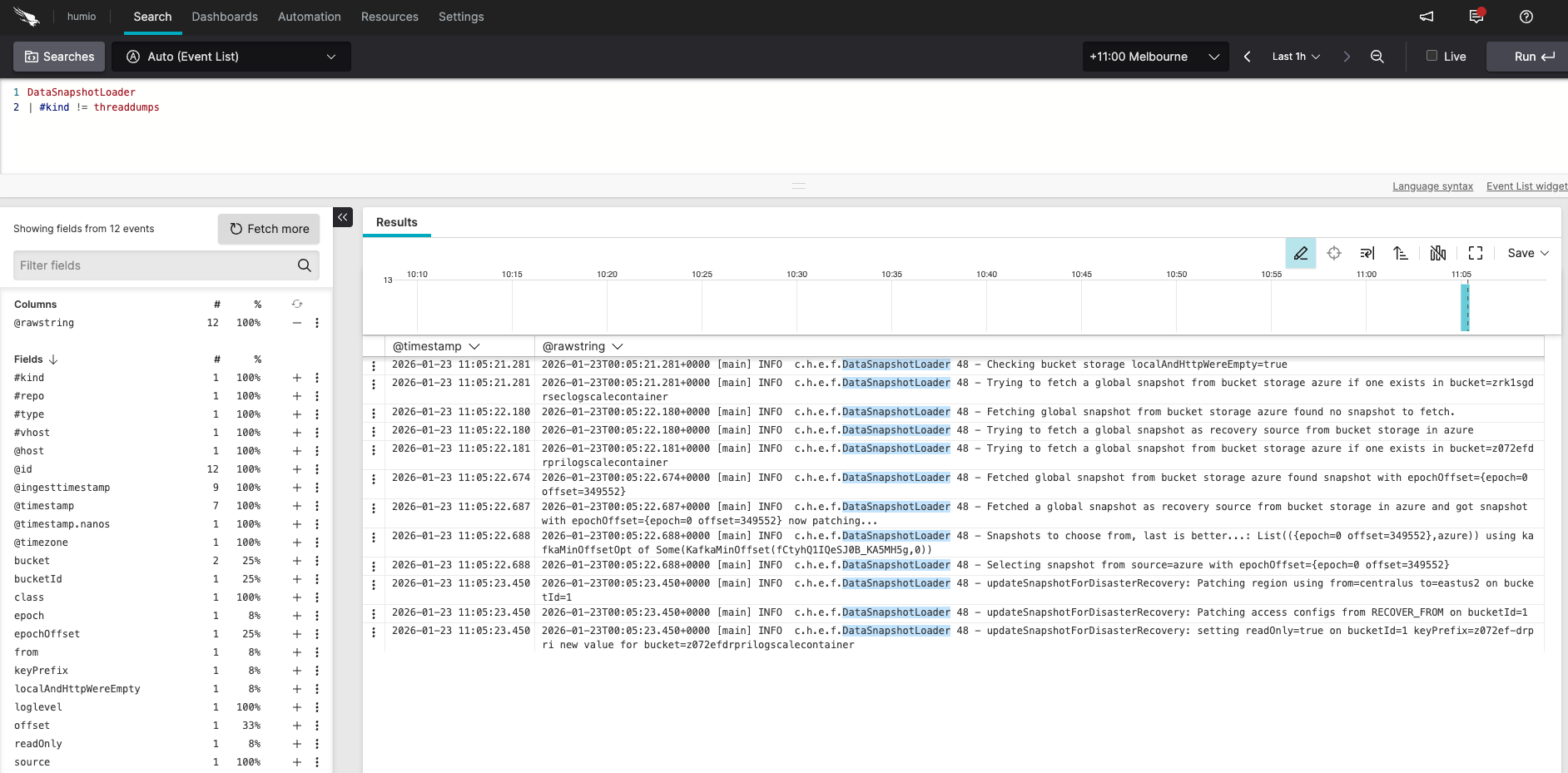 |
Log in to the secondary LogScale cluster UI, open the Humio repository, and run the following query:
DataSnapshotLoader
| #kind != threaddumps
You should see messages similar to:
Checking bucket storage localAndHttpWereEmpty=true
Trying to fetch a global snapshot from bucket storage azure if one exists in bucket=secondarylogscalecontainer
Fetching global snapshot from bucket storage azure found no snapshot to fetch.
Trying to fetch a global snapshot as recovery source from bucket storage in azure
Trying to fetch a global snapshot from bucket storage azure if one exists in bucket=primarylogscalecontainer
Fetched global snapshot from bucket storage azure found snapshot with epochOffset={epoch=0 offset=1329609}
Fetched a global snapshot as recovery source from bucket storage in azure and got snapshot with epochOffset={epoch=0 offset=1329609} now patching...
Snapshots to choose from, last is better...; List({epoch=0 offset=1329609},azure)) using kafkaMinOffsetOpt of Some(KafkaMinOffset(...))
Selecting snapshot from source=azure with epochOffset={epoch=0 offset=1329609}
updateSnapshotForDisasterRecovery: Patching region using from=eastus to=westus on bucketId=1
updateSnapshotForDisasterRecovery: Patching bucket using from=primarylogscalecontainer to=secondarylogscalecontainer on bucketId=1
updateSnapshotForDisasterRecovery: Patching access configs from RECOVER_FROM on bucketId=1
updateSnapshotForDisasterRecovery: setting readOnly=true on bucketId=1 keyPrefix= new value for bucket=secondarylogscalecontainer
Inspect the snapshot file on a secondary pod:
kubectl config use-context aks-secondary
POD=$(kubectl -n logging get pod -l app.kubernetes.io/name=humio -o jsonpath='{.items[0].metadata.name}')
kubectl -n logging exec "$POD" -c humio -- cat /data/humio-data/global-data-snapshot.json | head -60
# Confirm bucket/region reflect the secondary and readOnly flags are correct
Ready to promote when:
Operator is 1/1 on secondary.
Kafka components exist on secondary after re-apply.
DataSnapshotLoader logs match the expected sequence above.
Snapshot file shows patched region/bucket pointing to secondary; encryption keys match.