

Azure Storage Authentication
LogScale accesses Azure Blob Storage using storage account keys. The storage account key is stored in a Kubernetes secret and referenced using environment variables.
Architecture:
The architecture of storage authentication is shown in the following diagram:
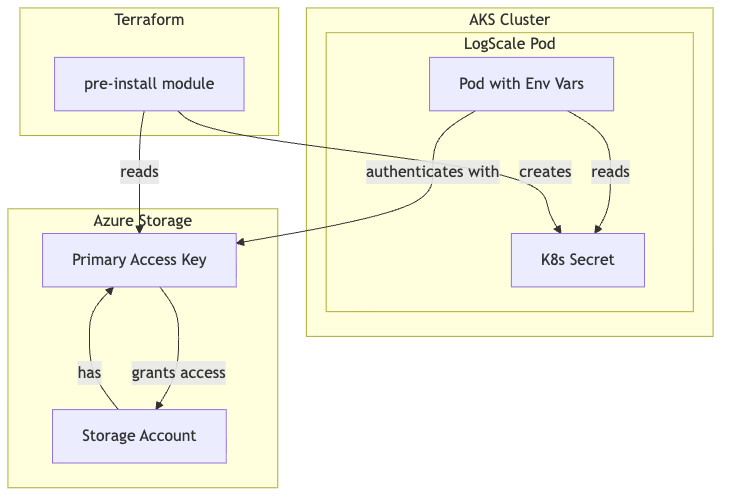 |
Components:
| Component | Resource | Purpose |
|---|---|---|
| Storage Account |
azurerm_storage_account
| Azure Blob Storage for LogScale data |
| Access Key |
storage_account.primary_access_key
| Authentication credential |
| K8s Secret |
kubernetes_secret_v1.logscale_storage_encryption_key
| Stores both access key and encryption key |
Environment Variables:
| Variable | Source | Purpose |
|---|---|---|
AZURE_STORAGE_ACCOUNTNAME
| Direct value | Target storage account |
AZURE_STORAGE_ACCOUNTKEY
| K8s secret | Storage account access key |
AZURE_STORAGE_BUCKET
| Direct value | Target container |
AZURE_STORAGE_ENDPOINT_BASE
| Direct value | Storage endpoint URL |
AZURE_STORAGE_ENCRYPTION_KEY
| K8s secret | Encryption key for data at rest |
Configuration in main.tf:
terraform
ser_logscale_envvars = concat([
  {
    name  = "AZURE_STORAGE_ACCOUNTNAME"
    value = module.logscale-storage-account.storage_acct_name
  },
  {
    name  = "AZURE_STORAGE_BUCKET"
    value = module.logscale-storage-account.storage_acct_container_name
  },
  {
    name = "AZURE_STORAGE_ACCOUNTKEY"
    valueFrom = {
      secretKeyRef = {
        name = module.pre-install.storage_encryption_key_secret_name
        key  = "azure-storage-account-key"
      }
    }
  },
  {
    name = "AZURE_STORAGE_ENCRYPTION_KEY"
    valueFrom = {
      secretKeyRef = {
        name = module.pre-install.storage_encryption_key_secret_name
        key  = "azure-storage-encryption-key"
      }
    }
  }
], var.extra_user_logscale_envvars)
Note
Azure Workload Identity is not currently supported by LogScale
for storage authentication. The LogScale codebase
(Config.scala) only supports
AZURE_STORAGE_ACCOUNTKEY for Azure Blob Storage
access.
Verification:
shell
# Verify K8s secret exists
kubectl get secret logscale-storage-encryption-key -n logging

# Verify pod has the environment variables
kubectl exec -n logging -it <humio-pod> -- env | grep AZURE_STORAGE

# Test storage access
kubectl logs -n logging -l app.kubernetes.io/name=humio --tail=50 | grep -i storage