

Cross-Region Storage Access for DR Recovery
During DR recovery, the secondary cluster must read the global snapshot from the primary cluster's Azure Blob Storage container. This requires:
Network-level access - Storage firewall IP rules allowing the secondary's NAT Gateway IP
Authentication - Storage account key (
AZURE_RECOVER_FROM_ACCOUNTKEY)(Optional) RBAC - Terraform also assigns Storage Blob Data Reader to the standby AKS managed identity on the primary storage account (not used by LogScale auth today)
Why IP-Based Rules (Not VNet Service Endpoints)
Azure Storage firewall supports two types of network access controls:
| Access Method | Same Region | Cross-Region | Used for DR |
|---|---|---|---|
| VNet Service Endpoints (virtualNetworkRules) | ✅ Works | ❌ Not supported | No |
| IP-Based Rules (ipRules) | ✅ Works | ✅ Works | Yes |
| Private Endpoints | ✅ Works | ✅ Works (with peering) | Optional |
Key limitation:
Azure VNet service endpoints for storage only work within the same region. Since the secondary cluster is in a different region (for example, eastus2) than the primary storage account (for example, centralus), VNet service endpoints cannot be used.
Solution:
The secondary cluster's NAT Gateway public IP is added to the primary
storage account's ipRules, and the secondary
cluster's subnets are added to virtualNetworkRules.
This provides defense-in-depth for cross-region access authorization.
What you'll see in the storage firewall after secondary deployment:
{
  "networkRuleSet": {
    "defaultAction": "Deny",
    "ipRules": [
      { "value": "<admin-ip>", "action": "Allow" },           // From ip_ranges_allowed_storage_account_access in tfvars
      { "value": "<secondary-nat-ip>", "action": "Allow" }    // Auto-added by secondary's azapi_update_resource
    ],
    "virtualNetworkRules": [
      // Primary cluster subnets
      { "virtualNetworkResourceId": ".../<primary-vnet>/subnets/<primary>-s-lsdigest" },
      { "virtualNetworkResourceId": ".../<primary-vnet>/subnets/<primary>-s-ing" },
      { "virtualNetworkResourceId": ".../<primary-vnet>/subnets/<primary>-s-ingest" },
      // Secondary cluster subnets (auto-added by secondary's azapi_update_resource)
      { "virtualNetworkResourceId": ".../<secondary-vnet>/subnets/<secondary>-s-lsdigest" },
      { "virtualNetworkResourceId": ".../<secondary-vnet>/subnets/<secondary>-s-ingest" },
      { "virtualNetworkResourceId": ".../<secondary-vnet>/subnets/<secondary>-s-ing" }
    ]
  }
}
Note
Both IP rules and VNet rules are used for defense-in-depth. The NAT Gateway IP provides cross-region access (since VNet service endpoints have regional limitations), while VNet rules provide an additional layer of network-level authorization.
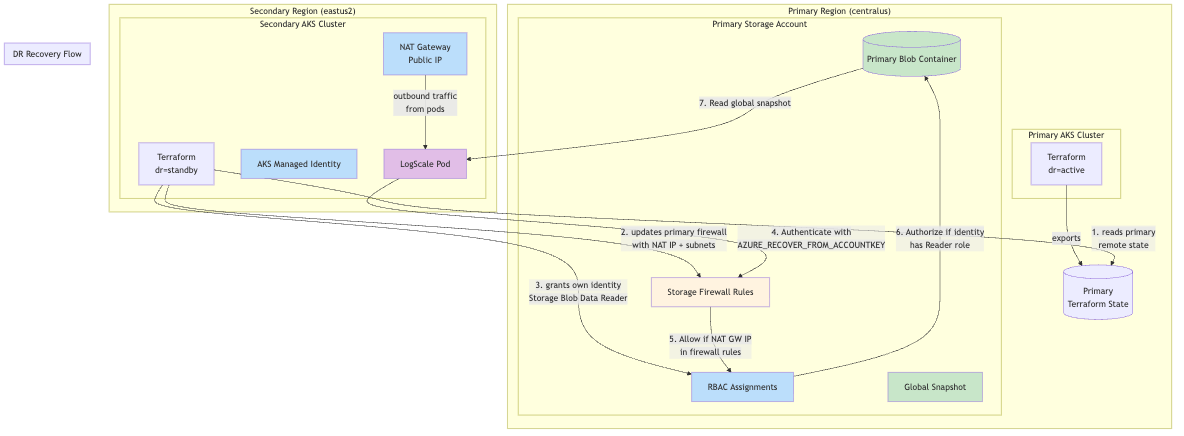
The following diagram displays the DR recovery flow:
 |
Why This Is Required:
LogScale uses storage account keys
(AZURE_RECOVER_FROM_ACCOUNTKEY) to authenticate to
the primary storage account during disaster recovery. Azure Storage
requires:
Network access: The client's IP address or subnet must be allowed through storage firewall rules. The secondary cluster's NAT Gateway public IP is added to ipRules, and the secondary cluster's subnets are added to virtualNetworkRules for defense-in-depth.
RBAC role assignment (optional for LogScale): Terraform also grants the secondary cluster's AKS managed identity "Storage Blob Data Reader" on the primary storage account. LogScale does not use Azure AD / RBAC for storage access today (it uses shared keys), so this role assignment is not required for LogScale DR recovery when shared_access_key_enabled=true.
How It Works:
Primary exports storage account ID and rules: The primary cluster exports its storage account resource ID, IP rules, and VNet rules via Terraform outputs
Secondary reads primary remote state: When
dr="standby", the secondary cluster reads the primary's Terraform state usingprimary_remote_state_configSecondary updates primary firewall: The secondary uses
azapi_update_resourceto add its NAT Gateway IP toipRulesand its subnets tovirtualNetworkRules, merging with existing rulesSecondary grants itself RBAC access: The secondary creates an
azurerm_role_assignmentgranting its AKS managed identity "Storage Blob Data Reader" on the primary storage accountSecondary can authenticate: During DR recovery, the secondary LogScale pod can now authenticate to the primary storage using the storage account key
Key Design Decision:
The secondary updates the primary's storage firewall and RBAC (not vice versa) because the secondary is deployed last. This eliminates the need to re-run terraform on the primary after the secondary is deployed.
Terraform Implementation:
The cross-region storage access is implemented in two places:
Storage firewall update (
data-sources.tf)RBAC role assignment (
modules/azure/storage/main.tf)
Each of these is described in the following sections.
Storage firewall update
(data-sources.tf)
The secondary cluster reads the primary's existing IP rules and VNet rules from remote state and merges them with its own NAT Gateway IP and subnet IDs. This prevents overwriting admin IPs or primary cluster subnet access.
# Read primary's existing rules from remote state
locals {
  primary_storage_ip_rules = try(
    data.terraform_remote_state.primary[0].outputs.storage_ip_rules,
    []
  )

  primary_storage_vnet_rules = try(
    data.terraform_remote_state.primary[0].outputs.storage_vnet_rules,
    []
  )

  # This cluster's subnets that need storage access
  local_storage_access_subnet_ids = compact([
    module.azure-core.logscale_digest_nodes_subnet_id,
    module.azure-core.logscale_ingest_nodes_subnet_id,
    module.azure-core.logscale_ui_nodes_subnet_id,
  ])

  # Merge: primary's existing IPs + secondary's NAT Gateway IP
  merged_storage_ip_rules = var.dr == "standby" ? distinct(concat(
    local.primary_storage_ip_rules,
    [module.azure-core.nat_gw_public_ip]
  )) : []

  # Merge: primary's existing subnets + secondary's subnets
  merged_storage_vnet_rules = var.dr == "standby" ? distinct(concat(
    local.primary_storage_vnet_rules,
    local.local_storage_access_subnet_ids
  )) : []
}

# Secondary adds its NAT Gateway IP and subnets to primary storage firewall
# IMPORTANT: This MERGES with primary's existing rules to avoid removing access
resource "azapi_update_resource" "primary_storage_firewall_for_dr" {
  count = var.dr == "standby" && local.primary_storage_account_id != "" ? 1 : 0

  type        = "Microsoft.Storage/storageAccounts@2023-01-01"
  resource_id = local.primary_storage_account_id

  body = {
    properties = {
      networkAcls = {
        ipRules = [
          for ip in local.merged_storage_ip_rules : {
            value  = ip
            action = "Allow"
          }
        ]
        virtualNetworkRules = [
          for subnet_id in local.merged_storage_vnet_rules : {
            id     = subnet_id
            action = "Allow"
          }
        ]
      }
    }
  }

  depends_on = [module.azure-core]
}
Why merging is critical: Azure's networkAcls API
replaces the entire array, not appends to it. Without merging, applying
the secondary would remove all existing rules (like admin access and
primary cluster subnets) and only leave the secondary's entries.
Note
The secondary cluster's subnets are added via
virtualNetworkRules in addition to the NAT Gateway
IP in ipRules. This provides defense-in-depth for
storage access authorization.
RBAC role assignment
(modules/azure/storage/main.tf)
# Grant this cluster's managed identity read access to primary storage account for DR recovery
# Only created on standby cluster when primary storage account ID and local principal ID are provided
resource "azurerm_role_assignment" "dr_read_primary_storage" {
  count = var.dr_primary_storage_account_id != "" && var.dr_local_principal_id != "" ? 1 : 0

  scope                = var.dr_primary_storage_account_id
  role_definition_name = "Storage Blob Data Reader"
  principal_id         = var.dr_local_principal_id

  # Skip authorization check since we're assigning cross-resource-group
  skip_service_principal_aad_check = true
}
Terraform Configuration:
Primary cluster (primary-centralus.tfvars):
# DR mode
dr = "active"

# Enable cross-region storage access
dr_cross_region_storage_access = true
Secondary cluster (secondary-eastus2.tfvars):
# DR mode
dr = "standby"

# Read primary's outputs for encryption key, storage details, and storage account ID
primary_remote_state_config = {
  backend   = "azurerm"
  workspace = "primary"
  config = {
    # These values must match your backend-configs/*.hcl files
    resource_group_name  = "terraform-state-rg"
    storage_account_name = "<your_storage_account_name>"
    container_name       = "tfstate"
    key                  = "logscale-azure-aks.tfstate"
  }
}
Data Flow Summary:
| Direction | Data Exchanged | Purpose |
|---|---|---|
| Primary → Secondary |
storage_account_id
| Target for firewall update |
| Primary → Secondary |
storage_encryption_key
| Decrypt global snapshot |
| Primary → Secondary |
storage_account_key
| Authenticate to primary storage |
| Primary → Secondary |
storage_account_name,
storage_container_name
| Locate primary bucket |
| Primary → Secondary |
storage_ip_rules
| Existing IP rules to merge with secondary NAT IP |
| Primary → Secondary |
storage_vnet_rules
| Existing VNet subnet rules to merge with secondary subnets |
| Secondary → Primary |
NAT Gateway IP (via azapi_update_resource)
| Merged with existing IPs in storage firewall |
| Secondary → Primary |
Subnet IDs (via azapi_update_resource)
| Merged with existing VNet rules in storage firewall |
Deployment Order:
Since the secondary updates the primary's storage firewall, deploy the primary first:
# Deploy Primary (full):
terraform init -backend-config=backend-configs/production-primary.hcl
terraform apply -var-file=primary-centralus.tfvars
This creates the primary storage account and exports its ID to remote state.
# Deploy Secondary (full):
terraform init -backend-config=backend-configs/production-secondary.hcl -reconfigure
terraform apply -var-file=secondary-eastus2.tfvars
This reads the primary's storage account ID and updates its firewall with the secondary's NAT Gateway IP and subnet IDs.
No re-apply of primary is needed. The secondary terraform apply handles the firewall update automatically.
Verification:
# Check primary storage account firewall IP rules include secondary NAT Gateway IP
az storage account show \
  --name <primary-storage-account> \
  --resource-group <primary-rg> \
  --query "networkRuleSet.ipRules" -o table

# Check primary storage account firewall VNet rules include secondary subnets
az storage account show \
  --name <primary-storage-account> \
  --resource-group <primary-rg> \
  --query "networkRuleSet.virtualNetworkRules[].virtualNetworkResourceId" -o tsv

# Get secondary NAT Gateway IP for comparison
terraform init -backend-config=backend-configs/production-secondary.hcl -reconfigure
terraform output nat_gw_public_ip

# Get secondary subnet IDs for comparison
terraform output dr_storage_access_subnet_ids

# Check RBAC role assignment exists on primary storage
az role assignment list \
  --scope "/subscriptions/<sub-id>/resourceGroups/<primary-rg>/providers/Microsoft.Storage/storageAccounts/<primary-storage-account>" \
  --query "[?roleDefinitionName=='Storage Blob Data Reader'].{Principal:principalId,Role:roleDefinitionName}" -o table

# Get secondary AKS managed identity principal ID for comparison
terraform output k8s_cluster_principal_id

# Test connectivity from secondary LogScale pod to primary storage
kubectl exec -n logging -it <humio-pod> --context aks-secondary -- \
  curl -s -o /dev/null -w "%{http_code}" \
  "https://<primary-storage-account>.blob.core.windows.net/<container>?restype=container"
# Expected: 403 (Forbidden) if auth fails, or connection if network allowed
Troubleshooting:
| Error | Cause | Solution |
|---|---|---|
| Cannot find the claimed account | NAT Gateway IP not in firewall rules | Re-apply secondary to update primary storage firewall |
AuthorizationFailure
| Terraform identity lacks permission to create RBAC role assignment | Ensure the caller can create Storage Blob Data Reader role assignments on the primary storage account; re-apply secondary |
AuthorizationPermissionMismatch
| Wrong storage account key |
Check AZURE_RECOVER_FROM_ACCOUNTKEY matches
primary
|
| Connection timed out | Storage firewall blocking traffic |
Verify primary_remote_state_config is set on
secondary
|
| 403 Forbidden with valid credentials | Storage firewall blocking traffic or wrong key/endpoint/container |
Verify NAT GW IP is in firewall (ipRules) and
AZURE_RECOVER_FROM_* values match the primary
|
| Admin IPs removed from firewall | IP/VNet rule merge not working |
Ensure primary exports storage_ip_rules and
storage_vnet_rules outputs; re-apply primary
then secondary
|
| Secondary VNet subnets not in rules | VNet rule merge not working |
Verify storage_vnet_rules output exists on
primary; re-apply secondary to update firewall
|