

Stage 1: Configuration
The configuration architecture is shown in the following diagram:
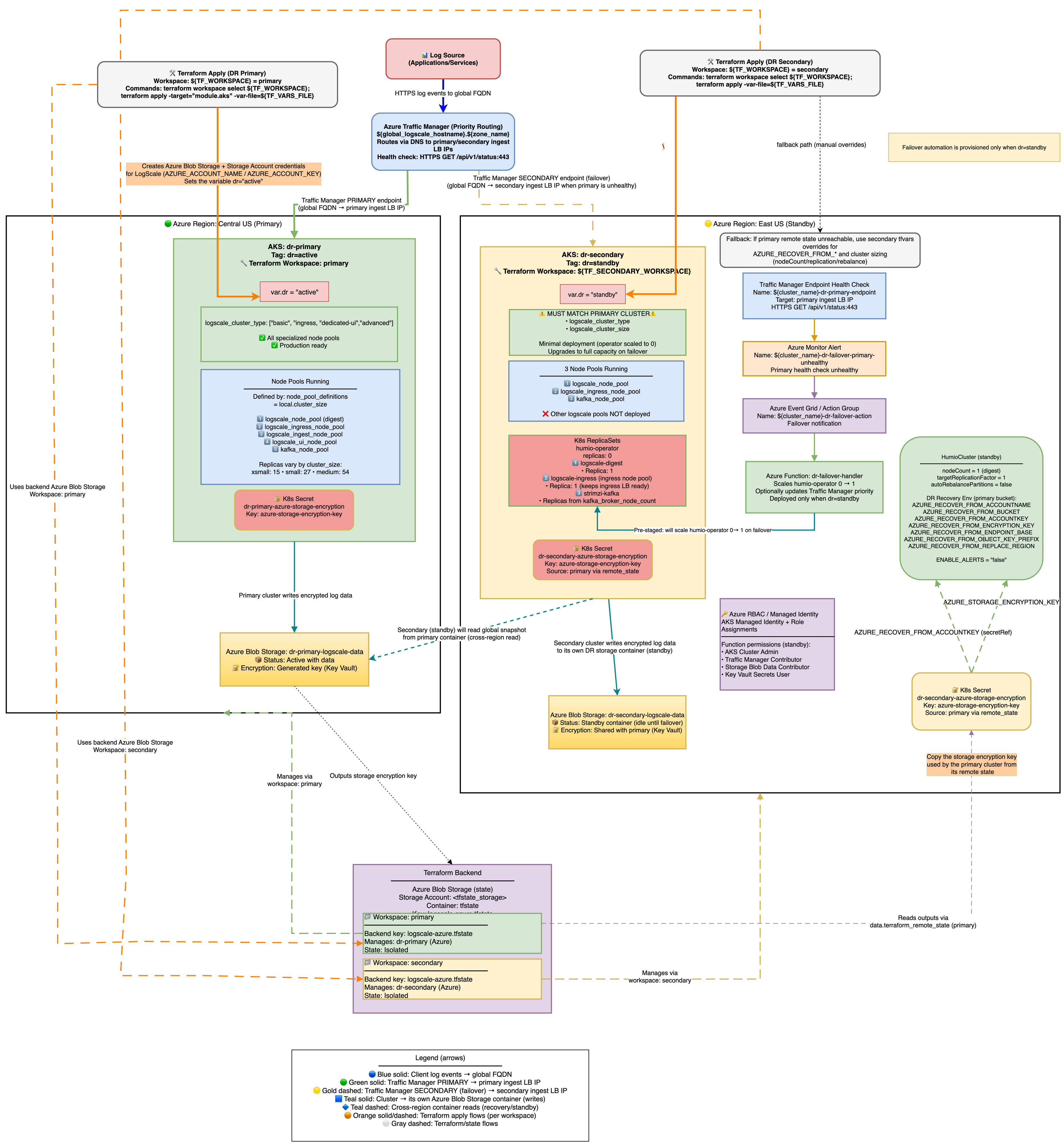 |
Azure DR Recovery Environment Variables
The following AZURE_RECOVER_FROM_* environment
variables are used for DR recovery:
| Environment Variable | Purpose |
|---|---|
AZURE_RECOVER_FROM_BUCKET
| The Azure Blob container name to recover from |
AZURE_RECOVER_FROM_ACCOUNTNAME
| Storage account name |
AZURE_RECOVER_FROM_ACCOUNTKEY
| Storage account access key |
AZURE_RECOVER_FROM_OBJECT_KEY_PREFIX
| Object key prefix in primary bucket (for example, <primary-prefix>) |
AZURE_RECOVER_FROM_ENCRYPTION_KEY
|
Encryption key matching primary's
AZURE_STORAGE_ENCRYPTION_KEY
|
AZURE_RECOVER_FROM_REPLACE_REGION
| Region replacement mapping (format: old/new) |
Common DR Environment Variables (Non-Provider-Specific):
| Environment Variable | Purpose | Default |
|---|---|---|
BUCKET_STORAGE_MULTIPLE_ENDPOINTS
| Required for DR. Allows each bucket to keep its own storage endpoint. | false |
ENABLE_ALERTS
|
Controls alert firing. Set automatically: true
for dr="active", false for
dr="standby", and not set when dr="".
| (varies) |
Why
BUCKET_STORAGE_MULTIPLE_ENDPOINTS=true is Required for Azure
DR
In Azure, each storage account has a unique endpoint URL (for example:
primaryacct.blob.core.windows.net and
secondaryacct.blob.core.windows.net). This differs from
AWS S3 or GCS where buckets in the same region share a common endpoint.
The problem without this setting:
By default, LogScale assumes all buckets use the same endpoint
When the standby cluster starts, it overwrites ALL bucket endpoints with its own endpoint
This means the primary bucket's data becomes inaccessible because LogScale tries to reach
primaryacctdata through thesecondaryacctendpointResult: 403 authentication errors during DR recovery
What this setting does:
Tells LogScale to treat each bucket's endpoint configuration independently
The primary bucket keeps pointing to
primaryacct.blob.core.windows.netThe secondary bucket keeps pointing to
secondaryacct.blob.core.windows.netResult: DR recovery works because each bucket is accessed via its correct endpoint
How it's configured:
Terraform automatically sets this when dr is not empty (see
locals.tf)Both primary (
dr="active") and standby (dr="standby") clusters get this settingNo manual configuration required
Verification:
# Check the env var is set on the HumioCluster
kubectl get humiocluster -n logging -o jsonpath='{.items[0].spec.environmentVariables}' | \
  jq '.[] | select(.name=="BUCKET_STORAGE_MULTIPLE_ENDPOINTS")'
# Expected: {"name":"BUCKET_STORAGE_MULTIPLE_ENDPOINTS","value":"true"}
Why
AZURE_RECOVER_FROM_REPLACE_BUCKET is NOT set:
Azure storage accounts have unique endpoints (for example:
primaryacct.blob.core.windows.net), unlike S3/OCI which
share regional endpoints. Setting REPLACE_BUCKET would swap
container names but keep the secondary's endpoint, causing 403
authentication errors. Instead, use
AZURE_RECOVER_FROM_ACCOUNTNAME to point directly to the
primary storage account.
Environment Variable Naming Convention:
{provider.envVarPrefix}_{purpose}_{configKey}
For Azure DR recovery: AZURE + _RECOVER_FROM_ + {configKey}
Primary Setup
The primary cluster is provisioned as usual. The dr="active"
variable is required for DR configuration setup and should be included in
the initial terraform apply execution.
Minimal example primary-<region>.tfvars
(DR-relevant settings only)
dr                        = "active"
azure_resource_group_region = "<primary-region>"
resource_name_prefix      = "primary"
azure_subscription_id     = "your-subscription-id"

# Cross-region access - enable RBAC for secondary
dr_cross_region_storage_access = true

# Global DNS (only on primary)
manage_global_dns              = true
global_logscale_hostname       = "logscale-dr"
global_dns_zone_name           = "example.com"

# Option A: DNS zone in Azure - module creates CNAME automatically
  global_dns_zone_resource_group = "dns-rg"
  global_dns_create_azure_record = true

# Option B: DNS zone external (e.g., AWS Route 53) - create CNAME manually
  # global_dns_zone_resource_group = ""     # Empty - no Azure DNS zone
  # global_dns_create_azure_record = false  # Skip Azure DNS CNAME creation
# Then manually create CNAME: logscale-dr.example.com -> <tm-profile-dr>.trafficmanager.net
Commands:
terraform workspace select primary
# Initialize with primary backend config
terraform init -backend-config=backend-configs/production-primary.hcl
terraform apply -var-file=primary-<region>.tfvars
Verify:
az aks show --resource-group primary-rg --name aks-primary
terraform output
# shows storage_account_name, storage_container_name, and a sensitive storage_encryption_key
Secondary Setup (workspace: secondary)
The tfvars file for the secondary AKS cluster configures the
HumioCluster environment variables
AZURE_RECOVER_FROM_* to point to the primary Azure Blob
container. These variables are set at cluster creation but are consumed
only when the LogScale pod starts and fetches the global snapshot
during DR recovery.
Standby Cluster Initial State:
When dr = "standby", the secondary cluster is provisioned
with a minimal infrastructure footprint, but LogScale stays
offline until the operator is scaled up.
AKS Node Pools:
System: Always provisioned for AKS system components.
Digest: Provisioned per cluster size (nodeCount declared as 1 in the HumioCluster).
Kafka: Provisioned for Kafka brokers (Strimzi manages pods).
Ingress: Provisioned per cluster size to keep Load Balancer healthy.
UI: Not created - The UI node pool is not provisioned when
dr="standby"to save costs.Ingest: Not created - The Ingest node pool is not provisioned when
dr="standby"to save costs.
Note
UI and Ingest node pools are automatically created during promotion when
dr changes from "standby" to "active". See
AKS Node Pool Topology for details.
Running Pods (initial state):
Kafka brokers: 3-5 replicas (per
kafka_broker_pod_replica_countin cluster size) - Required for LogScale to function when scaled upCert-manager: Running - Maintains certificates automatically
TopoLVM: Running - LVM volume provisioner for Humio storage
Ingress controller: Running to keep load balancer target group healthy
Not Running:
Humio operator: 0 replicas (patched after Helm install) until failover/promotion.
LogScale pods: 0 replicas (operator is off; HumioCluster declares
nodeCount=1).LogScale ingest/UI pods: 0 replicas - not part of standby topology; added when
drbecomes active.
Minimal example secondary-<region>.tfvars
(DR-relevant settings only)
dr                        = "standby"
azure_resource_group_region = "<secondary-region>"
resource_name_prefix      = "secondary"
azure_subscription_id     = "your-subscription-id"

# Remote state to fetch primary outputs (uses workspace to access primary state)
primary_remote_state_config = {
  backend   = "azurerm"
  workspace = "primary"  # Read from primary workspace state
  config = {
    # These values must match your backend-configs/production-primary.hcl file
    resource_group_name  = "terraform-state-rg"
    storage_account_name = "<your_storage_account_name>"
    container_name       = "tfstate"
    key                  = "logscale-azure-aks.tfstate"
  }
}

# Global DNS zone name - REQUIRED for ingress to accept traffic for the global DR FQDN
# This must match the primary's global_dns_zone_name value
global_dns_zone_name = "azure-dr.humio.net"

# Recovery hints (fallback if remote state is unavailable)
azure_recover_from_replace_region = "eastus/westus"
Important
The global_dns_zone_name variable must be set on the
standby cluster even though manage_global_dns = false. This
enables the ingress_extra_hostnames configuration
which adds the global DR FQDN to the ingress, allowing Traffic Manager
health checks and user traffic to reach the secondary cluster via the
global hostname.
Commands:
# Select secondary workspace
terraform workspace select secondary

# Initialize with backend config (first time only, or when switching environments)
terraform init -backend-config=backend-configs/production-secondary.hcl

# Plan and apply
terraform plan -var-file=secondary-<region>.tfvars
terraform apply -var-file=secondary-<region>.tfvars
Verify:
az aks show --resource-group secondary-rg --name aks-secondary

# Encryption keys match (compare hashes)
kubectl get secret -n logging logscale-storage-encryption-key --context aks-primary -o jsonpath='{.data.azure-storage-encryption-key}' | base64 -d | shasum -a 256
kubectl get secret -n logging logscale-storage-encryption-key --context aks-secondary -o jsonpath='{.data.azure-storage-encryption-key}' | base64 -d | shasum -a 256

# Verify storage credentials secret exists
kubectl get secret logscale-storage-encryption-key -n logging --context aks-secondary

# Pods minimal on secondary
kubectl get pods -n logging --context aks-secondary