

Traffic Manager Configuration
Azure Traffic Manager provides DNS-based traffic routing between primary and secondary clusters.
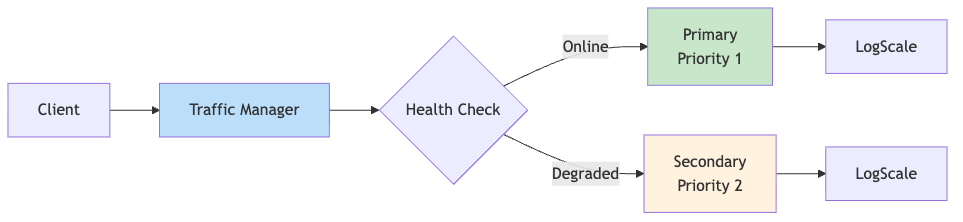
Traffic Manager Priority Routing
Traffic manager priority routing is illustrated in the following diagram:
 |
Health Check Configuration
| Setting | Value | Description |
|---|---|---|
| Protocol | HTTPS | Secure health probes |
| Port | 443 | Standard HTTPS port |
| Path | /api/v1/status | LogScale health endpoint |
| Interval | 30 seconds | Probe frequency |
| Timeout | 10 seconds | Max wait for response |
| Tolerated Failures | 3 | Failures before marking Degraded |
| Host Header | <global-hostname>.<zone> | Required for ingress routing |
Priority Routing Logic
| Primary Status | Secondary Status | Traffic Routed To |
|---|---|---|
| Online | Online | Primary (Priority 1) |
| Online | Degraded | Primary (Priority 1) |
| Degraded | Online | Secondary (Priority 2) |
| Degraded | Degraded | No healthy endpoint |
Failover Timing
| Stage | Duration |
|---|---|
| Traffic Manager detection | ~90 seconds (3 failures x 30s) |
| DNS propagation | ~60 seconds (TTL) |
| Total DNS failover time | ~2-3 minutes |
Expected Profile Status During Normal Operations
When the secondary cluster is in standby mode (dr="standby"),
the Traffic Manager profile will show a status of "Degraded". This is
expected and correct behavior.
Why this happens:
The secondary cluster's humio-operator is scaled to 0 replicas
No LogScale pods are running on the secondary cluster
The secondary endpoint fails health checks and shows "Degraded"
Traffic Manager marks the overall profile as "Degraded" when any endpoint is unhealthy
What you should see:
| Component | Expected Status | Notes |
|---|---|---|
| Primary endpoint | Online | Actively serving traffic |
| Secondary endpoint | Degraded | Expected - standby mode |
| Profile status | Degraded | Expected - reflects secondary's standby state |
| Traffic routing | Working | Routes to primary |