

Terraform Modules for Disaster Recovery (DR)
This implementation introduces two new Terraform modules specifically for disaster recovery. These modules automate the critical DR operations that would otherwise require manual intervention.
Why These Modules Are Needed
In a disaster recovery scenario, two things must happen quickly:
Traffic must be redirected from the failed primary cluster to the healthy secondary cluster
The secondary cluster must start up and begin serving requests
Without automation, an operator would need to manually update DNS records and scale up Kubernetes deployments - a process that could take 15-30 minutes or more. The modules below reduce this to under 10 minutes with no human intervention.
module.global-dns
The following table provides a summary of this module:
| Purpose | Summary | Deployed on |
|---|---|---|
| Provides automatic traffic failover between primary and secondary clusters using Azure Traffic Manager. |
When users access your LogScale cluster, they use a
single global DNS name (like
logscale.example.com). This module creates an
Azure Traffic Manager that continuously monitors both clusters'
health. If the primary cluster becomes unhealthy, Traffic
Manager automatically routes all traffic to the secondary
cluster - no DNS changes needed, no manual intervention
required.
|
Primary (active) cluster only when manage_global_dns =
true
|
Key resources created:
| Resource | Purpose |
|---|---|
azurerm_traffic_manager_profile
| Manages health-based routing between clusters using Priority routing method |
azurerm_traffic_manager_external_endpoint
                (primary)
| Points to primary cluster's load balancer IP (priority 1) |
azurerm_dns_cname_record
| Creates the global hostname CNAME pointing to Traffic Manager (optional - see below) |
Secondary Endpoint Registration:
The secondary (standby) cluster automatically registers itself with
Traffic Manager using
azapi_resource.traffic_manager_secondary_endpoint.
This resource:
Is created when
manage_global_dns = falseand the primary Traffic Manager endpoint ID is available via remote state (so it persists throughdrpromotion)Adds the secondary cluster's load balancer IP as a priority 2 endpoint
Requires no manual configuration - the standby cluster discovers the Traffic Manager profile from the primary's remote state
This approach eliminates the need for the primary cluster to know the secondary's IP address in advance, simplifying the deployment sequence.
DNS Configuration Options:
The module supports two DNS configurations depending on where your DNS zone is hosted:
| Scenario |
global_dns_create_azure_record
|
global_dns_zone_resource_group
| Action Required |
|---|---|---|---|
| DNS in Azure |
true
| Resource group name |
Module creates CNAME automatically
|
| DNS external (AWS Route 53, etc.) |
false
| "" (empty) |
Manually create CNAME in external DNS
|
When DNS is managed externally (e.g., AWS Route 53):
If your DNS zone is hosted outside Azure (common when humio.net or similar domains are managed in AWS Route 53), set:
global_dns_zone_name           = "azure-dr.humio.net"  # Used for Traffic Manager host header
global_dns_zone_resource_group = ""                    # Empty - no Azure DNS zone
global_dns_create_azure_record = false                 # Skip Azure DNS CNAME creation
Then manually create a CNAME record in your external
DNS provider:
| Record Type | Name | Value | TTL |
|---|---|---|---|
CNAME
|
<global_logscale_hostname>.<zone>
|
<global_logscale_hostname>.trafficmanager.net
| 60 |
Example for AWS Route 53:
Record Name: logscale.azure-dr.humio.net
Record Type: CNAME
Record Value: <tm-profile>.trafficmanager.net
TTL: 60 seconds
Note
Unlike OCI (which requires NS record delegation for
subdomain zones), Azure Traffic Manager uses its own
*.trafficmanager.net domain. You only need a simple
CNAME record pointing to the Traffic Manager FQDN -
no NS delegation required.
Traffic Manager Priority Routing:
The following diagram provides an overview of the traffic routing:
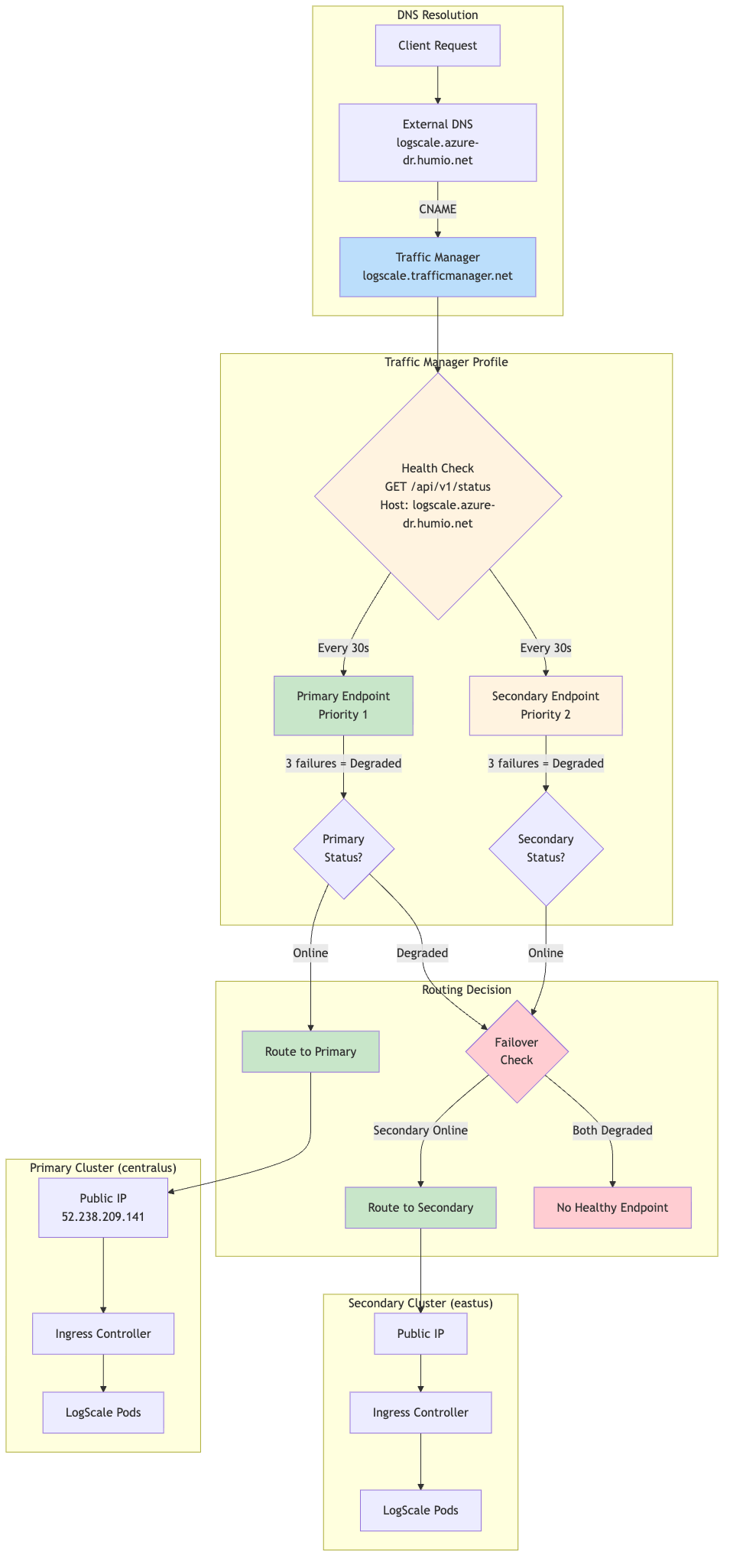 |
Priority Routing Logic:
The following table shows priority routing logic:
| Primary Status | Secondary Status | Traffic Routed To |
|---|---|---|
| Online | Online | Primary (Priority 1) |
| Online | Degraded | Primary (Priority 1) |
| Degraded | Online | Secondary (Priority 2) |
| Degraded | Degraded | No healthy endpoint |
Expected Profile Status During Normal Operations:
When the secondary cluster is in standby mode
(dr="standby"), the Traffic Manager profile will show a
status of "Degraded". This is expected and correct behavior, not an
error.
Why this happens:
The secondary cluster's
humio-operatoris scaled to 0 replicas (standby mode)No LogScale pods are running on the secondary cluster
The secondary endpoint fails health checks and shows "Degraded"
Traffic Manager marks the overall profile as "Degraded" when any endpoint is unhealthy
What you should see:
| Component | Expected Status | Notes |
|---|---|---|
| Primary endpoint | Online | Actively serving traffic |
| Secondary endpoint | Degraded | Expected - standby mode, no LogScale pods |
| Profile status | Degraded | Expected - reflects secondary's standby state |
| Traffic routing | Working | Routes to primary (highest priority Online endpoint) |
Verification:
Despite the "Degraded" profile status, traffic routes correctly:
# Global DR FQDN should return HTTP 200
curl -sk https://logscale.azure-dr.humio.net/api/v1/status
# DNS resolves to primary IP
dig +short logscale.azure-dr.humio.net
# Returns: <tm-profile>.trafficmanager.net → <primary-ip>
When to be concerned:
Only if the primary endpoint shows "Degraded" while the primary cluster should be healthy. This indicates an actual issue requiring investigation.
Health Check Configuration:
| Setting | Value | Description |
|---|---|---|
| Protocol | HTTPS | Secure health probes |
| Port | 443 | Standard HTTPS port |
| Path | /api/v1/status | LogScale health endpoint |
| Interval | 30 seconds | Probe frequency |
| Timeout | 10 seconds | Max wait for response |
| Tolerated Failures | 3 | Failures before marking Degraded |
| Host Header |
logscale.azure-dr.humio.net
| Required for ingress routing |
Failover Timing:
Detection: ~90 seconds (3 failures × 30s interval)
DNS propagation: ~60 seconds (TTL)
Total failover time: ~2-3 minutes
module.dr-failover-function
The following table provides a summary of this module:
| Purpose | Summary | Deployed on |
|---|---|---|
| Automatically starts the LogScale application on the secondary cluster when the primary fails. | The secondary cluster runs in a minimal "standby" state to save costs - the Humio operator is scaled to zero, so no LogScale pods are running. When the primary cluster fails, this module's Azure Function automatically scales up the Humio operator, which then starts the LogScale pod to recover from the primary's data. This happens automatically, triggered by the same health check that Traffic Manager uses. |
Secondary (standby) cluster only when dr =
"standby" and dr_failover_function_enabled =
true
|
Key resources created:
The following table shows the key resources created:
| Resource | Purpose |
|---|---|
azurerm_service_plan
| Consumption-based (Y1) plan for cost efficiency |
azurerm_linux_function_app
| Python 3.11 function that scales the Humio operator |
azurerm_role_assignment
| Grants the function "AKS Cluster Admin" role to manage deployments |
azurerm_monitor_action_group
| Connects the alert to the function |
azurerm_monitor_metric_alert
| Fires when primary Traffic Manager endpoint becomes unhealthy |
azurerm_storage_account
| Storage account for Function App (deployed in same region as Function App) |
Metric Alert Configuration:
The metric alert monitors the health state of the primary Traffic Manager external endpoint:
| Setting | Value | Description |
|---|---|---|
| Metric Namespace | Microsoft.Network/trafficManagerProfiles | Traffic Manager profile metrics |
| Metric Name | ProbeAgentCurrentEndpointStateByProfileResourceId | Endpoint health state (1=healthy, 0=unhealthy) |
| Aggregation | Maximum | Use maximum value in evaluation window |
| Operator | LessThan | Alert when value drops below threshold |
| Threshold | 1 | Fires when endpoint is unhealthy (state < 1) |
| Frequency | PT1M | Evaluate every 1 minute |
| Window Size | PT1M | Evaluate over 1-minute window |
| Dimension filter | EndpointName = <primary-endpoint-name> | Filters the metric to the primary external endpoint |
| Skip metric validation | true | Allows alert creation even if the metric is temporarily unavailable |
Implementation note:
The module scopes the alert to the Traffic Manager profile and uses the EndpointName dimension (extracted from the primary endpoint resource ID) to target only the primary endpoint.
How it works:
The following diagram provides an overview of the process:
 |
Failover chain timing:
| Stage | Duration |
|---|---|
| Traffic Manager detection | ~30-60 seconds |
| Azure Monitor alert evaluation | ~60 seconds |
| Pre-failover validation (configurable) | ~180 seconds (default) |
| Azure Function execution | ~10-20 seconds |
| Total (detection → function complete) | ~4-5 minutes |
Configuration options (in tfvars):
| Variable | Default | Description |
|---|---|---|
dr_failover_function_pre_failover_failure_seconds
| 180 | Seconds primary must be failing before triggering failover (set to 0 for testing) |
dr_failover_function_cooldown_seconds
| 300 | Minimum time between failovers to prevent flapping |
dr_failover_function_max_retries
| 3 | Retry attempts for Kubernetes API calls |
dr_failover_function_location
| null | Azure region override for Function App deployment. If not set, defaults to the resource group region. Useful when the primary region lacks quota for consumption-based (Y1) Function Apps. |
dr_failover_function_sku
| Y1 | SKU for the Function App Service Plan. Options: Y1 (Consumption), EP1/EP2/EP3 (Premium), B1/B2/B3 (Basic). Use B1 if Consumption/Premium quota is unavailable in your region. |
Function App SKU Selection:
Azure Function Apps support multiple pricing tiers. The choice depends on quota availability in your target region:
| SKU | Type | Quote Required | Use Case |
|---|---|---|---|
| Y1 | Consumption | Dynamic VMs | Default, cheapest, pay-per-execution |
| EP1/EP2/EP3 | Premium | ElasticPremium VMs | Pre-warmed instances, VNet integration |
| B1/B2/B3 | Basic | BS Series | Fallback when Consumption/Premium unavailable |
Checking Azure Quota:
If deployment fails with quota errors, check available quota:
# Check Dynamic VMs quota (for Y1 Consumption plan)
az vm list-usage --location <region> -o table | grep -i dynamic

# Check BS Series quota (for B1/B2/B3 Basic plan)
az vm list-usage --location <region> -o table | grep -i "BS Family"
Example tfvars for Basic SKU (quota workaround):
# Use Basic plan when Consumption (Y1) quota is unavailable
dr_failover_function_sku      = "B1"
dr_failover_function_location = "eastus2"
Cross-Region Deployment:
The Function App can be deployed to a different Azure region than the
AKS cluster if quota constraints prevent deployment in the primary
region. This is configured using the
dr_failover_function_location variable:
# Deploy Function App to westus when eastus2 lacks Y1 quota
dr_failover_function_location = "westus"
Why this works:
The Azure Function communicates with AKS using Azure's control plane API (ARM), not the pod network. The Function App's Managed Identity is granted the "Azure Kubernetes Service Cluster Admin Role" on the AKS cluster, which is a subscription-scoped RBAC assignment that works regardless of the Function App's region.
AKS Authorized IP Ranges (Critical):
When AKS is configured with authorized IP ranges
(ip_ranges_allowed_to_kubeapi), the Function App's
outbound IPs must be included in the authorized list. Otherwise, the
function will fail to connect to the Kubernetes API with connection
timeout errors.
This is handled automatically by the
azapi_update_resource.aks_authorized_ips_for_function
resource in data-sources.tf, which:
Reads the Function App's
possible_outbound_ip_addressesafter deploymentMerges these IPs with the existing AKS authorized IP ranges
Updates the AKS cluster's
apiServerAccessProfile.authorizedIPRanges
Why this requires a separate resource:
A circular dependency exists because:
The AKS cluster must be created before the Function App (Function App needs AKS resource ID for RBAC)
The Function App's outbound IPs are only known after creation
The AKS cluster needs the Function App's IPs in its authorized ranges
The
azapi_update_resource.aks_authorized_ips_for_function
resource breaks this cycle by updating AKS after both resources exist.
Troubleshooting Function App connectivity:
If the Function App logs show connection timeout errors like:
Connection to
        <ks-cluster>.hcp.<region>.azmk8s.io timed
        out
Verify the function's outbound IPs are in the AKS authorized ranges:
# Get Function App outbound IPs
az functionapp show \
  --name <function-app-name> \
  --resource-group <rg-name> \
  --query "possibleOutboundIpAddresses" -o tsv | tr ',' '\n'

# Get AKS authorized IP ranges
az aks show \
  --name <aks-cluster-name> \
  --resource-group <rg-name> \
  --query "apiServerAccessProfile.authorizedIpRanges" -o tsv

# If IPs are missing, apply the data-sources update:
terraform apply -var-file=secondary-<region>.tfvars \
  -target=azapi_update_resource.aks_authorized_ips_for_function
Note
The function may have up to 25+ possible outbound IPs depending on the SKU. All must be included in the authorized IP ranges for reliable connectivity.
Troubleshooting Function Code Deployment:
When updating the Function App code, Terraform's
zip_deploy_file may not always trigger a proper code
update due to Azure's caching mechanisms. If the function continues to
fail with errors referencing old code after a Terraform apply, use the
Kudu zipdeploy API directly.
Symptoms of stale code deployment:
Function logs show errors referencing code/variables that have been removed
The
FUNCTION_CODE_HASHapp setting shows the new hash, but the function behavior doesn't matchFunction returns HTTP 500 with empty response body
Diagnose by checking deployed code:
# Get deployment credentials
CREDS=$(az functionapp deployment list-publishing-profiles \
  --name <function-app-name> \
  --resource-group <rg-name> \
  --query "[?publishMethod=='MSDeploy'].{user:userName,pass:userPWD}" -o tsv)
USER=$(echo "$CREDS" | cut -f1)
PASS=$(echo "$CREDS" | cut -f2)

# Check what's in wwwroot
curl -s -u "${USER}:${PASS}" \
  "https://<function-app-name>.scm.azurewebsites.net/api/vfs/site/wwwroot/" | jq '.[].name'

# Check recent function logs for errors
curl -s -u "${USER}:${PASS}" \
  "https://<function-app-name>.scm.azurewebsites.net/api/vfs/LogFiles/Application/Functions/Host/" | \
  jq -r '.[0].href' | xargs curl -s -u "${USER}:${PASS}" | tail -50
Force code deployment via Kudu API:
# Navigate to the dr-failover-function module
cd modules/azure/dr-failover-function

# Get deployment credentials
USER='$<function-app-name>'
PASS=$(az functionapp deployment list-publishing-profiles \
  --name <function-app-name> \
  --resource-group <rg-name> \
  --query "[?publishMethod=='MSDeploy'].userPWD" -o tsv)

# Deploy directly via Kudu zipdeploy API
curl -X POST -u "${USER}:${PASS}" \
  --data-binary @function_app.zip \
  "https://<function-app-name>.scm.azurewebsites.net/api/zipdeploy?isAsync=false" \
  -H "Content-Type: application/zip" \
  --max-time 300

# Verify deployment succeeded
curl -s -u "${USER}:${PASS}" \
  "https://<function-app-name>.scm.azurewebsites.net/api/deployments" | \
  jq '.[0] | {status, complete, end_time}'
After Kudu deployment, restart the function:
# Restart to clear any cached code
az functionapp restart \
  --name <function-app-name> \
  --resource-group <rg-name>

# Wait 30 seconds for restart, then test
sleep 30

# Test the function
FUNC_KEY=$(az functionapp keys list \
  --name <function-app-name> \
  --resource-group <rg-name> \
  --query "functionKeys.default" -o tsv)

curl -X POST "https://<function-app-name>.azurewebsites.net/api/dr_failover_trigger?code=${FUNC_KEY}" \
  -H "Content-Type: application/json" \
  -d '{"schemaId":"azureMonitorCommonAlertSchema","data":{"essentials":{"firedDateTime":"2024-01-01T00:00:00Z"}}}'
Why Terraform deployment may fail to update code:
The zip_deploy_file attribute in the
azurerm_linux_function_app resource creates the
deployment package, but Azure Functions may cache the old code in
memory. The FUNCTION_CODE_HASH app setting is used to
trigger redeployment when code changes, but the actual extraction and
loading of new code depends on Azure's deployment infrastructure.
When Terraform shows "apply complete" but the code isn't updated:
The hash changed and Terraform updated the Function App resource
Azure accepted the new zip file
But the worker process continued running with cached code
The Kudu /api/zipdeploy endpoint bypasses this by:
Uploading the zip directly to the deployment infrastructure
Triggering a full rebuild (when
SCM_DO_BUILD_DURING_DEPLOYMENT=true)Forcing the worker to reload from the new deployment