

Network Architecture
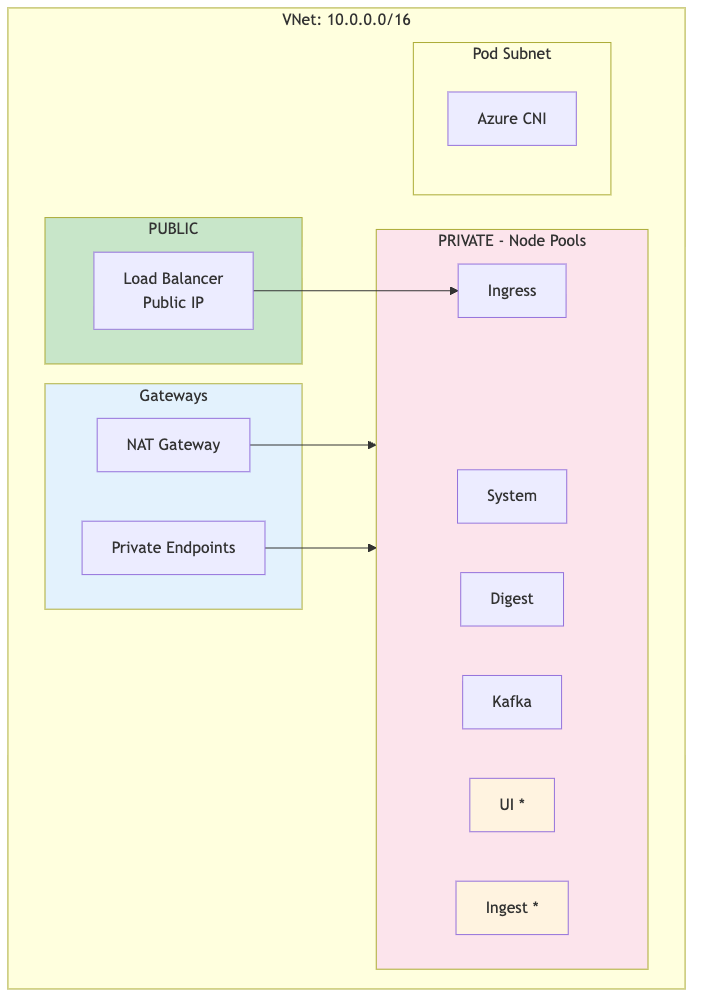
Each DR cluster (primary and secondary) has its own VNet with the following architecture:
 |
Note
UI and Ingest node pools (marked with *) are only created when dr !=
"standby". Standby clusters use digest nodes for all workloads
during failover.
Subnet configuration
| Subnet | CIDR | Type | Purpose |
|---|---|---|---|
| ${prefix}-s-system | 10.0.16.0/20 | Private | AKS system node pool |
| ${prefix}-s-lsdigest | 10.0.32.0/20 | Private | LogScale digest nodes |
| ${prefix}-s-kafka | 10.0.48.0/20 | Private | Kafka broker nodes |
| ${prefix}-s-ing | 10.0.64.0/20 | Private | Ingress controller nodes |
| ${prefix}-s-ui | 10.0.80.0/20 | Private |
LogScale UI nodes (not created when dr="standby")
|
| ${prefix}-s-ingest | 10.0.96.0/20 | Private |
LogScale ingest nodes (not created when dr="standby")
|
| ${prefix}-s-pods | 10.0.128.0/17 | Private | Azure CNI pod IPs |
Node Pool Creation by DR Mode
| Node Pool | dr="active" or dr="" | dr="standby" |
|---|---|---|
| System | Created | Created |
| Digest | Created | Created |
| Kafka | Created | Created |
| Ingress | Created | Created |
| UI | Created (if cluster type supports) | Not created |
| Ingest | Created (if advanced cluster type) | Not created |
Note
Standby clusters don't need UI or Ingest capacity until failover. Node
pools are created during promotion (dr="standby" →
dr="active").
Network Security Groups (NSGs)
NSGs control traffic flow between the internet, load balancer, and AKS nodes.
1. AKS Cluster NSG (${cluster_name}-aks-nsg)
Inbound rules:
| Priority | Source | Port(s) | Protocol | Description |
|---|---|---|---|---|
| 100 | AzureLoadBalancer | 443, 80 | TCP | Health probes from Azure LB |
| 110 | VNet | * | * | Internal VNet communication |
| 120 | ip_ranges_allowed_to_kubeapi | 443 | TCP | kubectl access from allowed IPs |
Outbound rules:
| Priority | Destination | Port(s) | Protocol | Description |
|---|---|---|---|---|
| 100 | Internet | 443 | TCP | HTTPS to Azure services, container registries |
| 110 | Storage | 443 | TCP | Azure Blob Storage access |
| 120 | AzureActiveDirectory | 443 | TCP | Azure AD authentication |
2. Azure Load Balancer
The ingress-nginx service creates an Azure Standard Load Balancer with:
Public IP address (assigned by Azure)
Health probes on ports 80/443
Backend pool targeting ingress node pool
Azure Storage Firewall
Azure Storage accounts use firewall rules to control access:
| Access Method | Same Region | Cross-Region | Used for DR |
|---|---|---|---|
| VNet Service Endpoints | Works | Not supported | No |
| IP-Based Rules (ipRules) | Works | Works | Yes |
| Private Endpoints | Works | Works (with peering) | Optional |
Key limitation: Azure VNet service
endpoints for storage only work within the same region. For cross-region
DR, the secondary cluster's NAT Gateway IP must be added to the primary
storage account's ipRules.
Storage Firewall Configuration:
{
  "networkRuleSet": {
    "defaultAction": "Deny",
    "ipRules": [
      { "value": "<admin-ip>", "action": "Allow" },
      { "value": "<secondary-nat-ip>", "action": "Allow" }
    ],
    "virtualNetworkRules": [
      { "virtualNetworkResourceId": ".../subnets/<primary>-s-lsdigest" },
      { "virtualNetworkResourceId": ".../subnets/<primary>-s-ingest" },
      { "virtualNetworkResourceId": ".../subnets/<secondary>-s-lsdigest" },
      { "virtualNetworkResourceId": ".../subnets/<secondary>-s-ingest" }
    ]
  }
}
Request Flow (Internet → LogScale)
The request flow is shown in the following diagram:
 |
Traffic Flow Steps:
| Step | Component | Description |
|---|---|---|
| 1 | DNS/Traffic Manager | Client queries DNS, Traffic Manager returns healthy cluster IP |
| 2 | Load Balancer | Azure LB routes to NodePort (30000-32767) |
| 3 | nginx-ingress | TLS termination, routes by Host header |
| 4 | LogScale Pod | Processes request, accesses Blob Storage |