

Keyboard Shortcuts
LogScale offers keyboard shortcuts to streamline navigation and query editing in the web interface.
These shortcuts are context-specific and may not be available on all areas of the console.
General Keyboard Navigation| Functionality | macOS | Windows |
|---|---|---|
| Opens the list of the keyboard bindings available in the search page | Ctrl+K | Ctrl+K |
| Next interaction point (such as link, form element or button) | tab or ⌥ option+Tab | Tab |
| Previous interaction point | shift+Tab | Shift+Tab |
| Navigate between items, such as buttons or dropdown | ← / → / ↓ / ↑ | ← / → / ↓ / ↑ |
| Activate a currently selected link or button | Enter / Space | Enter / Space |
| Open link in new tab | command+Enter | Ctrl+Enter |
| Open link in new window | shift+Enter | Shift+Enter |
| Check or uncheck a checkbox | Space | Space |
| Deselect all series in widgets (see Hint: Deselect Series in Widgets) | shift+click | shift+click |
| Close the current modal dialog or dropdown menu | esc | esc |
| Jump to repositories or dashboards (jump panel, see Manage Dashboards) | Ctrl+O | Ctrl+O |
The Jump Panel provides quick access to repositories and dashboards. Press Ctrl+O from anywhere in the web interface and type to filter for specific items:
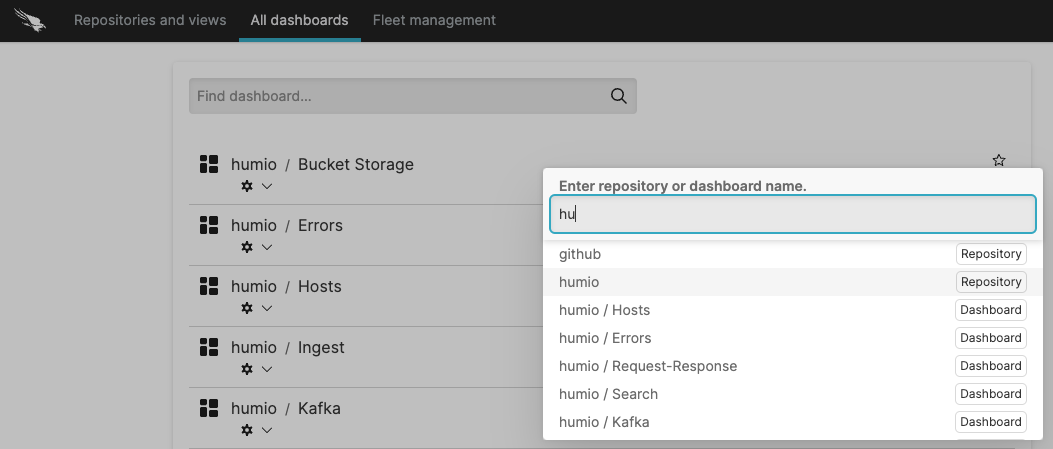 |
Figure 27. Jump Panel
LogScale Editors
These shortcuts are available in all LogScale's editors, like the Query Editor or the parser editor.
| Functionality | macOS | Windows |
|---|---|---|
| Show suggestions in query input | Ctrl+Space | Ctrl+Space |
| Apply query suggestion | tab | Tab |
| Navigate down in query suggestions | ↓ | ↓ |
| Navigate up in query suggestions | ↑ | ↑ |
| Move cursor to the beginning/ end of a word | ⌥ option+← / ⌥ option+→ | Alt+← / Alt+→ |
| Move cursor to start of line | Ctrl+A | Ctrl+A |
| Move cursor to end of line | Ctrl+E | Ctrl+E |
| Move cursor to start/end of code | shift+↑ / shift+↓ | Shift+↑ / Shift+↓ |
| Select text | shift+← and shift+→ | Shift+← and Shift+→ |
| Delete line | shift+command+K | Shift+Ctrl+K |
| Insert a line break within the query | shift+Enter | shift+Enter |
| Copy line up/down | shift+⌥ option+↑ / shift+⌥ option+↓ | Shift+Alt+↑ / Shift+Alt+↓ |
| Move line up/down | ⌥ option+↑ / ⌥ option+↓ | Alt+↑ / Alt+↓ |
|
Insert empty line above/below Copy and insert the current line below | shift+⌥ option+↑ / shift+⌥ option+↓ | Shift+Ctrl+Enter |
| Multiselect lines | Ctrl+⌥ option+↑+↓ | Ctrl+Alt+↑+↓ |
| Toggle comment lines on/off | command+C / command+K | Ctrl+C / Ctrl+K |
| Functionality | macOS | Windows |
|---|---|---|
| Focus search field | command/ | Ctrl/ |
| Run current query | command+Enter | Ctrl+Enter |
| Stop search | command+C | Ctrl+C |
| Exit the Query Editor | ⌥ option+tab | Alt+tab |
| Toggle the browser to capture or ignore the Tab key. | Ctrl+shift+M | Ctrl+M |