

Cross-Region Storage Access
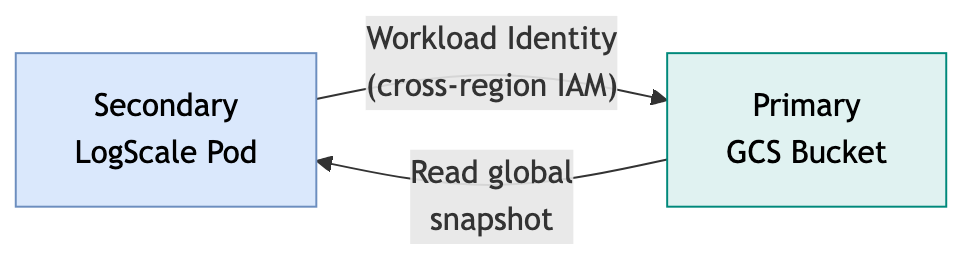
LogScale data is stored in GCS buckets, one per cluster. The secondary cluster needs read access to the primary's bucket during failover recovery.
 |
Cross-Region GCS Access
During failover, the secondary cluster reads the global snapshot from the primary's GCS bucket. The bucket access is controlled via Workload Identity — the secondary cluster's GCP service account is granted IAM roles on the primary bucket.
IAM Configuration (from modules/gcp/gke/storage.tf):
| Resource | Role | Member | Purpose |
|---|---|---|---|
| Own GCS bucket |
roles/storage.objectUser
| Own cluster's Workload Identity SA | LogScale read/write to own bucket |
| Primary GCS bucket |
roles/storage.legacyBucketReader
| Secondary cluster's Workload Identity SA | Bucket-level read access for DR recovery |
| Primary GCS bucket |
roles/storage.objectViewer
| Secondary cluster's Workload Identity SA | Object-level read access for snapshot recovery |
Cross-region IAM binding:
The Terraform GKE module grants these roles when var.dr ==
"standby" and var.dr_primary_gcs_bucket is set:
resource "google_storage_bucket_iam_member" "dr_cross_region_bucket_access" {
  count  = var.dr == "standby" && var.dr_primary_gcs_bucket != "" ? 1 : 0
  bucket = var.dr_primary_gcs_bucket
  role   = "roles/storage.legacyBucketReader"
  member = module.gcs_workload_identity.gcp_service_account_fqn
}

resource "google_storage_bucket_iam_member" "dr_cross_region_object_access" {
  count  = var.dr == "standby" && var.dr_primary_gcs_bucket != "" ? 1 : 0
  bucket = var.dr_primary_gcs_bucket
  role   = "roles/storage.objectViewer"
  member = module.gcs_workload_identity.gcp_service_account_fqn
}
Deterministic GCS Bucket Naming
GCS bucket names are passed as the gcs_bucket_name variable to the GKE
module. The bucket is created using the
terraform-google-modules/cloud-storage module with the
provided name and the cluster's region.
Encryption Key Sync
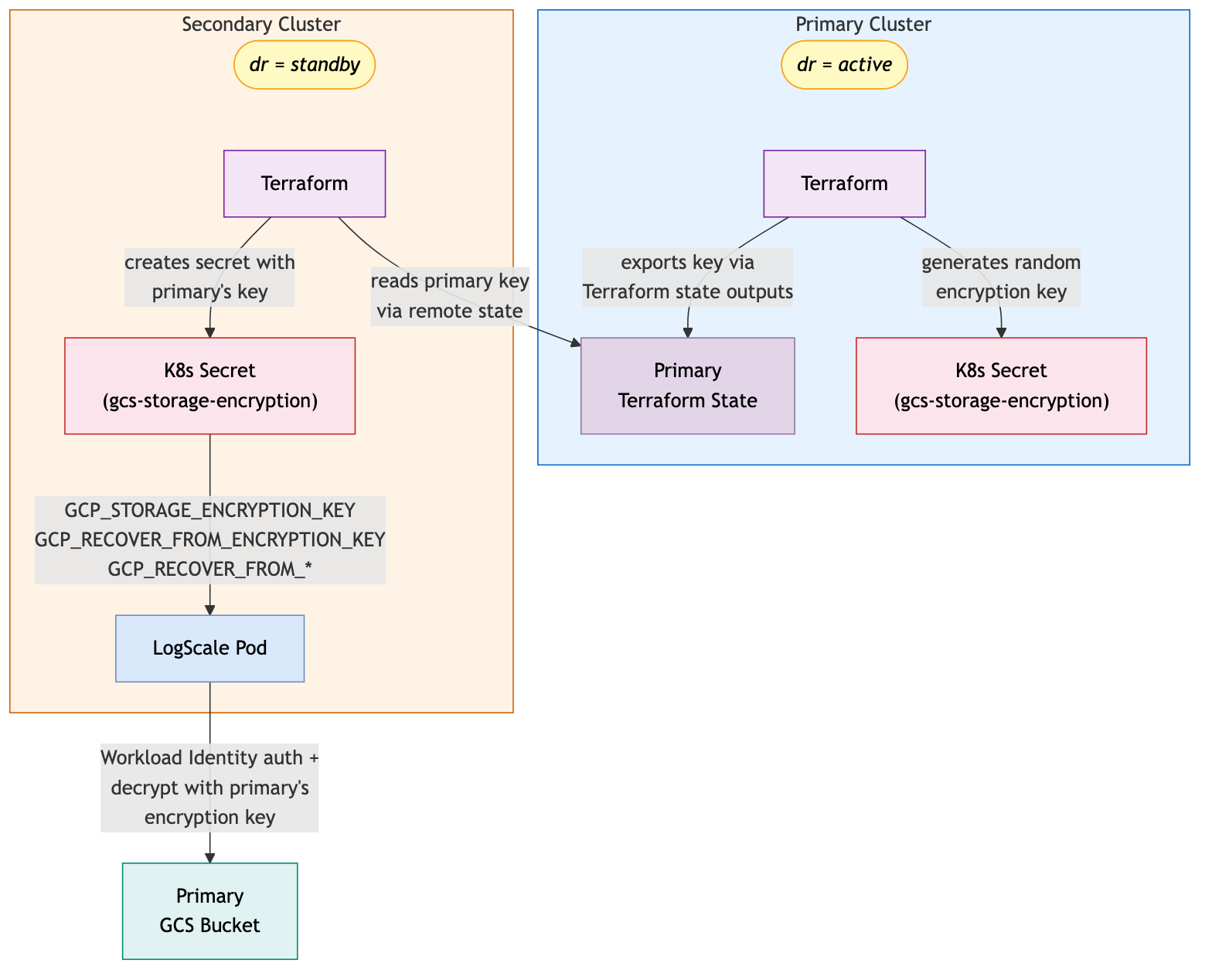
The primary cluster generates an encryption key using
random_password (64 characters, no special characters)
and stores it in a Kubernetes secret. The secondary cluster retrieves this
key via Terraform remote state.
 |
| Method | Configuration | Use Case |
|---|---|---|
| Remote State (Recommended) |
primary_remote_state_config block in secondary
tfvars
| GCS backend — automatic sync from primary workspace |
| Explicit Key |
existing_gcs_encryption_key variable
| Manual key management |
Key details:
Primary generates the key via
random_password.gcp_storage_encryption_password(not CMEK/KMS)Primary stores the key in secret:
<cluster-name>-gcp-storage-encryption-key(key name: gcp-storage-encryption-key)Secondary retrieves the key via
primary_remote_stateorexisting_gcs_encryption_keySecondary stores the DR recovery key in a separate secret:
dr-secondary-gcs-storage-encryption(configurable viagcp_recover_from_encryption_key_secret_name)The DR recovery secret is referenced by the
GCP_RECOVER_FROM_ENCRYPTION_KEYenvironment variable viasecretKeyRefSame key must be used across both clusters for DR recovery
Note: Standby apply will fail if the encryption key is not available.
Verification
To verify cross-region GCS access is working:
# From secondary cluster, verify read access to primary bucket
gcloud storage buckets describe gs://<primary-bucket-name> \
  --project=<project-id>

# Verify service account permissions
gcloud storage buckets get-iam-policy gs://<primary-bucket-name> | grep <secondary-sa>

# Test object read (if snapshot exists)
gcloud storage cp gs://<primary-bucket-name>/snapshot.tar.gz /tmp/snapshot-test.tar.gz