

Search Interface
The Search interface is where you can
search your data in your repository.
Figure 16, “Search interface” highlights the common elements
in the Search web interface:
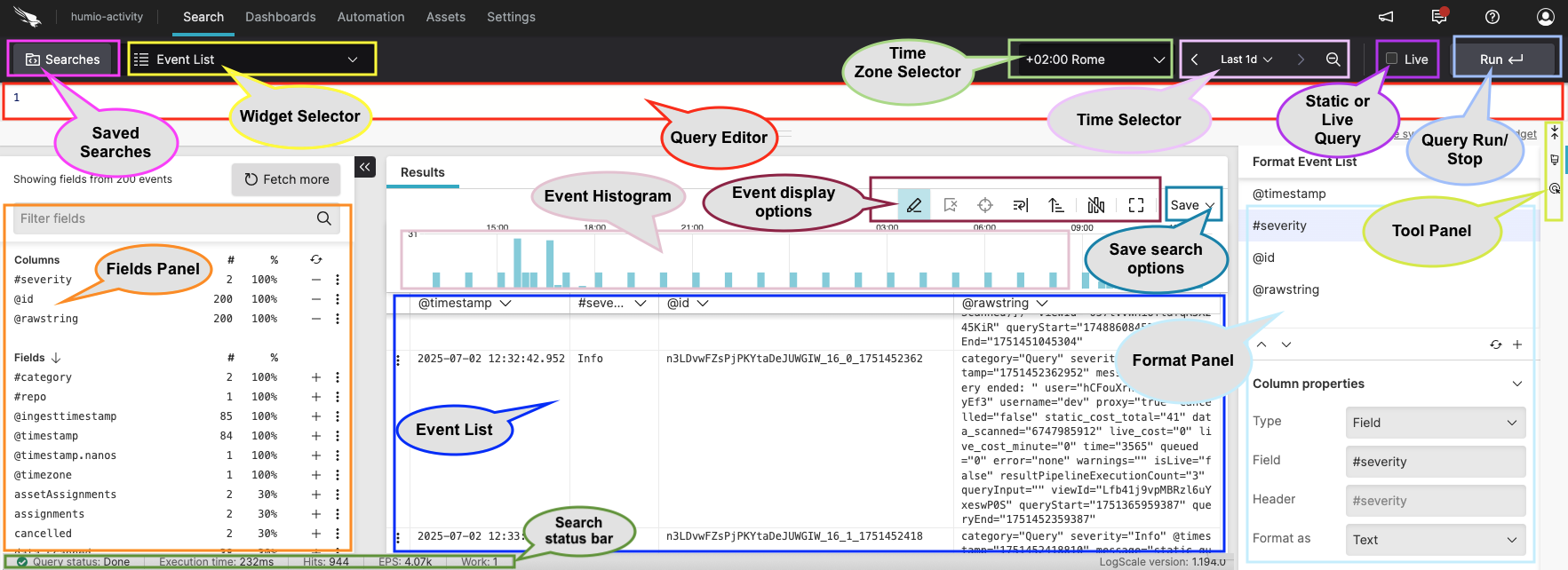 |
Figure 16. Search interface
Common elements in this page include:
Query Editor aka Search Box
Fields panel
Event List which may include different results tabs depending on the functions used in the query
Event histogram, aka Event distribution chart, that shows the distribution of events over time
Search status bar
Widget Selector dropdown menu for different data visualization
Time interval selector dropdown
Timezone selector dropdown
checkbox to choose whether to run your query as live or static
Tool Panel to access different functionalities such as active interaction with the data or event line wrapping
Format Event List panel to format the Event List (field properties, size, etc.) or to access column formatting
For more information on LogScale extensive search functionalities, see Search Data.