

Format Columns
You can control the columns appearance in the Event list; click the up-arrow icon next to each column header to access various actions:
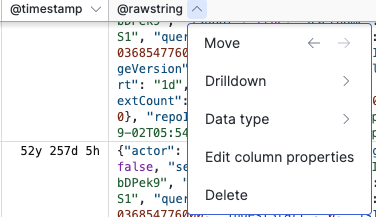 |
Figure 94. Formatting Columns From the Event List
Available options are:
— moves the column left or right in the Event List.
— opens the available interaction options for that field. See Field Interactions.
— allows to select a formatting data type for the field. See Field Data Types.
— opens the Format Event List panel to: add or resize columns, set Field Data Types, and configure Column Properties.
— deletes the column from the Event List.
You can also fit the column to the content; click and drag the header to adjust the column size:
Figure 95. Adjust column size