Look Up Events
Every event in LogScale has a unique identifier in the @id field. You can use this identifier as a permalink to an event: a way to return to one specific event directly, instead of searching for it again.
The @id field
LogScale automatically assigns an @id to every event when it is stored. The value is unique and stays the same for the life of the event, so you can rely on it to refer back to a specific event later.
An @id value looks like this:
@id="nMOguMvBICusroAaOf8xnnLS_15922_181_1780664843"Important
You do not create these values yourself — you copy them from an event you have already found (the @id field is shown on each event). The value encodes where and when the event is stored, which is what lets LogScale go straight to it.
@id matches are exact and case-sensitive — copy the value rather than typing it by hand.
Look up an event by its @id
To retrieve a single event, filter on its @id:
@id="nMOguMvBICusroAaOf8xnnLS_15922_181_1780664843"Because the identifier points directly at the event, LogScale can jump straight to it rather than searching through your data. That makes @id lookups fast, even over large time ranges — which is what makes them useful as permalinks: save or share the value, then paste it back into a search to return to the exact same event.
A typical workflow:
This is useful for sharing specific events in an efficient manner.
Retrieve several events at once
You can look up more than one event in a single search.
Using or:
@id="nMOguMvBICusroAaOf8xnnLS_15922_181_1780664843"
or @id="nMOguMvBICusroAaOf8xnnLS_15922_182_1780664843"
Or, using in():
in(@id, values=[
"nMOguMvBICusroAaOf8xnnLS_15922_181_1780664843",
"nMOguMvBICusroAaOf8xnnLS_15922_182_1780664843"
])LogScale retrieves each of the listed events directly, the same way it does for a single @id.
Invalid event IDs
An @id value has a specific structure. If you search for a value that is not a valid event ID — for example, a mistyped or made-up value — then no event can possibly match it.
When this happens, LogScale recognizes that the condition can never be true and treats it as matching nothing: the search returns no results, without doing unnecessary work.
// Not a valid @id — returns no results
@id="not-a-real-id"
The same applies when an invalid value appears alongside valid ones. An
invalid @id in an or simply
contributes nothing, because it can never match:
// Returns the valid event; the invalid id contributes nothing
@id="nMOguMvBICusroAaOf8xnnLS_15922_181_1780664843"
or @id="not-a-real-id"Look up events using table interactions
The Search page supports event
interactions in Table widgets when
results contain an @id value. Use this option to
look for specific events through their IDs.
To look up an event:
Locate a row in the search results
Select the three-dot menu in that row →
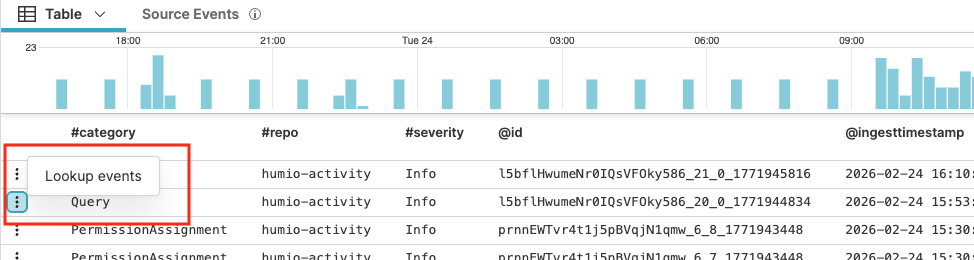
Figure 89. Lookup Events
The
Searchpage opens. It displays a query in this format:logscale Syntaxin(@id, values=[idnumber])The query looks for details on that specific event. The query returns the @rawstring field in the results.
Timestamp highlight
When looking up events, the Table widget
supports timestamp visualization. When the table results include
@timestamp fields, hovering over a table row
highlights the corresponding time period in the histogram with a blue
bar: