

Transposes (transforms) table data by converting columns into
rows, switching the orientation. This is a great way of
reorganizing data into a more readable format or a format that
can be more easily applied to other display formats as part of a
widget. Use transpose() to transpose a
(table-like) query result by creating an event (row) for each
column (attribute name), in which attributes are named
row[1],
row[2], etc.
| Parameter | Type | Required | Default Value | Description |
|---|---|---|---|---|
column | string | optional[a] | column | Field to use as column value. |
header | string | optional[a] | Field to use as header value. | |
limit | integer | optional[a] | 5 | Maximum number of rows to transpose. |
| Minimum | 1 | |||
| Maximum | 1,000 | |||
pivot[b] | string | optional[a] | Field to use as both header AND column value. | |
[a] Optional parameters use their default value unless explicitly set. | ||||
Hide omitted argument names for this function
Omitted Argument NamesThe argument name for
pivotcan be omitted; the following forms of this function are equivalent:logscale Syntaxtranspose("value")and:
logscale Syntaxtranspose(pivot="value")These examples show basic structure only.
transpose() Function Operation
For example, given a query that returns a table, such as:
groupBy(loglevel)| loglevel | _count |
|---|---|
| ERROR | 2 |
| WARN | 400 |
| INFO | 200 |
The result can be transposed to:
groupBy(loglevel)
| transpose()| column | row[1] | row[2] | row[3] |
|---|---|---|---|
| _count | 2 | 400 | 200 |
| loglevel | ERROR | WARN | INFO |
To use the loglevel row as the header, use:
...
| transpose(header=loglevel)| column | ERROR | WARN | INFO |
|---|---|---|---|
| _count | 2 | 400 | 200 |
transpose() Examples
Click next to an example below to get the full details.
Create a Pivot Table
Create a view of LogScale activity using the
transpose() function
Query
groupBy([type,actor.user.id],function={groupBy(actor.user.id, function=max(@timestamp))})
|transpose(header=type)
|drop(column)
Introduction
The humio-audit repository contains audit events for the LogScale cluster. Reporting on this information can provide a wealth of information, but a useful summary can be created based on the activities, users and which the latest user of that particular operation.
Step-by-Step
Starting with the source repository events.
- logscale
groupBy([type,actor.user.id],function={groupBy(actor.user.id, function=max(@timestamp))})The first step to creating a pivot table is the base query that will create the initial summary of the information. In this fragment, a nested
groupBy()aggregation. The embedded aggregation creates a group of the maximum access time for a given user, by usingmax()on the @timestamp against the actor.user.id. This creates a table of the last event by the user. The outergroupBy()then creates an aggregation of this maximum user time against the type which defines the operation performed.The result is a table of the last user and time for a specific operation; for example, the last time a query was executed. An example of this table can be seen below:
type actor.user.id _max alert.clear-error0O7WGPBX9YbvZbKOrBMd5fgH1700546666592 alert.create0O7WGPBX9YbvZbKOrBMd5fgH1699004139419 alert.update0O7WGPBX9YbvZbKOrBMd5fgH1700546666676 dashboard.create0O7WGPBX9YbvZbKOrBMd5fgH1698417330709 dataspace.query0O7WGPBX9YbvZbKOrBMd5fgH1700721296197 - logscale
|transpose(header=type)The
transpose()will convert individual columns into rows, switching the orientation. For example, the type column will now become the type row. However, there are no row titles, so the title for the resulting table will by default create a header row containing the column and row numbers, like this:column row[1] row[2] row[3] row[4] row[5] _max 1700546666592 1699004139419 1700546666676 1698417330709 1700722209214 actor.user.id 0O7WGPBX9YbvZbKOrBMd5fgH 0O7WGPBX9YbvZbKOrBMd5fgH 0O7WGPBX9YbvZbKOrBMd5fgH 0O7WGPBX9YbvZbKOrBMd5fgH 0O7WGPBX9YbvZbKOrBMd5fgH type alert.clear-error alert.create alert.update dashboard.create dataspace.query However, the aggregate grouping, type could be used instead as a valid header for each column. To achieve that, use the
headerparameter to specify type as the column. The resulting table now looks like this:alert.clear-error alert.create alert.update column dashboard.create dataspace.query 1700546666592 1699004139419 1700546666676 _max 1698417330709 1700722210073 0O7WGPBX9YbvZbKOrBMd5fgH 0O7WGPBX9YbvZbKOrBMd5fgH 0O7WGPBX9YbvZbKOrBMd5fgH actor.user.id 0O7WGPBX9YbvZbKOrBMd5fgH 0O7WGPBX9YbvZbKOrBMd5fgH - logscale
|drop(column)The table created contains the summarized information pivoted around the user ID and last event time further summarized by the type of the event. However, there is a column in the table, column, which is now a field in the event stream that was generated from the old row before the table was pivoted.
That column can be removed by dropping the column field from the event using
drop()to remove the column from the events. Event Result set.
Summary and Results
Pivoting an event set of data allows for the information to be displayed and summarized in a format that may make more logical sense as a display format. The final table will look like this:
| alert.clear-error | alert.create | alert.update | dashboard.create | dataspace.query |
|---|---|---|---|---|
| 1700546666592 | 1699004139419 | 1700546666676 | 1698417330709 | 1700722210073 |
| 0O7WGPBX9YbvZbKOrBMd5fgH | 0O7WGPBX9YbvZbKOrBMd5fgH | 0O7WGPBX9YbvZbKOrBMd5fgH | 0O7WGPBX9YbvZbKOrBMd5fgH | 0O7WGPBX9YbvZbKOrBMd5fgH |
Identify Matching Fields using transpose()
Identify the name of a matched field during a query using the
transpose() function
Query
/ssh/i
| groupBy(field=user,function=transpose())
      | row[1] = /ssh/|
| column != @rawstring|column != msg
Introduction
In this example, the transpose() function swaps
columns (fields) for rows and rows (events) for columns. This can be
useful to determine which field a particular match has been located in.
Example incoming data might look like this:
| user | command | parent |
|---|---|---|
| lewisr | /usr/bin/sed | /usr/bin/perl |
| kingm | /bin/mount | /bin/bash |
| jonesk | /usr/bin/rsync | /usr/bin/ssh |
| jacksonb | /sbin/fdisk | powershell.exe |
| howardn | /usr/bin/tail | cmd.exe |
| hillp | /bin/systemctl | /usr/bin/sudo |
| harrisl | /usr/sbin/tcpdump | /usr/sbin/sshd |
The data shows both the command
executed and its parent command in the
parent field. To identify
whether a particular command was run either as a command or as a parent
(for example a shall or ssh) you could independently
search each field. Alternatively, use transpose()
to transpose the columns and then be shown the matching column.
Step-by-Step
Starting with the source repository events.
- logscale
/ssh/iFilters events containing the string
ssh(case-insensitive) in any field. This initial filter improves query performance by reducing the data set before applying the transpose operation. This will limit the processing of the full set of data, but is optional if you wanted a view across multiple potential commands. - logscale
| groupBy(field=user,function=transpose())Group the events, using the user field as the basis for the grouping. This will create a unique set of events based on the username.
The
transpose()function is then used as the aggregation function; this will swap rows (matching events) and columns (fields). This initially converts the data into the username and then a row for field of the incoming events:user column row[1] row[2] row[3] row[4] row[5] adamsb #hostname user="adamsb" user="adamsb" user="adamsb" user="adamsb" <no value> adamsb #repo stddata stddata stddata stddata <no value> adamsb #type syslog-datagen syslog-datagen syslog-datagen syslog-datagen <no value> adamsb @id TENLqJfjZQ4NG7s4AEs5b9zP_9_7_1765871856 TENLqJfjZQ4NG7s4AEs5b9zP_9_9_1765871897 TENLqJfjZQ4NG7s4AEs5b9zP_9_189_1765872044 TENLqJfjZQ4NG7s4AEs5b9zP_9_369_1765872191 <no value> adamsb @ingesttimestamp 1765871856736 1765871897806 1765872044775 1765872191822 <no value> adamsb @rawstring <34>1 2025-12-16T07:57:36.020Z user="adamsb" command="/usr/bin/grep" parent="/usr/bin/ssh" <34>1 2025-12-16T07:58:17.095Z user="adamsb" command="/usr/bin/grep" parent="/usr/bin/ssh" <34>1 2025-12-16T08:00:44.042Z user="adamsb" command="/usr/bin/grep" parent="/usr/sbin/sshd" <34>1 2025-12-16T08:03:11.109Z user="adamsb" command="/usr/bin/grep" parent="/usr/bin/ssh" <no value> adamsb @timestamp 1765871856020 1765871897095 1765872044042 1765872191109 <no value> adamsb @timestamp.nanos 0 0 0 0 <no value> adamsb @timezone Z Z Z Z <no value> adamsb app command="/usr/bin/grep" command="/usr/bin/grep" command="/usr/bin/grep" command="/usr/bin/grep" <no value> adamsb command /usr/bin/grep /usr/bin/grep /usr/bin/grep /usr/bin/grep <no value> adamsb host user="adamsb" user="adamsb" user="adamsb" user="adamsb" <no value> adamsb msg parent="/usr/bin/ssh" parent="/usr/bin/ssh" parent="/usr/sbin/sshd" parent="/usr/bin/ssh" <no value> adamsb parent /usr/bin/ssh /usr/bin/ssh /usr/sbin/sshd /usr/bin/ssh <no value> adamsb priority 34 34 34 34 <no value> adamsb user adamsb adamsb adamsb adamsb <no value> adamsb version 1 1 1 1 <no value> Because there might be multiple matching input rows from the event set, each matching row of data is place into an array field row for each matching source event.
- logscale
| row[1] = /ssh/|Searches for the matching command pattern in the first row of the transposed data. This identifies which fields contained the matching pattern in the original data structure.
Note that the output will include rows (matching columns from the original event set) that are not needed. These can now be filtered out.
- logscale
| column != @rawstring|column != msgRemoves unnecessary columns from the output by filtering out the @rawstring and msg fields. This improves the readability of the final results by showing only relevant field matches.
Event Result set.
Summary and Results
The query is used to identify whether specific commands appear in either the command or parent command fields by transposing the data structure.
This query is useful, for example, to track command execution patterns and identify potential security concerns in command chains.
Sample output from the incoming example data:
| user | column | row[1] | row[2] | row[3] | row[4] | row[5] |
|---|---|---|---|---|---|---|
| evansm | command | /usr/bin/ssh | /usr/bin/ssh | /usr/bin/ssh | /usr/bin/ssh | /usr/bin/ssh |
| fosterd | parent | /usr/sbin/sshd | /usr/bin/ssh | <no value> | <no value> | <no value> |
| wardj | command | /usr/sbin/sshd | /usr/sbin/sshd | /usr/sbin/sshd | /usr/sbin/sshd | /usr/sbin/sshd |
| wardj | parent | /usr/sbin/sshd | /bin/bash | cmd.exe | /sbin/lsof | /usr/bin/ssh |
| watsonm | parent | /usr/sbin/sshd | /usr/bin/ssh | <no value> | <no value> | <no value> |
| whitep | parent | /usr/bin/ssh | /usr/sbin/sshd | <no value> | <no value> | <no value> |
| williamsr | parent | /usr/sbin/sshd | /usr/bin/ssh | <no value> | <no value> | <no value> |
| wilsonk | parent | /usr/bin/ssh | /usr/sbin/sshd | <no value> | <no value> | <no value> |
| woodm | parent | /usr/bin/ssh | /usr/sbin/sshd | <no value> | <no value> | <no value> |
| wrightj | parent | /usr/sbin/sshd | /usr/bin/ssh | <no value> | <no value> | <no value> |
| youngd | parent | /usr/bin/ssh | /usr/sbin/sshd | <no value> | <no value> | <no value> |
| zimmermanr | parent | /usr/sbin/sshd | /usr/bin/ssh | <no value> | <no value> | <no value> |
Note that the output clearly shows whether matches were found in the command or parent fields, making it easy to identify the context in which SSH-related commands appear.
The use of transpose() here provides a method for
changing the way the data is identified from searching specific fields
for data to search for data and identifying which field that data was
located in. This can be useful to identify conts or security instances.
Search Across Multiple Structured Fields
Search across multiple structured fields using the transpose() function within groupBy()
Query
groupBy(@id, function=transpose())
| row[1] = /httpd/
| groupBy(column)
Introduction
By transposing event set, the information can be viewed and summarized
in a more human readable form. In this example, the
transpose() function is used within a
groupBy() function to search across multiple
structured fields in the humio repository.
Example incoming data might look like this:
| host | @rawstring |
|---|---|
| MAIL01 | 2025-03-18T10:14:47.142Z MAIL01 httpd[61789]: 192.168.0.198 - - [2025-03-13:23:05:48 +0800] "GET /api/v2/products/search HTTP/1.1" 200 33456 |
| LON-SRV01 | 2025-03-18T10:14:46.940Z LON-SRV01 httpd[60123]: 192.168.0.198 - - [2025-03-13:20:50:14 +0500] "GET /uploads/documents/terms.pdf HTTP/1.1" 401 36912 |
| MAIL01 | 2025-03-18T10:14:46.691Z MAIL01 httpd[51234]: 192.168.0.198 - - [2025-03-13:12:50:16 -0300] "GET /downloads/mobile/app-v2.1.apk HTTP/1.1" 403 1234 |
| SYD-SRV01 | 2025-03-18T10:14:46.542Z SYD-SRV01 httpd[45678]: 192.168.1.123 - - [2025-03-13:19:30:17 +0400] "GET /uploads/avatars/default.png HTTP/1.1" 404 61789 |
| PROD-SQL01 | 2025-03-18T10:14:46.141Z PROD-SQL01 httpd[56789]: 192.168.1.245 - - [2025-03-13:17:30:38 +0200] "GET /uploads/avatars/default.png HTTP/1.1" 200 13456 |
Step-by-Step
Starting with the source repository events.
- logscale
groupBy(@id, function=transpose())Groups events by unique @id values, applies the
transpose()function for each group, converting row values into column headers. A new row-based structure for each @id field is created.After using
transpose(), the data might look like this:@id column row[1] xhCUZ4fQzxEbr3qoyzLIQqSE_0_520_1742292886 @timezone Z xhCUZ4fQzxEbr3qoyzLIQqSE_0_520_1742292886 app httpd[56789]: xhCUZ4fQzxEbr3qoyzLIQqSE_0_520_1742292886 host PROD-SQL01 xhCUZ4fQzxEbr3qoyzLIQqSE_0_520_1742292886,msg, 192.168.1.245 - - [2025-03-13:17:30:38 +0200] "GET /uploads/avatars/default.png HTTP/1.1" 200 13456 xhCUZ4fQzxEbr3qoyzLIQqSE_0_520_1742292886 priority 34 xhCUZ4fQzxEbr3qoyzLIQqSE_0_520_1742292886 version 1 - logscale
| row[1] = /httpd/Filters for events where row[1] regex matches the value
httpd.After filtering, the data might look like this (@rawstring has been removed from the below for clarity):
@id column row[1] xhCUZ4fQzxEbr3qoyzLIQqSE_0_520_1742292886 app httpd[56789]: xhCUZ4fQzxEbr3qoyzLIQqSE_0_528_1742292886 app httpd[45678]: xhCUZ4fQzxEbr3qoyzLIQqSE_0_531_1742292886 app httpd[51234]: xhCUZ4fQzxEbr3qoyzLIQqSE_0_536_1742292886 app httpd[60123]: xhCUZ4fQzxEbr3qoyzLIQqSE_0_540_1742292887 app httpd[61789]: - logscale
| groupBy(column)Groups results by the column field, showing which original fields contained the value
httpd, and makes a count of matches per field, returning the counted results in a field named _count. The final groupBy(column) removes duplicate entries. Event Result set.
Summary and Results
The query is used to search across multiple structured fields in the
humio repository to show where httpd
appears most often. It makes results more readable, identifies field
patterns, and is very useful for statistical analysis.
Sample output from the incoming example data:
| column | _count |
|---|---|
| @rawstring | 5 |
| app | 5 |
Transpose a Basic Table
Transposing an event set effectively switches rows (each event) into columns (an event)
Query
groupBy([loglevel])
| transpose(header=loglevel)
| drop(column)
Introduction
By transposing event set, the information can be viewed and summarized in a more human readable form. Transposing also allows for aggregated data to be viewed in a form where the value of an aggregated field becomes the columns. This can be used to summarize the information further by showing multiple rows of data. For example, in the humio repository the event information contains a list of errors, warnings, or informational events for activity within the cluster.
Step-by-Step
Starting with the source repository events.
- logscale
groupBy([loglevel])Aggregates the lows by the loglevel. This field will either be
WARN,ERRORorINFOdepending on the level of the event log entry. The default function is used, which results in a count in the number of times an event of this type has been seen:loglevel _count ERROR27424 INFO18840156 WARN2059898 In this output, each event is a row in the table, each with two fields, loglevel and _count.
- logscale
| transpose(header=loglevel)Transposing the events within the
transpose()will make each field in each event a row in the new stream of events, for example, the loglevel field with the valueERRORwill become the field ERROR, swapping the rows for columns. By using theheaderparameter,transpose()uses the value of the aggregated field as the fieldname. The output will now be a table with a column (field) for each value, and a single row with the count:ERROR INFO WARN column 97159 63719404 5716733 _count - logscale
| drop(column)In the final output, the column field in the events is the one generated from the field names of the original events and it's not needed, so it can be removed by using the
drop()function to remove the field from the event set. Event Result set.
Summary and Results
The transpose() is a great way of reorganizing data
into a format is either more readable, or easily applied to other
display formats as part of a widget. The final table looks like this:
| ERROR | INFO | WARN |
|---|---|---|
| 97159 | 63719404 | 5716733 |
However, the information as it is now formatted can more easily be applied to a variety of visualizations. For example, the data can be formatted as a bar chart, as we now have a list of fields and a value:
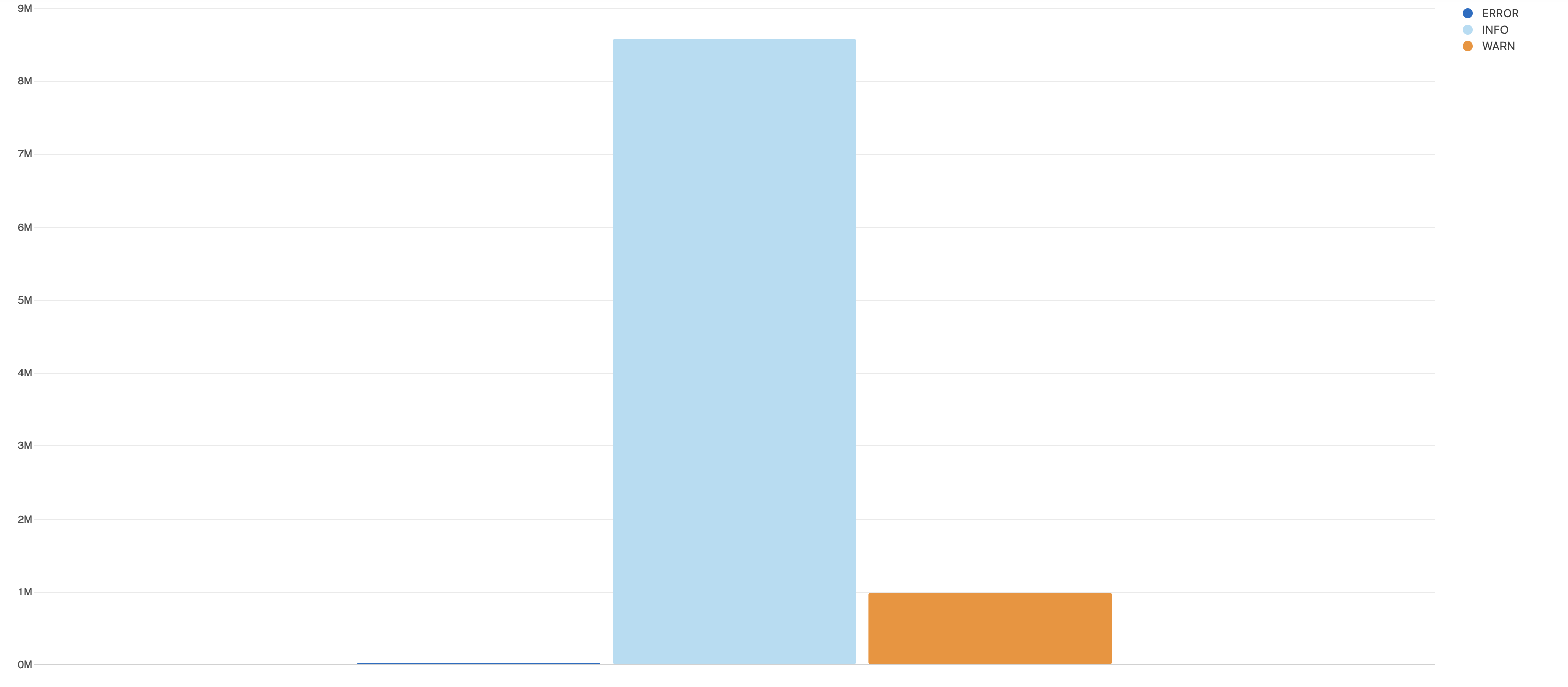 |
The difference is that without transpose(), the
aggregate result set is a list of events with a field name and value.
With transpose(), the result set is a single event
with multiple fields, and this is interpreted by the bar chart as a
series of values.